Loading
Salesforce now sends email only from verified domains. Read More
Set Up and Maintain Retail Execution
Table of Contents
Select Filters

          No results
          No results
          Here are some search tips

          Check the spelling of your keywords.
          Use more general search terms.
          Select fewer filters to broaden your search.

          Search all of Salesforce Help
          Set Up Multi-Markets with Sales Orgs

          Set Up Multi-Markets with Sales Orgs

          Use multi-market management in Consumer Goods (CG) Cloud to filter data, business processes, and configurations within a Salesforce org by market and avoid creating multiple Salesforce orgs for each market. Multi-market management supports a global template approach within an org by setting up sales organizations within a Salesforce org. Multi-market management supports only processes that are based on the enhanced data model, such as advanced visits, advanced orders, sales folders, and advanced promotions. Multi-market isn’t supported out-of-the-box for retail stores, assessment tasks, action plans, or retail store KPIs.

          Required Editions

          Available in: Lightning Experience in Professional, Unlimited, and Enterprise Editions that have Consumer Goods Cloud enabled
          Note
          Note Sales orgs are a part of the enhanced data model.

          Sales organizations are business segments within CG Cloud that you can use to structure your data and business processes by your organizational unit. For example, if Salesforce organization is a wardrobe or cabinet, sales organizations are the drawers in which you can put your products, accounts, or business process configurations to segment your data. Big CG companies can use sales organizations that have complex and varied Go-To-Market (GTM) strategies that have various processes for different product categories. Big players can also use sales organizations to introduce their solutions to various markets and various countries that differ in processes or GTM strategies.

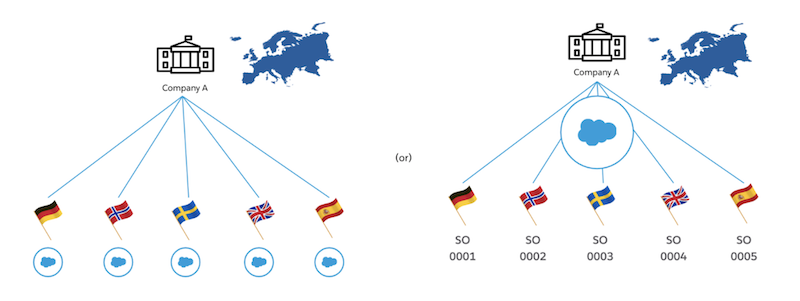
          For example, company A operates in multiple European countries (multi-markets). The company has multiple retail channels, slightly different products, and substantially different go-to-market strategy and business processes for each country. Company A can use sales orgs in two ways: either create a Salesforce Org and CG Cloud sales org for every country or create one Salesforce Org for Europe and separate CG Cloud Sales Orgs for each country.

          Diagram showing Company A with Salesforce Org and CG Cloud sales org for every country or Company A with one Salesforce Org for Europe and separate CG Cloud Sales Orgs for each country.

          By using sales orgs, you can:

          • Assign offline users to one sales org
          • Assign online users, such as business admins to one or more sales orgs
          • Segment master data, such as accounts and products of a sales org
          • Segment master data, such as accounts and products of a sales org

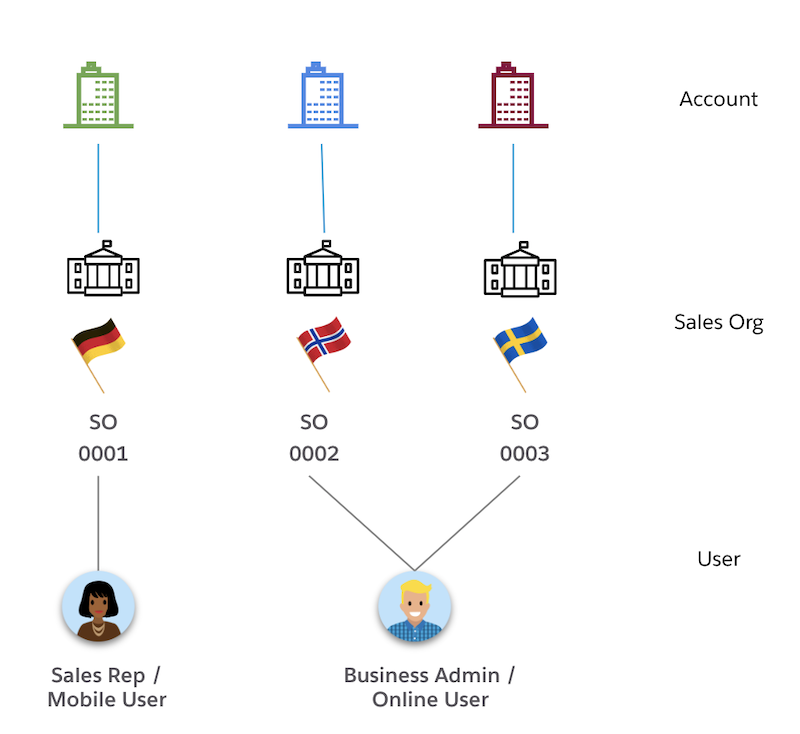
          Every user in your company performs a different set of activities. You can typically divide your users into three groups: admins, supervisors, and reps. Each user can belong to more than one sales org. You can also assign users to a Mobility Sales Org, which specifies the sales org of the user’s mobile device. The mobile device receives only data relevant to the specified Mobility Sales Org. A user can belong to only one Mobility Sales Org.

          Drawing showing Sales Rep assigned to only one sales org and Business Admin or Online user assigned to multiple sales orgs

          A field user (offline user) usually belongs to only one sales organization (Mobility Sales Org). A back-office user (online user or business admin) can belong to multiple sales orgs.

          Note
          Note Note: When you upgrade the RE managed package, make sure to add picklist value sets to the sales org and the business area.
          • Add Picklist Values to Sales Org Picklist Value Set
            To create a sales org, first add values to the sales org picklist. The Sales Organization drop-down list values are retrieved from the predefined picklist values part of the Global Value Set.
          • Add Picklist Values to Business Area Picklist Value Set
            To use Retail Execution in the Consumer Goods Offline mobile app, add values to the business area picklist value set.
          • Create a Sales Org
            Create a sales org to segment data based on your business processes by geography, product division, or account team. Segment configurations by business in one Salesforce org. Manage multiple markets (multi-markets) in one Salesforce org. You can also create multiple sales orgs.
          • Set Up Penny Perfect Pricing for Multi-Market
            Configure sales organizations with Penny Perfect Pricing to automatically apply market-specific pricing logic based on the customer and order context.
           
          Loading
          Salesforce Help | Article