With Enhanced data model, during offline visits, you can perform advanced actions, such
as offline ordering, penny perfect pricing, and ad-hoc visit creation, based on territories. You
can also perform multimarket segmentation using harmonized master data and manage customers and
products, plan and execute visits, and build processes and hierarchies.
Required Editions
Available in: Lightning Experience in Enterprise, Professional, and
Unlimited Editions that have Consumer Goods Cloud enabled
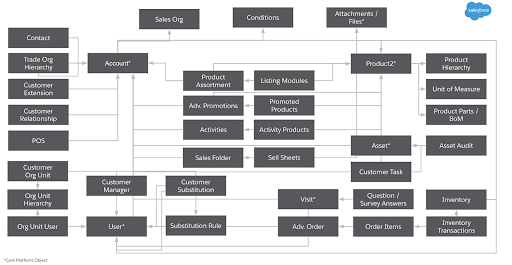
The image shows the objects within the Consumer Goods Cloud Enhanced data model.
For a complete list of objects and fields in the data model, see the Consumer Goods Cloud guide.
Account, the main object in Enhanced data model, can be linked to other objects in these
ways:
Directly—for example, Account Manager, POS, Contact, or Account Extensions.
Indirectly through other objects, such as Asset Audit linked via Asset, Org Unit linked
via Customer Org unit, or Customer Set linked via Customer Set Customer.
Master Data By using master data, you can collect, aggregate, and distribute retail process data consistently. Master Data is required for retail business functions such as order taking, visit management, and activity execution.
Advanced Promotions Target higher revenue and market share for your product through Temporary Price Reductions (TPR), coupons, or in-store displays. The Consumer Goods Cloud app uses special promotions called Sellable Promotions to manage promotions.
Visit and Advanced Activity Planning and Execution Optimize field activities with visit and advanced activity management. Spend less time on operational activities and focus on building relationships with retailers to drive sales and satisfaction.
Advanced Order and Pricing Explore advanced order and pricing options through key objects and relationships. With the objects within the Advanced Order and Pricing, you can manage direct and indirect orders, and order types such as standard pre-orders, order samples, or order advertising material.
Route, Tour, and Warehouse Key Objects Set up route templates and tour templates, create routes with (warehouse, user, and customer) assignments, and create independent tours or tours from routes by using the Route, Tour, and Warehouse objects.
Miscellaneous Explore the objects used for miscellaneous tasks under retail execution.
Did this article solve your issue?
Let us know so we can improve!
Loading
Salesforce Help | Article
Cookie Consent Manager
General Information
Required Cookies
Functional Cookies
Advertising Cookies
General Information
We use three kinds of cookies on our websites: required, functional, and advertising. You can choose whether functional and advertising cookies apply. Click on the different cookie categories to find out more about each category and to change the default settings.
Privacy Statement
Required Cookies
Always Active
Required cookies are necessary for basic website functionality. Some examples include: session cookies needed to transmit the website, authentication cookies, and security cookies.
Functional Cookies
Functional cookies enhance functions, performance, and services on the website. Some examples include: cookies used to analyze site traffic, cookies used for market research, and cookies used to display advertising that is not directed to a particular individual.
Advertising Cookies
Advertising cookies track activity across websites in order to understand a viewer’s interests, and direct them specific marketing. Some examples include: cookies used for remarketing, or interest-based advertising.