
Set Up Inventory Management
Inventory management involves tracking the existing inventory or stock of products and managing the demands or orders on the stock efficiently. In the retail industry, requests or orders for stock are placed from stores to the manufacturer’s head office. The head office issues purchase orders to the vendors who ship the products to warehouses. The warehouses store and distribute the products to retail stores and wholesalers. The retail and wholesale stores sell the products directly to customers.
Required Editions
| Available in: Lightning Experience in Professional, Enterprise, and Unlimited Editions that have Consumer Goods Cloud enabled |

Sales managers can use inventory management in Consumer Goods Cloud to easily manage the moving inventory or stock of products. These are the types of inventories in Consumer Goods Cloud:
- Inventories: Use inventories to track products that sales reps deal with. A manufacturer owns the products in the inventory and keeps the products in the personal storage space.
- Quotas: Use quotas to manage any limits on the number of products that a manufacturer can provide to a customer, such as advertising material and product samples.
- Cash floats: Use cash floats to track cash transactions or payment collections for an order. Payment processes use inventory to assign the collected cash to a manufacturer.
When a sales rep places an order on behalf of a customer, the system validates the ordered quantity against the available stock or the quota allocated for the customer or the rep. With this information available, reps can better manage an order.
Create inventory transaction templates to define the rules that govern inventories and quotas. For example, 100 units of a product are assigned to a rep. If the rep delivers 20 units, the remaining 80 units can be shown as available units.
To manage inventories for an order, set up Inventory Control in your order item template.
Inventory management also facilitates validations, which stop the sales rep from releasing an order when the allocated inventory or quota is exceeded. This configuration is maintained in the order item template, under Inventory Control.
Admins can use the order item template to set up and maintain Order Item Inventory Transactions, which is the junction object that contains the Inventory Control Template and the Inventory Transaction Template.
Here are the roles and responsibilities of users who deal with inventory management.
| User Persona | Role |
|---|---|
| HQ Sales Manager | Defines regions or customer types for products. |
| Inventory Manager or Supervisor |
|
| Sales Rep or Tour Driver |
|
| Business Admin | Reviews existing list of inventory templates and inventory transaction templates. |
Here are the steps to set up inventory management.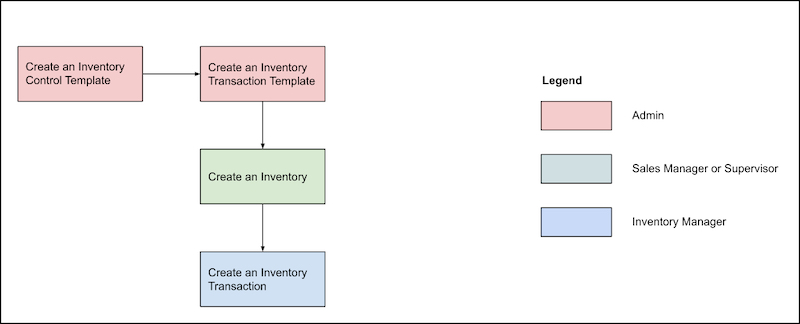
- Create an Inventory Control Template
To define the properties of an inventory including its unit of measure, and whether the inventory is relevant to manufacturers or customers, create inventory control template records. To create an inventory or a quota for a product by using a specific inventory control template, assign the product to the template. The assignment is valid for a specific period. Cash floats aren’t assigned to any product. - Create an Inventory Transaction Template
To define the movement behavior of an inventory, create an inventory transaction template. For example, when a standard order is released, the number of units of an item that's delivered as a part of the order gets deducted from the available inventory. To ensure inventory control for an order item, set up Inventory Control of the order item template. - Create an Inventory
To track the products that reps deal with, create inventory records. Define quotas for reps and customers for controlled distribution of specific products based on legal requirements or company rules. You can create three types of inventory records: Inventory, Quota, or Cash Float. The properties of an inventory record depend on the inventory control template that you use to create the inventory. You can also add other attributes to the inventory, such as the initial quantity of the inventory. You can define the inventory or the quota for a sales rep or a customer on multiple levels based on the organization unit and the customer hierarchy. - Create an Inventory Transaction
Inventory transactions for a sales rep are always part of a process. For example, you can reduce the inventory by creating an order or increase the inventory by creating a return order. You can also add products or quantities after a delivery from a replenishment order. All inventory movements are recorded as inventory transactions. An inventory transaction is created automatically after an order is released. You can also create inventory transactions manually to record the initial product quantity values of a user inventory. An inventory record can include multiple inventory transactions.
