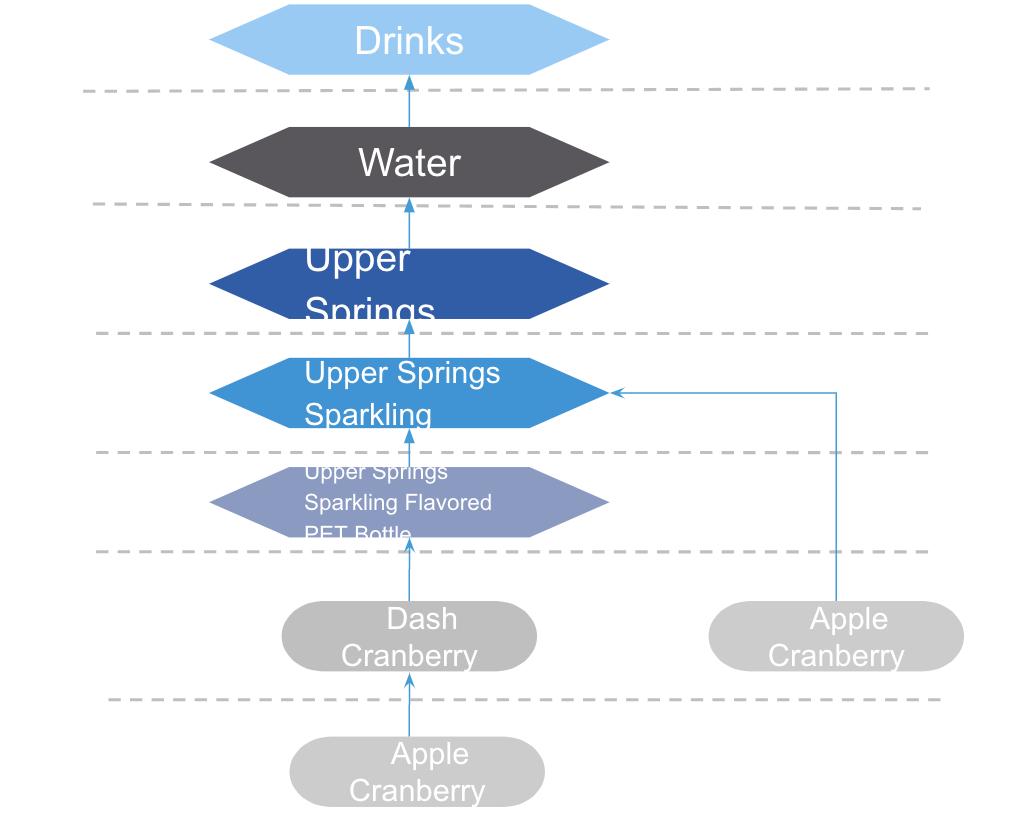
Use a product dynamic hierarchy to identify, group, and search for products. Use the
higher levels in the product hierarchy as filter criteria to search for products, to group
product lists, or to assign pricing conditions.
Required Editions
Available in: Lightning Experience in Performance, Enterprise, and
Unlimited Editions that have Consumer Goods Cloud enabled
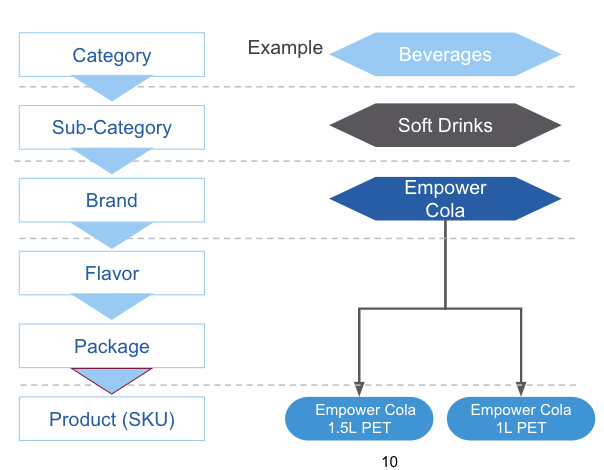
The available levels of the product hierarchy from highest to lowest:
Category
Subcategory
Brand
Flavor
Package
Product
Here are various product hierarchy levels represented in Consumer Goods Cloud with a product
example:
It isn’t mandatory to use all levels, but a maximum of 6 levels are supported.
Note Flavor and Package are labels and can be changed to any other label, as needed.
If the product’s assigned level is unique to the hierarchy, a new level is added to the
structure to accommodate the product. Therefore, when selecting a product level, consider the
overall structure of the product hierarchy that you want to create.
You can create other product levels by adding picklist values to the Product Level field on
the Product2 object and manually changing the level order and labels. However, Category is
always at the highest level. For example, you can add levels between Category and Brand, but
make sure that Category is at a higher level than Brand. If you rename a level, don’t change
the level’s API name because Retail Execution uses the API level name for various
functions.
At a minimum, a product hierarchy has the top-level Category and one other level. Ensure that
all branches of the hierarchy have an equal number of levels. For example, if a category has
two subcategories and one of the subcategories has a brand, ensure that you define a brand for
the other subcategory.
A hierarchy’s validity dates determine whether a product is valid for the hierarchy. For a
promotion or order, only the product hierarchy valid for the entire time frame is
available.
Did this article solve your issue?
Let us know so we can improve!
Loading
Salesforce Help | Article
Cookie Consent Manager
General Information
Required Cookies
Functional Cookies
Advertising Cookies
General Information
We use three kinds of cookies on our websites: required, functional, and advertising. You can choose whether functional and advertising cookies apply. Click on the different cookie categories to find out more about each category and to change the default settings.
Privacy Statement
Required Cookies
Always Active
Required cookies are necessary for basic website functionality. Some examples include: session cookies needed to transmit the website, authentication cookies, and security cookies.
Functional Cookies
Functional cookies enhance functions, performance, and services on the website. Some examples include: cookies used to analyze site traffic, cookies used for market research, and cookies used to display advertising that is not directed to a particular individual.
Advertising Cookies
Advertising cookies track activity across websites in order to understand a viewer’s interests, and direct them specific marketing. Some examples include: cookies used for remarketing, or interest-based advertising.