Use the product hierarchy to organize your product offerings in retail execution
processes such as orders, promotions, or inventory. When you create a product, its product level
determines its position in the product hierarchy. The product is added to the hierarchy when you
assign a parent to the product.
Required Editions
Available in: Lightning Experience in Performance, Enterprise, and
Unlimited Editions that have Consumer Goods Cloud enabled
Generally, product hierarchy information is fetched from the ERP systems via integration. A
product has a dynamic (via parent relations) and a static (or “flattened”) product hierarchy
for optimized access in certain scenarios such as Condition Search in Penny Perfect Pricing.
In the Enhanced model, both dynamic and static product hierarchies are required for Consumer
Goods Cloud processes.
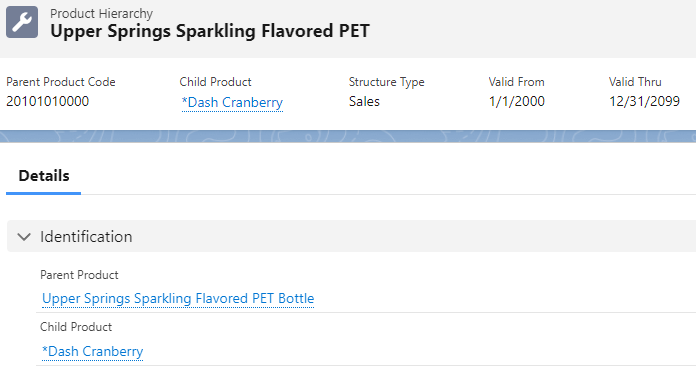
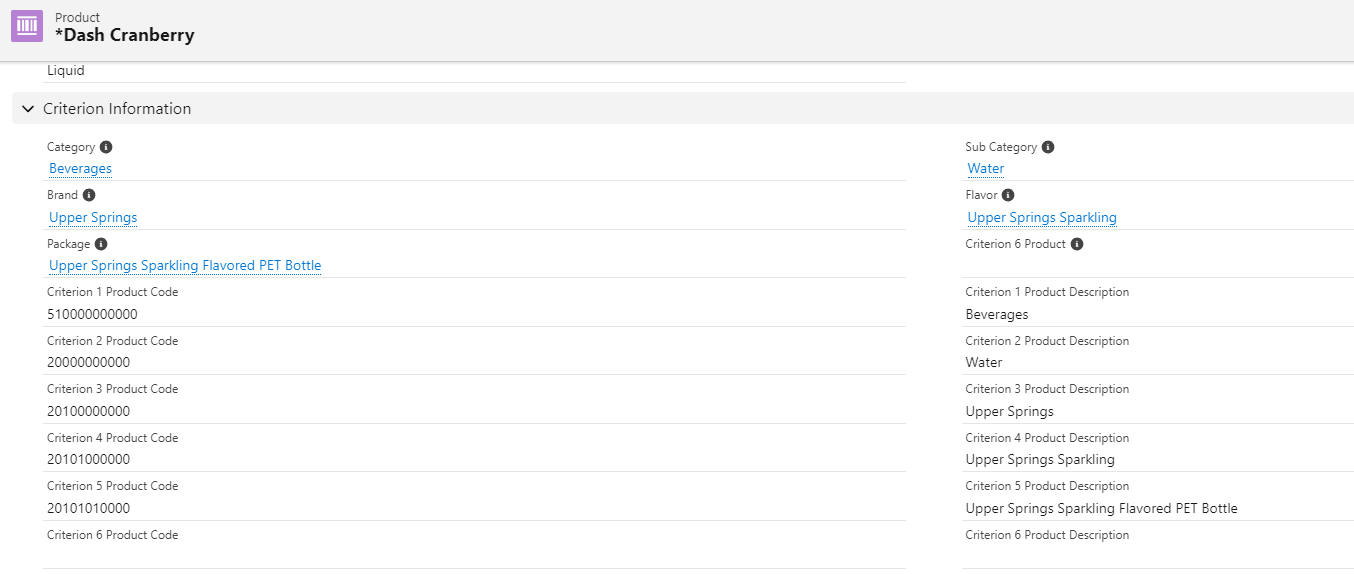
For example, Dash Cranberry is mapped to its parent Upper Springs Sparkling Flavored PET via
parent product, but it also contains a direct link to the parent product using Criterion 5,
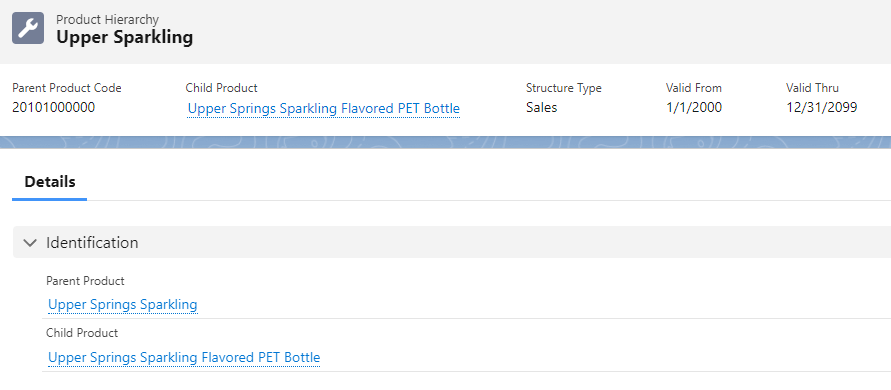
Package. The parent Upper Springs Sparkling Flavored PET is in turn related to its parent
product, Upper Springs Sparkling, and can be directly found in Dash Cranberry as Criterion 4,
Flavor.
Note We support only 5 parent levels in the static (or “flattened”) hierarchy and only 6 levels
in the dynamic hierarchy.
Product Dynamic Hierarchy Use a product dynamic hierarchy to identify, group, and search for products. Use the higher levels in the product hierarchy as filter criteria to search for products, to group product lists, or to assign pricing conditions.
Parent Product (Product Group) Product group refers to a parent of the product or a product group. For a parent product, always use product Template with the type as product group.
Update the Product Level Order in a Hierarchy Except for the Category level, you can change the order of the levels in a product hierarchy. For example, you can set Brand before Sub-Category or remove Sub-Category.
We use three kinds of cookies on our websites: required, functional, and advertising. You can choose whether functional and advertising cookies apply. Click on the different cookie categories to find out more about each category and to change the default settings.
Privacy Statement
Required Cookies
Always Active
Required cookies are necessary for basic website functionality. Some examples include: session cookies needed to transmit the website, authentication cookies, and security cookies.
Functional Cookies
Functional cookies enhance functions, performance, and services on the website. Some examples include: cookies used to analyze site traffic, cookies used for market research, and cookies used to display advertising that is not directed to a particular individual.
Advertising Cookies
Advertising cookies track activity across websites in order to understand a viewer’s interests, and direct them specific marketing. Some examples include: cookies used for remarketing, or interest-based advertising.