
Loading
Salesforce now sends email only from verified domains. Read More
Retail Execution at Your Fingertips
Table of Contents
Select Filters

          No results
          No results
          Here are some search tips

          Check the spelling of your keywords.
          Use more general search terms.
          Select fewer filters to broaden your search.

          Search all of Salesforce Help
          Daily Reports

          Daily Reports

          Sales reps and supervisors can use daily reports to analyze, track, and monitor all field rep activities. Daily reports track the productive time spent on customer visits, research, and sales, and the downtime spent on breaks, vacation, and private appointments. Use daily reports to improve productivity by tracking the time spent on customer visits. Sales reps can use Visit Calendar to create and maintain daily and weekly visits, and update the daily reports for productive and downtime visits.

          Required Editions

          Available in: Lightning Experience in Professional, Unlimited, and Enterprise Editions that have Consumer Goods Cloud enabled.
          Note
          Note You can use this feature in Consumer Goods (desktop) and in the Consumer Goods offline mobile app with the enhanced Consumer Goods data model (Spring ’22 onwards).

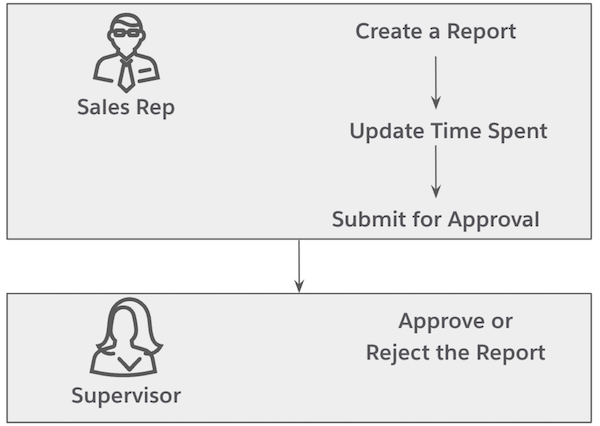
          Sales reps use the daily reports to enter their activities and the time spent on each activity. Reps must release a daily report before a supervisor can approve or reject the daily report.

          This workflow defines the tasks for sales reps and supervisors.

          Daily Reports Workflow

          These resources help you set up daily reports. To set up daily reports in the Consumer Goods Cloud offline mobile app, see Create a Daily Report by Using Time Cards.

          1. Create a Daily Report
            Create daily reports to capture the time that you spent on performing various tasks during each day.
          2. Update Duration for Daily Report Activities
            Based on the daily report template that's used, activities are shown for a daily report. As a sales rep, to create a report, enter the duration for each of these activities. The maximum duration for each activity and the duration for all the activities in a daily report can’t be more than the maximum duration that's configured in the daily report template.
          3. Request Approval to Release a Daily Report
            In a typical daily report workflow, you must request for an approval before you can release a daily report. You can request approval for the reports whose status is Initial.
          4. Approve or Reject a Daily Report
            Supervisors can review their reps’ daily reports whose status is Released, and can either approve or reject the reports.
          5. Reassign a Daily Report
            If a report is incorrectly assigned to a supervisor, the supervisor can reassign daily reports to a different approver.
           
          Loading
          Salesforce Help | Article