
Customer Master Data and Related Key Objects
Manage account data such as customer hierarchies, roles, relationships by using Customer Master objects.
Required Editions
| Available in: Lightning Experience in Enterprise and Unlimited Editions that have Consumer Goods Cloud enabled |
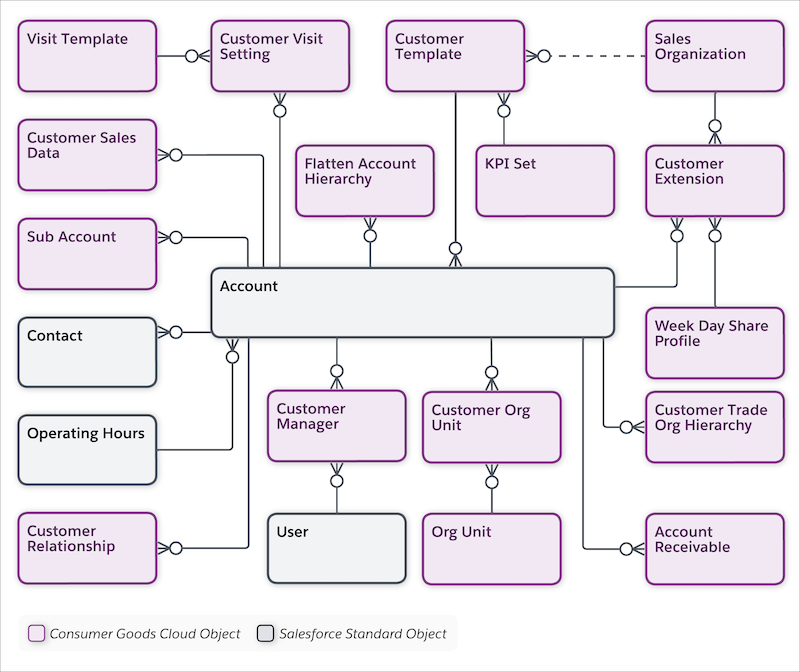
The Account within the customer master stores details on different accounts with whom you conduct business. The Trade Org Hierarchy stores relationships between accounts as parent-child relationships. Other account details stored in various objects within the customer master are contact, relationship roles with other accounts, and users assigned.
The image shows the objects to manage account information.
| Object | API Name | Description |
|---|---|---|
| Account | Account | Information on customers with whom you conduct business. An account can be a retailer, distributor, wholesaler, or consumer. |
| Account Receivable | cgcloud__Account_Receivable__c | Customer information about invoices, debit, and credit notes. |
| Contact | Contact | A standard object that holds the details (names, photos, and phone numbers) of the primary contact (store manager or the buyers) associated with the retail store and additional contacts related to an account. |
| Customer Extension | cgcloud__Account_Extension__c | Additional account information such as account classification, status, complex pricing configuration, and account roles. Customer extension details are used during retail execution workflows, such as visit and promotions. |
| Customer Manager | cgcloud__Account_Manager__c | User assignments for an account using org units. User assignments can be direct or through the AccountManagerOrgUnitBased batch process. Customer managers manage retail operations including order placement and visit creation, customer relationships, and team activities. They connect sales teams with their customers and are crucial for sales, service, and strategic planning. Customer managers are used to create account team members through the EffectiveAccountManagerSyncBatch process. |
| Customer Org Unit | cgcloud__Account_Org_Unit__c | Represents the relationship between customers, retailers, distributors, wholesalers, or traders, and org units. Points to keep in mind:
|
| Customer Relationship | cgcloud__Account_Relationship__c | Specifies the relationship between two customers:
For example, a customer who has a Bill To role is billed for the order of another account. You set the time frame for the role in the Customer Extension object. A customer can have many relationships of the same type, but only one primary relationship by type. For example, a customer can have many wholesalers, but only one primary wholesaler. |
| Customer Sales Data | cgcloud__Account_Sales_Data__c | Customer’s month-by-month sales volume for up to two consecutive years. This object is used in the Customer Sales Report on the Consumer Goods Offline Mobile app. |
| Customer Template | cgcloud__Account_Template__c | Details of a template to create an account. |
| Customer Visit Setting | cgcloud__Account_Visit_Setting__c | Information that your users use to plan visits automatically. |
| Flatten Org Unit Hierarchy | cgcloud__Flatten_Org_Unit_Hierarchy__c | Contains a version of the trade org unit hierarchy data, flattened by a batch process. You can use this object to filter and group customers in customer sets based on segmentation rules. |
| KPI Set | cgcloud__KPI_Set__c | A list of individual KPIs or measures that help you evaluate promotions. You can map a KPI set to a business process by using the business templates. KPIs at a parent level are read-only and are the aggregations of all child KPIs. |
| Operating Hours | OperatingHours | A standard object that holds details about the operating hours for the stores(accounts). |
| Org Unit | cgcloud__Org_Unit__c | Smallest units of an organization, such as a department or a branch office. For example, NTO California org unit under Northern Trail Outfitters (NTO) for the org level type, Sales. You can create multiple types of org units within one organization. You can create org units based on physical territories for sales teams or logical org units for service teams. |
| Sales Organization | cgcloud__Sales_Organization__c | Business segments that you use to structure your data and business processes by your organizational unit. You can base business segmentation on geographical territories, product division, or account team. |
| Sub-Account | cgcloud__Sub_Account__c | A subset of accounts whose KPIs add to the parent account KPIs in the account plan. For example, volume for supermarkets or hypermarkets. Subaccounts are used primarily in account planning. |
| Trade Org Hierarchy | cgcloud__Account_Trade_Org_Hierarchy__c | Represents how various accounts under a parent customer account are organized and related to each other. For example, your relationship with your retailers, distributors, or wholesalers. You need trade org hierarchy to plan for retail activities at a parent level. Child accounts inherit the retail activities from the parent account. These relationships are time-dependent and are valid only for the set time frame. |
| Visit Template | cgcloud__Visit_Template__c | Template to create customer visit types. For example, sales visit, training, delivery visit, or phone call. |
| Week Day Share Profile | cgcloud__Week_Day_Share_Profile__c | Customer information about the breakdown of product or category deliveries for days of the week or subperiods. You can define the weekday share profile as either a percentage or an absolute value. The weekly profile is updated when product rates change during the week or during mid-week promotions. Distribute KPIs across weekdays or subperiods by using weekday share profile. |
| User | User | Specific business roles for a sales org. Users conduct retail activities based on the defined role (for example: sales rep or supervisor). |
