
Order Management Key Objects
Facilitate order-taking during retail visits or promotions by understanding order management.
Required Editions
| Available in: Lightning Experience in Enterprise and Unlimited Editions that have Consumer Goods Cloud enabled |
The image shows the objects used for order management.
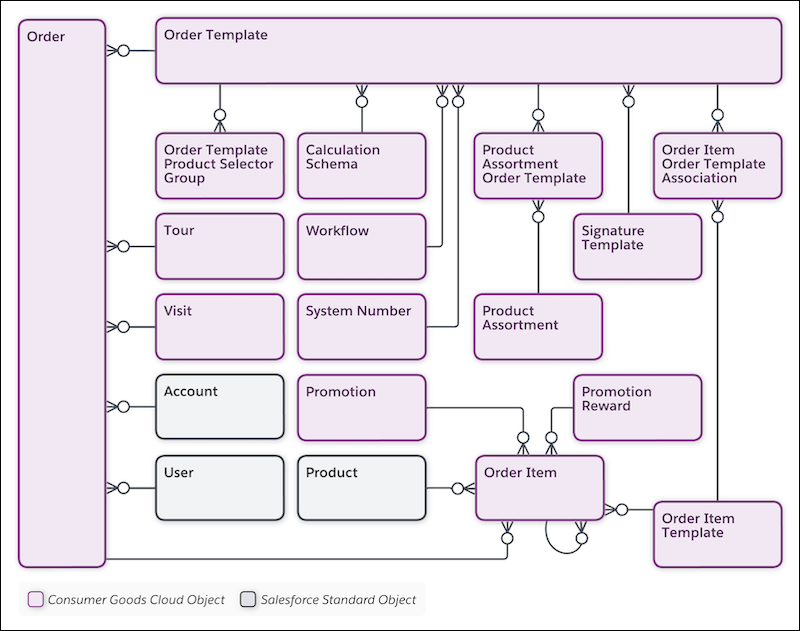
| Object | API Name | Description |
|---|---|---|
| Account | Account | Information on customers with whom you conduct business. An account can be a retailer, distributor, wholesaler, or consumer. |
| Advanced Order | cgcloud__Order__c | Header details of an order that contains references to a visit, customer, order, and delivery date. |
| Advanced Promotion | cgcloud__Promotion__c | Agreements between a manufacturer and a customer to increase revenue and market share by using temporary price reductions or in-store displays. |
| Calculation Schema | cgcloud__CP_Calculation_Schema__c | The calculation schema defines how the price of an order item and an order is calculated. The calculation schema contains a sequence of condition types and defines the calculation steps that you perform in a particular sequence. |
| Order Item | cgcloud__Order_Item__c | Details about an order, such as quantities, unit of measure, promotion, and pricing for products. |
| Order Item Order Template Association | cgcloud__Order_Item_Order_Template_Association__c | Association between Order Item Template and Order Template. |
| Order Item Template | cgcloud__Order_Item_Template__c | Template that defines the behavior of an order item. Examples of order item templates are standard, return, or free items. |
| Order Template | cgcloud__Order_Template__c | Predefined templates to create an order:
Order templates specify the basic characteristics of an order that your users create. |
| Order Template Product Selector Group | cgcloud__Order_Template_Product_Selector_Group__c | Use this object to assign a product selector group to an order template. Product selector groups define how to show products in an order disposal list. The product selector group also determines the item view filters that a disposal list shows. |
| Product | Product2 | Product details and related information, such as product parts, product conditions, unit of measure, product managers, and warehouses. |
| Product Assortment | Assortment | Products that you group for a specific purpose, such as eligibility for sale in a specific store. One assortment can have products from various categories. |
| Product Assortment Order Template | cgcloud__Product_Assortment_Order_Template__c | Association between product assortment and order template. |
| Promotion Reward | cgcloud__Promotion_Reward__c | Details of rewards that are applicable for a reward group that is associated with a sellable promotion. The rewards that are applicable to a promotion are ascertained based on the results of the promotion hurdles and expressions. |
| Signature Template | cgcloud__Signature_Template__c | Template to create and define the general characteristics of a signature such as description, location, attribute set (appears when you capture or review a signature in an order or invoice), and sales org. |
| System Number | cgcloud__System_Number__c | Defines the structure of an order or invoice number. For example: Length 8 or Length 3 digits prefix User Identification (LU), + 5 digits sequential number. The system creates and assigns a new number for each new order based on the definition. |
| Tour | cgcloud__Tour__c | Tour details such as the date of the tour, tour notes, vehicle, and route details. You can create a tour from a route (van-sales tour) or independently. |
| User | User | Specific business roles for a sales org. Users conduct retail activities based on the defined role (for example: sales rep or supervisor). |
| Visit | Visit | Information on tasks or operations to carry out during a field rep’s visit to a store. A visit can be a standard scheduled visit or an ad-hoc visit. Plan ad-hoc visits for inventory issues, or to promote or upsell a product. |
| Workflow | cgcloud__Workflow__c | Details of a workflow. You can use these details in various business processes such as
You can’t add a single workflow for multiple business processes at the same time. |
Did this article solve your issue?
Let us know so we can improve!
