
You are here:
Additional Line Item Actions
Learn how to define and implement custom actions for line items in Industries CPQ (Configure, Price, Quote) using Lightning Web Components (LWC). This setup enables users to trigger specific actions on individual line items within the cart, tailored to business requirements.
Industries CPQ offers customization of line items through Lightning Web Components (LWC). By defining custom actions, businesses can enable users to perform targeted operations directly from the cart interface. These actions are specified using JSON, which defines the action label and event name to trigger within the LWC.
LineItem Custom Actions in JSON: The section defines custom actions in the JSON structure
AdditionalCustomJson. This JSON structure specifies the custom actions,
including labels for each action and the name of the event to be triggered when that action is
selected.
{
  "lineItemCustomActions": [
    {
      "label": "Line Item Action 1",
      "name": "lineItemAction1"
    },
    {
      "label": "Line Item Action 2",
      "name": "lineItemAction2"
    }
  ]
}
- The
lineItemCustomActionsarray contains objects, each representing a custom action that can be performed on a line item in the CPQ cart. Each object contains two properties. labelspecifies the display name for each action in the cart UI. For example, Line Item Action 1 might display as a button or option users can click.namerepresents the event name that triggers custom code in the LWC. Each name here should be unique and should match event handlers defined in the custom LWC component.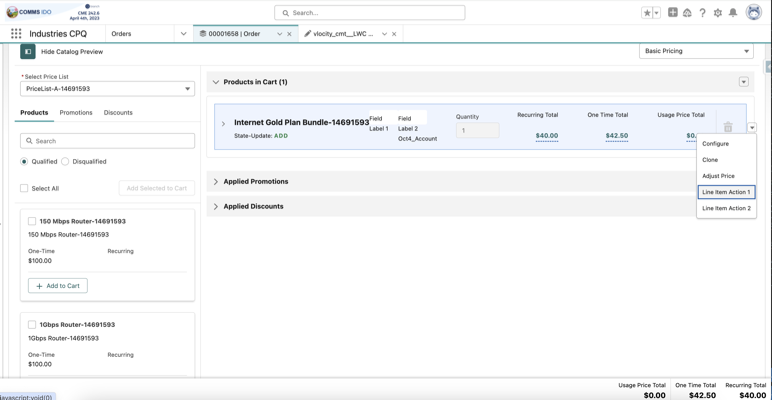
When you select a custom action, for example, Line Item Action 1, the associated event is
triggered in the LWC. This event corresponds to the name defined in the JSON configuration and
can be used to execute custom logic. The name property in the JSON structure
matches the event handler method in the LWC. This approach ensures that each line item action
performs the correct operation as defined by the event handler in the LWC.
- Create a Custom LWC Component for Event Handling
Learn how to define and implement custom actions on line items in Standard CPQ (Configure, Price, Quote) using Lightning Web Components (LWC). This allows users to trigger custom actions on cart line items tailored to business needs. - Handling Custom Events and Creating Modals in LWC
This topic explains how to handle custom events in Salesforce Lightning Web Components (LWC) and create modals that are triggered by these events. You'll learn how to write LWC code to listen for events, trigger actions, and display modals in response to those events. - Add a Component to cpqCartTab
Learn how to add a custom component to the cpqCartTab in Salesforce CPQ using the additionalCustomJson parameter.
