You are here:
Amend In-Flight Orders
Any order that's in the process of fulfillment is referred to as an In-flight order. Using the Amending In-Flight Orders feature, you can modify your order after you’ve submitted it. It helps you fine-tune your order before order management completes its fulfillment.
If you want to cancel the original order, see Cancel an In-Flight Order.
- From the App Launcher, search for Orders and open it.
- From the orders list, select an order to amend.
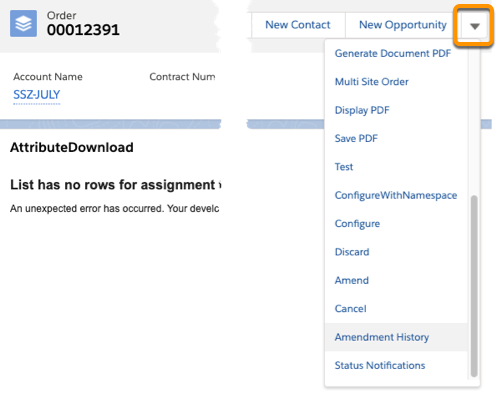
- In the tab for the order, select Amend from the menu.
-
As required, add, modify, or delete the cart line items. You can also modify, add, or cancel a promotion and discount that applies to a line item.
You can modify a line item only if it hasn’t passed the point of no return (PONR). PONR is a state in the order fulfillment process after which you can’t modify an order, including a promotion or discount that applies.
See In-Flight Amendments.
 Note
NoteAfter you complete amending the supplemental order, you can also discard the changes before you submit the order for fulfillment.
To discard the changes you made to the order, from the cart actions, click the arrow and then click Discard. CPQdiscards the supplemental order and the original order is activated for order fulfillment. See Order Statuses in CPQ.
-
When you complete amending the supplemental order, click Submit order.
After you submit an amended order, the following status changes occur on the supplemental and the original orders:
-
OM accepts the new order: The supplemental order status changes to In-Progress and the original order is superseded.
-
OM rejects the new order: The supplemental order is rejected and the original order is activated.
-
OM doesn't immediately accept or reject the new order.
If an orchestration item is running when you submit a supplemental order, then OM waits for that item to complete before moving ahead. (You can change that behavior. See: In-Flight Amendment: Changing the Default Behavior or a Running Order Item )
After the item completes, OM decomposes the order and either accepts or rejects it.
-