
You are here:
Base Pricing Adjustments
Salesforce records the base price for every line item in the pricing log. The pricing log is a JSON field on the line item object that enables the pricing waterfall in the Price Details in the Industries CPQ Cart. Although the pricing log is efficient for the Cart's operations, it is not recommended for configurations or services that need to evaluate past pricing history.
Instead, the adjustments records for Orders (Order Pricing), Opportunities (Opportunity Pricing), Quotes (Quote Pricing), and Assets (Account Pricing) should be used. Adjustment records are the source of truth and can be used to reconstruct the pricing history. By default, adjustment records do not record the base or starting price. However, you may need base pricing information for downstream systems or for reporting. If so, it can be enabled at runtime in the Industries CPQ Cart and in repricing batch jobs using the CreateBaseAdjustment parameter.
Using the CreateBaseAdjustment parameter increases the number of adjustment records, which will impact storage requirements and performance. It is not necessary for most deployments.

In order to use base pricing adjustments, the PricingPlanService implementation must be the active implementation for the PricingInterfacePricingInterface.
Behavior in MACD Scenarios
When the CreateBaseAdjustments parameter is enabled, base pricing adjustments are created for various order scenarios, including MACD (Modify, Add, Change, Disconnect) orders. These are the expected behavior:
-
- Disconnect Orders: For Disconnect orders, the system creates ADD and DISCONNECT adjustment records for each order item. This behavior ensures accurate lifecycle tracking of order items. Example: If an asset is disconnected, both the original addition and the disconnect adjustments are captured to maintain pricing history.
- Partial Disconnect Orders: Adjustment records reflect the split between retained and disconnected items, maintaining a clear record of pricing changes.
- Change of Product (CoP): Adjustment records capture transitions between old and new products, detailing pricing adjustments for both the removal of the old product and the addition of the new one.
The CreateBaseAdjustment Parameter to Add Base Prices to Adjustment Records
You can enable the CreateBaseAdjustment parameter in your pricing plans. When you set this parameter to True, base prices are written to the adjustment records as shown below.

With some pricing models, you can have multiple effective price list entries. You may have price list entries with time plans and time policies that will change the price after a defined time interval has passed. Using the CreateBaseAdjustment parameter, each of these price list entries are recorded as base prices, but you can distinguish them using the sequence and estimated start and end dates.

At runtime in the Industries CPQ Cart, the Price Details window only displays the applied base price based on the current date, which in this example is the $149.99 One Time Std Price.
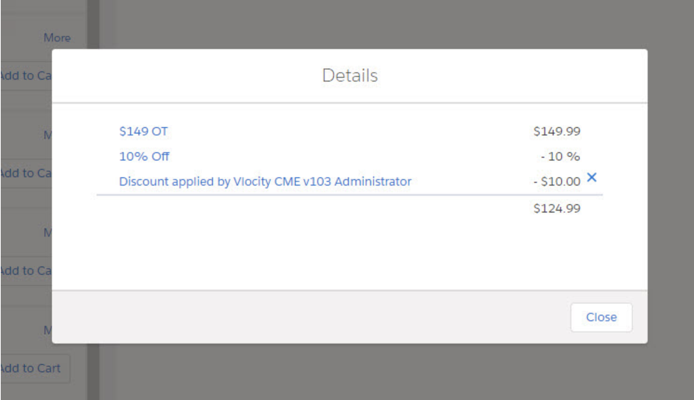
In this example, the other base price, $99.99, is written to the adjustment records, but will not display in the Price Details window.
Enable Base Pricing Adjustments in Pricing Designer
To enable base pricing adjustments record base prices for Orders, Opportunities and Quotes in the Industries CPQ Cart, set the CreateBaseAdjustments parameter on the Initialize Pricing Context step of your pricing plan.
Before You Begin
To use base pricing adjustments, the PricingPlanService implementation must be the active implementation for the PricingInterface.
-
From the Vlocity Pricing Designer app, click the
 menu button, and select Pricing Plans.
- Click the Default Pricing Plan or the pricing plan that you want to use to record base prices.
- In the Pricing Plan Steps section, click Initialize Pricing Context.
-
Click the Edit Parameters icon
 next to Parameters.
- In the Parameters box, enter {"CreateBaseAdjustments":"True"}.
- Click Save.

Enabling Base Pricing Adjustments in Repricing
If you have existing orders, opportunities, quotes, or assets that need base pricing adjustment records, you can run the repricing service with the CreateBaseAdjustment parameter set to True in batch, and the repricing service used the pricing log to create new base pricing adjustment records for you.
The Base Pricing Adjustments feature is available in the Fall '18 and later.
To use base pricing adjustments, the PricingPlanService implementation must be the active implementation for the PricingInterface.
You cannot use the CreateBaseAdjustment parameter to reprice orders, opportunities, or quotes that have been imported from an external system since they will not have pricing logs.
To enable base pricing adjustments in repricing, pass the CreateBaseAdjustments = true flag through the input map of the batch processor. For example, the code below invokes the repricing service with CreateBaseAdjustments enabled for an order and its line items. The order and order item IDs should be replaced with the correct IDs for your deployment.
Map<String, Object> input = new Map<String, Object>();
// Set the CreateBaseAdjustments flag
input.put('CreateBaseAdjustments', true);
// Object being repriced: Order/Account/Opportunity/Quote
input.put('repriceBy', 'Order');
// Object row Id: Order Id, Account Id, Opportunity Id, Quote Id
input.put('objectId', '8011I000000dHQo');
// rootItemIds are nothing but root line items or asset Id of the root in a bundle present in Order/Account/Opportunity/Quote
input.put('rootLineItemIds', new List<Id>{'8021I000001s5saQAA'});
input.put('repriceProvidedLineItemsOnly', false);
RepricingBatchProcessor repricingBatchJob = new RepricingBatchProcessor(input);
ID batchprocessid = Database.executeBatch(repricingBatchJob,1);
Alternatively, the repricing service can also be invoked using anonymous Apex in the Salesforce Developer Console using the code below. The order ID should be replaced with the correct ID for your deployment.
List<Order> a = [SELECT Id FROM Order WHERE Id='8011I000000dHQo'];
Map<String,Object> repricingInput = new Map<String,Object>{'objectList' => a,'CreateBaseAdjustments' => true, 'GenerateAllPrices' => true};
Map<String,Object> repricingOutput = new Map<String,Object>();
Map<String,Object> repricingOptions = new Map<String,Object>();
vlocity_cmt.VOIInvoker voi = vlocity_cmt.VOIInvoker.getInstance();
voi.invoke('Repricing', 'repriceLineItems', repricingInput, repricingOutput, repricingOptions);
Troubleshooting
Common Issues with Base Pricing Adjustments
- Incorrect Adjustment Records: Verify that CreateBaseAdjustments is enabled. Ensure the adjustment records for orders align with the expected behavior for MACD scenarios (e.g., ADD and DISCONNECT for Disconnect orders).
- Storage Concerns: Monitor adjustment records to ensure that the additional data does not exceed storage limits.
