
You are here:
Calculation Procedures for Attribute-Based Pricing
To speed your deployment, Salesforce Industries Communications, Media, and Energy provides preconfigured calculation procedures and matrices for attribute-based pricing.
If you have installed the Attribute/Volume Based Pricing DataPack, you have the following records in your org.
Calculation Procedure |
Calculation Matrix |
DataPack |
|---|---|---|
AttributePricingProcedure |
AttributePricingMatrix |
AttributePricingDataPack.json |
SourceTargetAttributePricingProcedure |
SourceTargetAttributePricingMatrix |
SourceTargetAttributePricingDataPack.json |
RangeAttributePricingProcedure |
RangeAttributePricingMatrix |
RangeAttributePricingDataPack.json |
Each DataPack contains a calculation procedure and a matrix that supports one of the three approaches to attribute-based pricing.
The attribute-based pricing calculation procedures look up data from their calculation matrices. These calculation procedures are invoked by the PricingPlanHelper Apex class. In order for the output to be returned correctly, the procedures must have the following variables defined.
Variable Name |
Data Type |
Description |
|---|---|---|
REC_MNTH_STD_PRC |
Currency |
Pricing variable code that maps to vlocity_cmt__RecurringCharge__c field |
OT_STD_PRC |
Currency |
Pricing variable code that maps to vlocity_cmt__OneTimeCharge__c field |
USAGE_STD_PRC |
Currency |
Pricing Variable that maps to vlocity_cmt__UnitPrice__c field. |
UOM |
Text |
Pricing variable that maps the unit of measure to vlocity_cmt__UsageMeasurementId__c field. |

There is no need to set Apex pre-processor and post-processor classes previously used for attribute-based pricing.
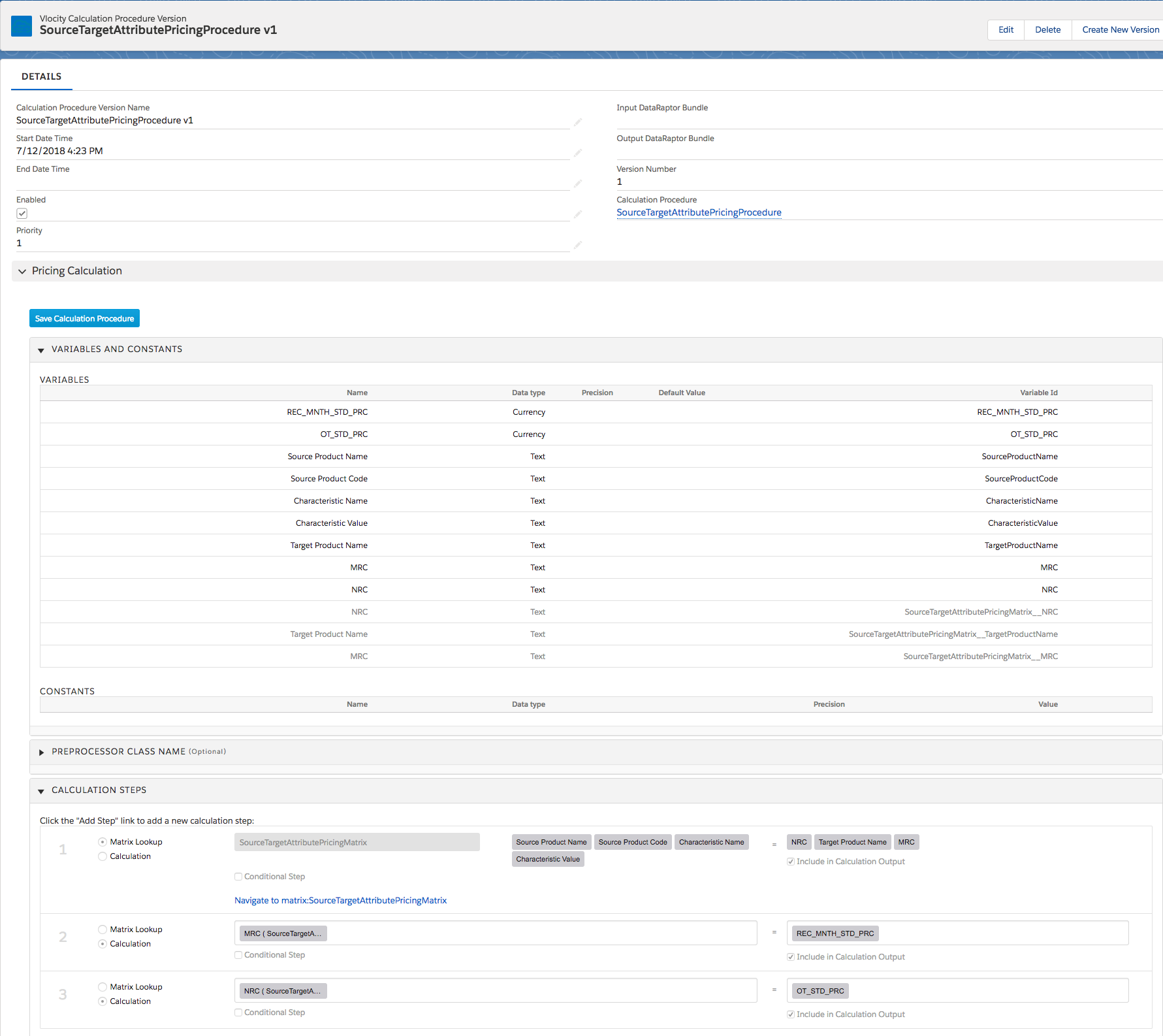
When you implement source-target attribute-based pricing, the Matrix Lookup calculation step for the Target Product Name must have the Include in Calculation Output flag checked in addition to the monthly recurring charge (MRC) and non-recurring charge (NRC) outputs. The pricing plan service uses the Target Product Name and any path parameters that are specified to determine the products to apply the MRC and NRC prices.
Target Product Name needs Include In Calculation Output flag checked
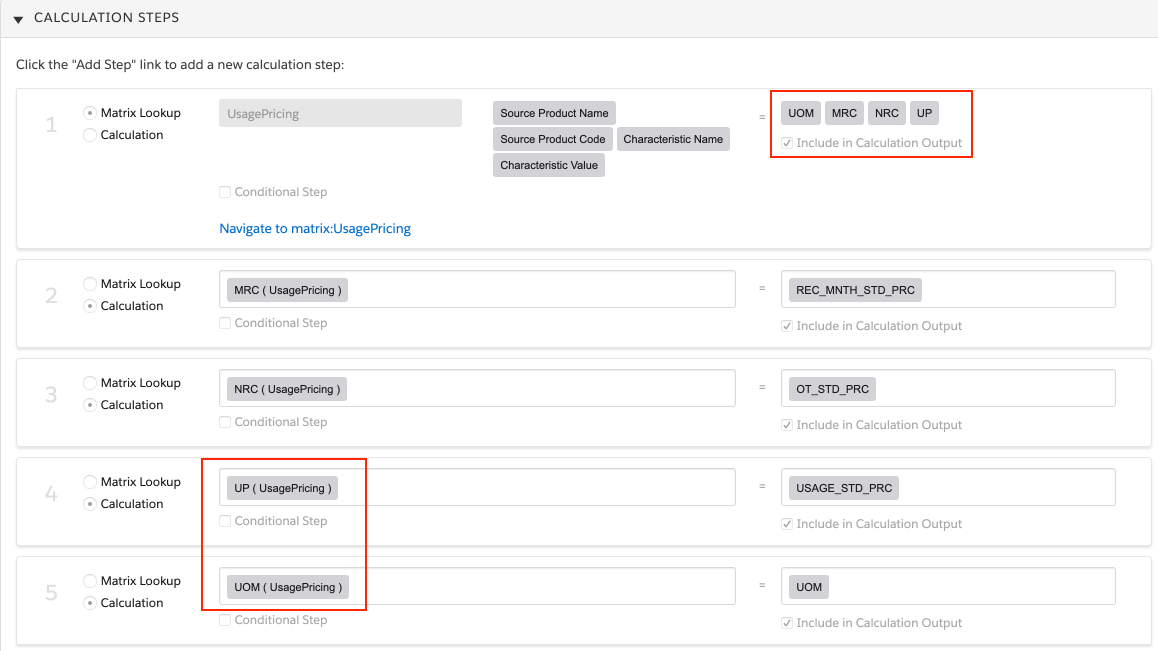
To include usage-based pricing in pricing calculations, you must configure two additional calculation steps for Unit of Measurement (UOM) and Unit Price (UP) and check the Include in Calculation Output flag. See Declarative Calculation Procedures for configuring calculation steps.
See Setting Up a Custom Pricing Step for Attribute-Based Pricing to create a new step in the Default Pricing Plan.
Testing Calculation Procedures and Calculation Matrices
To test the data you entered in your calculation matrices, go to the calculation procedure that calls it and use the Simulate function.
- Navigate to the Vlocity Calculation Procedures tab, and find the calculation procedure that you installed from the DataPack.
- In the Vlocity Calculation Procedure Versions related list, click the latest calculation procedure version.
- In the Vlocity Calculation Procedure Version Detail, click Simulate.
- Enter sample data for each variable, and then click Simulate All Steps.
