
You are here:
Change of Plans in Industries CPQ and Product Catalog
Customers of service providers can be enabled to change or migrate their services and plans after the initial purchase.
To ensure that the existing service is not disrupted or discontinued, the Change of Plans feature (also known as Replace Offers) allows service providers to upgrade or downgrade customer plans during the lifecycle of the subscription.
If you're using product versioning, you can upgrade a customer's current asset to newer version. The source and target root product bundle can be the same when changing versions. The reason is a product bundle could have a different hierarchy if the reference date is modified. See Versioning Reference Dates.

This feature is supported in Enterprise Product Catalog (EPC) and Configure Price Quote (CPQ) for the Winter ‘19 release and later.
Change of plans include several key features:
-
Service Continuity
Your customers can migrate from the original plan to the new plan without any disruptions to their existing services.
-
Unchanged Service Identifiers
Service identifiers such as your customer's email address and mobile phone number remain the same while migrating from one offer to another offer.
-
A View into the History of Subscription Updates and Traceability
You can view the history of the asset details for your customers.
With CME Summer '21, migration uses Product2.GlobalGroupKey__c instead of productID to match leaf products between source and target products.
Use Case Scenarios
Customers can move to new plans from old plans without any interruptions in service. In all cases, you can move the customer from the source (original plan) to the target (new plan).
Customers can change plans that result in moving from one bundled offer to another bundled offer. A bundled offer contains plans, devices, and services that are packaged together. Both bundled offers may have common products that are retained in the process. Some of the existing assets that are not available in the new bundled offer will be disconnected.
The following use case scenarios apply to the Change of Plans feature.
Upgrading to a New Plan
Let's say your existing customer wants to upgrade their limited phone plan to a new plan with unlimited data, text, and talk. You want to ensure that their existing phone service is not interrupted and their phone number remains the same. With Salesforce's Change of Plan feature, you can move this customer to an unlimited plan, guaranteeing continuity of service and retaining the same mobile number and email address (service identifiers).
Moving to Bundled Offers
You have an existing customer who is currently signed up for individual services (phone and internet service). With the Change of Plan feature, you can move the standalone offers (phone and internet service) to a bundled offer for a specified period of time.
Combining Service Plans
You have an existing customer who purchased multiple products at different points in time. The customer now wants to reduce their overall bill without discontinuing the service. With the Change of Plan feature, you can review the customer's history and recommend a more effective way to combine services without discontinuing the original service.
Understanding Leaf Matching and Cardinality in Product Replacement
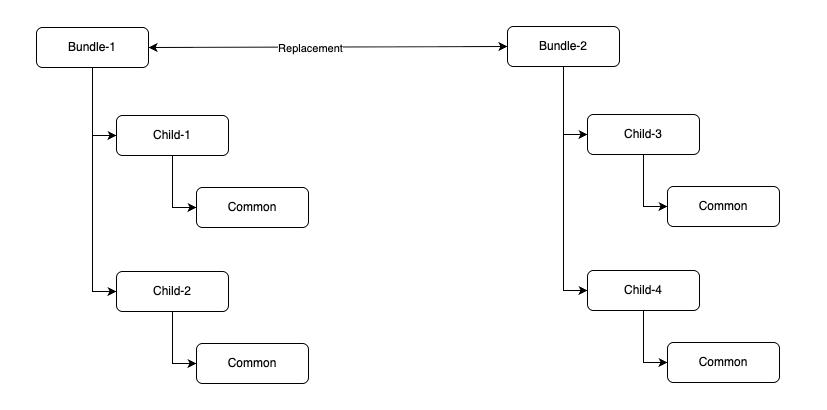
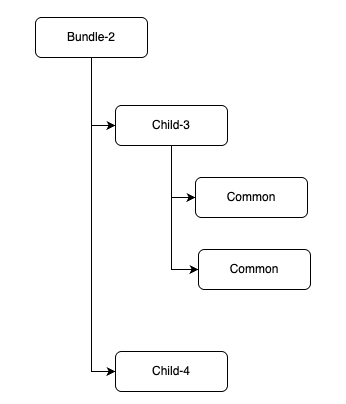
Leaf matching is determined by the number of shared ancestors between the source and target products. If there are no common ancestors, or if multiple target products share the same number of common ancestors, the system consistently selects the same target product.
The API does not ignore cardinality. Instead, it populates cardinality requirements as a soft exception, which prevents transaction failure while allowing users to resolve complex cardinality scenarios that the API cannot automatically establish.
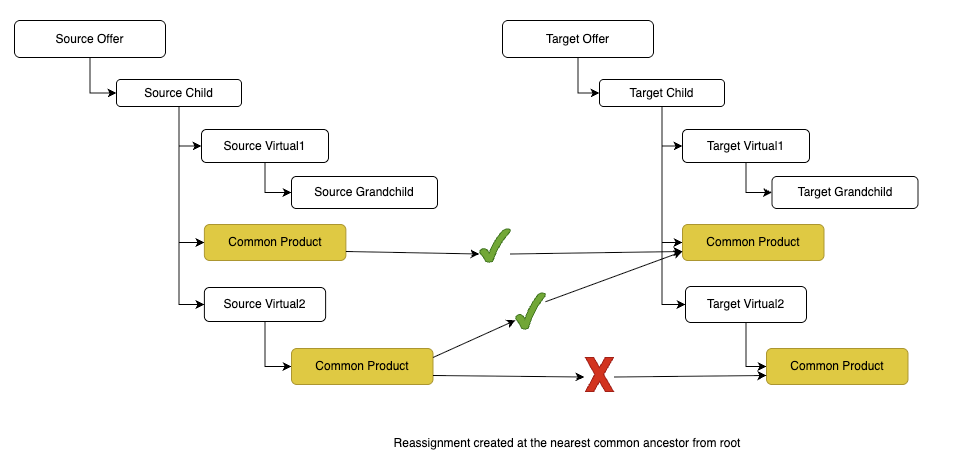
Product Setup for Replacement Scenario
The scenario illustrates how the system maps common products when replacing Bundle-1 with Bundle-2. This visual breakdown clarifies the mapping logic".

- Create an Offer Migration Plan and Define Mappings in the Product Catalog
To help customers who want to change offers, you can create a migration plan that allows switching from one product offer to another. A migration plan can define specific products that are eligible or can be open for changing from any product to any other product. - Search for Offer Migration Plans in the Product Catalog
You can search for existing offer migration plans, view them, and make any modifications to the plan or the mappings. - Edit and Delete Offer Migration Plans in the Product Catalog
You can edit existing offer migration plans or delete ones that do not apply to your business any longer. - Replace and Compare Plans in the Industries CPQ Cart
Replacing a product works with any eligibility rules that you have defined. You can only replace plans depending on your customer's eligibility to change plans. You can compare the Recurring Total of the old asset with the Recurring Total and One Time Total of the new asset. You can also compare the action and sub-actions of the old and new assets. You cannot view the attributes for each asset from this view. - Query-Driven Asset Disconnector Scheduler
The Query-Driven Asset Disconnector Scheduler provides an automated, cron-driven method to disconnect assets. You can make asset management efficient and hassle-free by using the scheduler to manage their assets by automatically disconnecting the assets that expired or reached the end of their lifecycle.The Asset Disconnector Scheduler feature is integrated into the Standard Cart APIs. - Replacing Plans from the Asset Viewer
For Spring '22 and later, replacing plans supports bulk processing. With bulk processing, you can select multiple existing plans and create a quote or order for them. You can then choose to replace plans one at a time or a group of plans all at once. For example, say you want to move all customers on a broadband plan to an improved plan, you can select all such plans and upgrade your customers in a single order or quote. - Set Up Change Fees in the Product Catalog
Service providers often charge fees for making changes to existing plans to cover their costs. As a service provider, you can charge change fees. - Transformation of Multiplay Offers
Communications Service Providers always need to find ways to attract new customers and retain their existing customers. One of these methods is to introduce new offers for the same services and products with more attractive prices and marketing. An existing customer who wishes to benefit from new offers and prices has the choice of migrating their plan to new offers. This involves moving from one product bundle to another, for example, migrating a mobile plan to a better mobile plan.
