You are here:
Checking Configurations for Offers and Specifications
You can check that your commercial products are correctly configured for the Specification Type value. Use these reports to identify mismatched bundled products or products with no specification type.
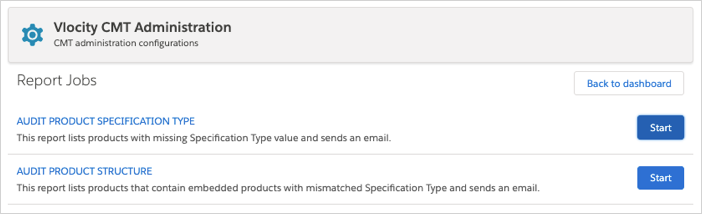
You can view the reports by running the jobs in the Vlocity CMT Administration tab, as described in the following table. The reports are sent to the email address of the user who runs the job.
Purpose |
Job |
|---|---|
Identify products with no Specification Type value. |
AUDIT PRODUCT SPECIFICATION TYPE |
Identify bundled products with mismatched Specification Type values. |
AUDIT PRODUCT STRUCTURE |
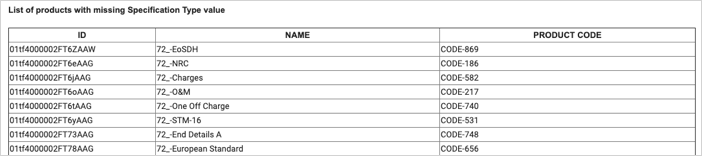
For the AUDIT PRODUCT SPECIFICATION TYPE job, the email shows a list of product specifications that do not have a Specification Type value. It shows the name, the Product Code value, and the ID for each product specification. The email will be similar to the following example.
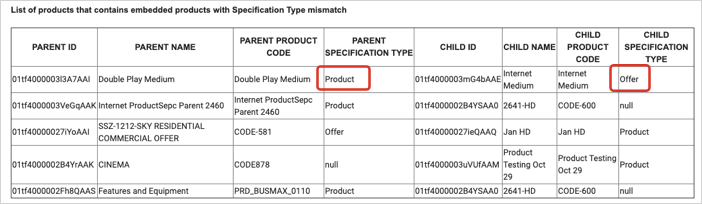
For the AUDIT PRODUCT STRUCTURE job, the email shows a list of parent and child products that do not have matching Specification Type values. To identify the mismatch, compare the Parent Specification Type and Child Specification Type columns. Parent and child products must have the same specification type.
In the following example, the Double Play Medium item is a parent product in a bundle and has a Specification Type values of Product. It has a child product called Internet Medium that is set as an Offer.
- From the App Launcher, search for and open Vlocity CMT Administration.
- In the Admin Console table, click Report Jobs.
-
Click Start for the report you want to run.
You receive an email with the job name in the subject line.
- To fix identified issues, see Configuration for Offer Specification Realization.