
You are here:
Context Rules Framework
Use the context rules framework to build rules that change what products, promotions, and prices appear for customers. You can also apply penalties for promotions or contracts that are canceled.You can also create rules to ensure pricing adjustments are allowed only in certain conditions. Context rules work together with advanced rules framework to ensure all orders are configured and priced correctly.
There are two primary types of context rules: Qualification and Penalty. These rule types have different uses in Industries Cart. See Types of Context Rules.
Create and manage context rules in the Product Console. Build context rules with reusable components. Context rules can be combined into rule sets and applied to products, promotions, price lists, and price list entries. They can also be applied to virtual objects. See Context Rules Components.
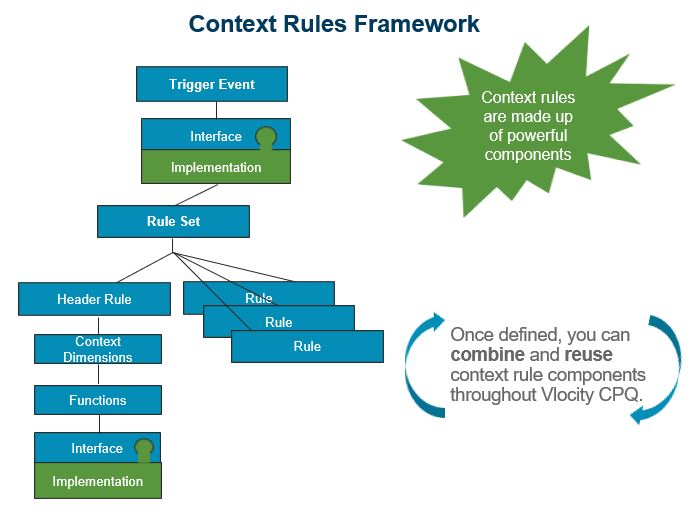
Setting Up Context Rules Framework
The following interface implementations must be active and set to their default values to enable the specified types of context rules.
Interface Implementations
Interface |
Implementation |
Enables which context rules? |
|---|---|---|
ContextRuleService |
ContextRuleService |
For all types of context rules |
ProductAvailabilityOpenInterface |
CtxRulesProductsOpenImplementation |
For qualification context rules for products |
PricingManAdjEligibilityInterface |
PricingManAdjEligibilityService |
For qualification context rules for pricing adjustments |
RepricingManAdjEligibilityInterface |
RepricingManualAdjEligibilityService |
For qualification context rules for pricing adjustments used in a repricing batch job |
TightestMatchServiceImplementation |
For qualification context rules for price list entries and child price lists |
CPQ Configuration Setup Custom Settings
The context rules framework uses the following CPQ configuration custom settings:
-
ContextRulesEnabledCPQ Configuration Settings Reference: true (required)
-
CPQ Toast Message Log LevelCPQ Configuration Settings Reference
CPQPartition Session Cache
Configure the CPQPartition session cache to support the context rules framework as follows:
-
Set the CPQ Configuration Setup CacheEnabledCPQ Configuration Settings Reference custom setting to true.
-
Allocate 5 MB or more to the CPQPartition platform cache Session Cache. See Creating a Platform Cache Partition.

The CPQ Configuration Setup
- Types of Context Rules
In the Vlocity Product Console, you can create the following types of context rules: Qulification rules and Penalty Rules. - Context Rule Components
You build context rules by combining context rule components. Over time, this will establish a library of components that can reduce overall development time and expedite new development. - Functions for Rules
In context rules, when you need rules to evaluate complex criteria, you can create a function. - Using Context Rules to Check User's Eligibility in Self-Service Transactions
The following configurations enable you to evaluate the eligibility of the logged-in user for self-service transactions: - Migrate Context Rules Between Environments
You can migrate context rules from one environment to another, for example from a Sandbox environment to a Production environment.
