Loading
Get Started with Communications, Media, and Energy & Utilities (CME)...
Table of Contents
Select Filters

          No results
          No results
          Here are some search tips

          Check the spelling of your keywords.
          Use more general search terms.
          Select fewer filters to broaden your search.

          Search all of Salesforce Help
          cpq-cart-item-lookup (layout)

          cpq-cart-item-lookup (layout)

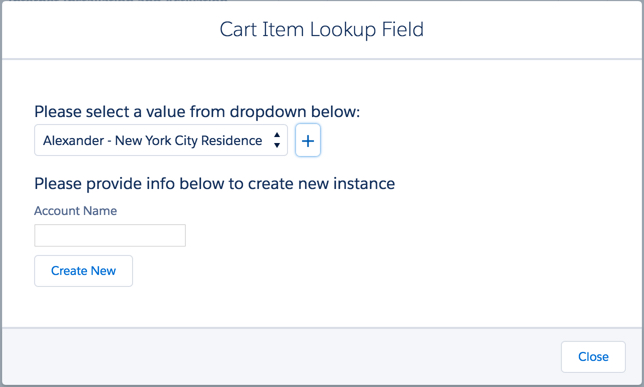
          The cpq-cart-item-lookup layout renders the Cart Item Lookup Field dialog box.

          Template

          cpq-cart-item-lookup (layout)

          Data Source

          Dual

          Remote Class

          CpqAppHandler

          Remote Method

          getAvailableSites

          Input Map

          Input Map Variable

          Value

          cartId

          {{params.id}}

          id

          {{params.lineItemId}}

          lookupField

          {{params.fieldName}}

          Result JSON Path

          None

          REST API Information

          Get Available Sites

          For more information, see Get Available Sites.

          GET /vlocity_cmt/v2/cpq/carts/{{params.id}}/sites?id={{params.lineItemId}}&lookupField={{params.fieldName}}

          Cards

          Empty

          Image

          In the Cart Item Lookup Field window, under 'Please select a value from dropdown below', the value 'Alexander - New York City Residence' is selected. Under 'Please provide info below to create new instance', the Account Name field is blank. Below the Account Name field is a Create New button.
           
          Loading
          Salesforce Help | Article