You are here:
Creating a Calculation Procedure for Cost and Margin
The calculation procedure calls the associated calculation matrix to find the margin range for the product and then returns the output from the matrix to the pricing service. If a line item in the cart is outside the upper and lower bounds of the margin range, the Industries CPQ Cart reports an error to the user. For example, if you defined a margin range that cannot be lower than 5%, the Industries CPQ Cart shows an error if the range is 4% for that line item.
For more information about calculation procedures, see

For a list of the pricing variables for cost and margins, see Pricing Variables for Cost and Margins.
If a line item contains a product that does not match the matrix, the pricing service will continue to the next step of the pricing plan.
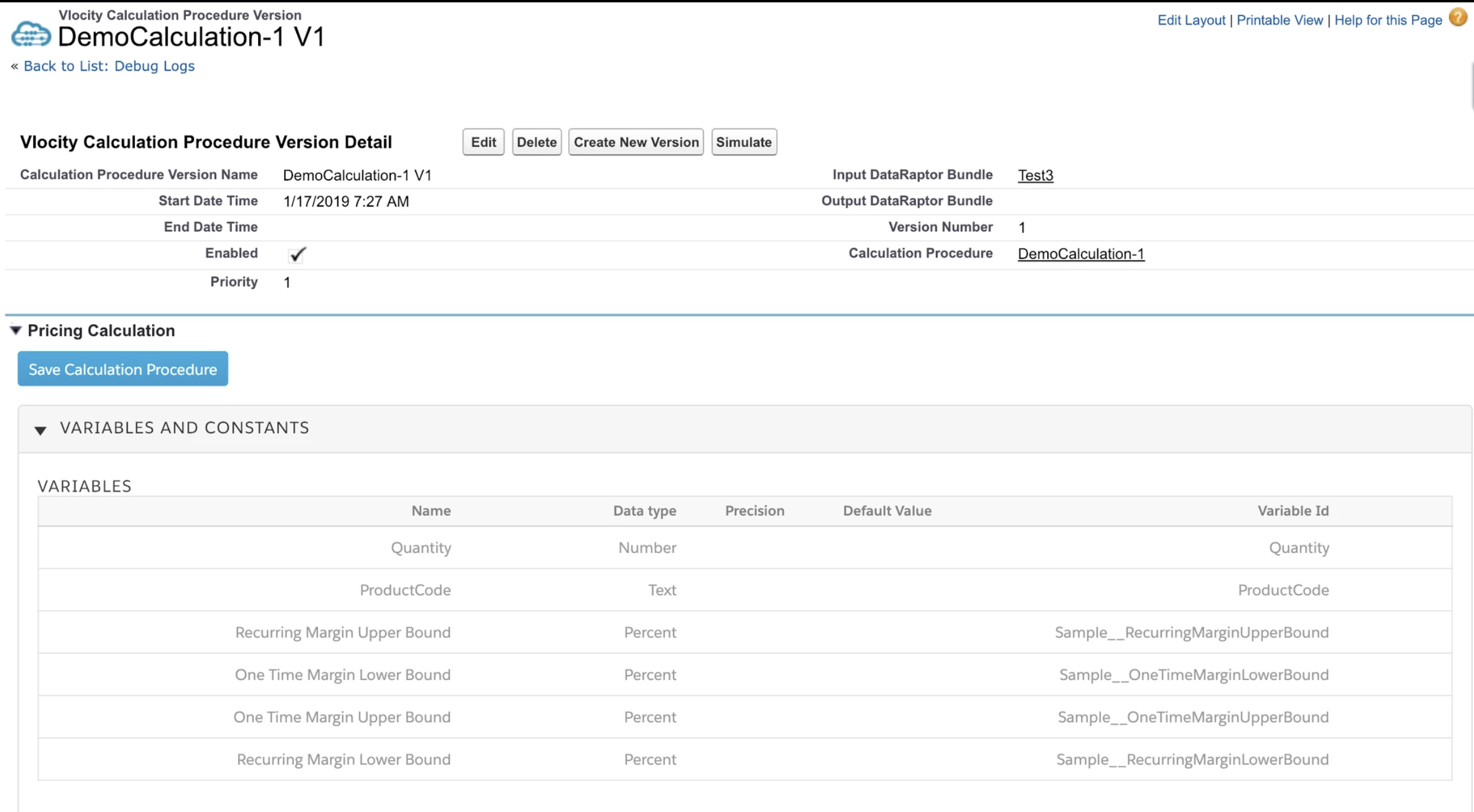
- Create a calculation procedure as shown in the following screen. Specify the Record Type to be Declarative.
- If you also enabled usage pricing, add Usage Margin Lower Bound and Usage Margin Upper Bound variables.
- Associate the procedure with the Extract Data Mapper bundle you created.
- Use the Calculation Matrix lookup to associate the calculation steps with the matrix you created. Be sure to check the "Include in Calculation Output" option. Output variables are required.
- Enable the calculation procedure and make sure it has the highest priority.