
You are here:
Entity Filters
Each rule may have an entity filter, which filters out the orders on which to run, and a rule action, which defines what the rule does. Therefore, entity filters are also called rule action filters or rule filters. Rules use entity filters to determine which items in an order are subject to the rule action. Rules can contain one filter or many filters, depending on the business logic that the rule implements. Filters are reusable. For example, as part of a promotion, you might create a filter to identify premises where the service activation date is 45 days or less. After a filter is created, it's available for use in any rule that requires it.
An entity filter focuses on selected items in the order. For example, the flow implements promotional pricing for Sports and Movies channels that are child products of the ICU Cable service. The action is applied to the selected items, in this case, Sports and Movies. Applying the action results in changed order pricing.
An entity filter consists of one or more conditions that are based on fields or attributes. Entity filters apply those conditions to objects. Each object is evaluated to determine if the condition applies to it.
You build entity filters by dragging elements to visually represent the filter results. Entity filters are associated with rule actions. A rule action can be a matrix, calculation, or procedure.
Entity filters focus on select line items. For example, you can create an entity filter to return all child products, except discounts. You can define entity filters to run for specific dates, or you can leave the dates blank to run the filters on any date (all the time). You can also reuse entity filters.
You can add only one entity filter to an action, but you can create compound entity filters.
Filters are reusable and additive. Over time, it is possible to build a library of filters.

The advanced rules implementation doesn’t consider the valid from, valid until, and active flags.
Entity Filter Conditions
An Entity Filter must include conditions. If it doesn’t include conditions, you'll get a Rule Support Error.
There are four types of Entity Filter conditions:
-
Attribute—Qualify an entity based on an atttibute value.
When you open the Attribute Selection dialog, it shows attribute categories and their associated attributes. Attribute categories are only shown if their Applicable Type is set to any entity and Applicable Sub Type is set to Product Attribute. See Create Attribute Categories in the Product Designer.
-
Field—Qualify an entity based on a field value.
-
Function—Qualify an entity based on a predefined function.
A function lets you use a predefined set of items related to the context line item instead of using a filter type. You can use a function only in an XLI filter. You still require an internal filter to qualify the selected set of items. The predefined sets are cached, saving on queries during run-time.
-
Filter—Qualify an entity based on a set of related items.
A condition defines a set of items by providing query parameters in relation to the context item, and an evaluation filter. The evaluation filter processes all items resulting from the query and outputs a true or false result based on the evaluation criteria. This condition type is also known as a compound filter.
Entity Filters include operators and values. Conditions use the operators and/or. The index starts at zero. You can use the following operators in an Entity Filter:
Operator |
Meaning |
Example |
Explanation |
|---|---|---|---|
﹦ |
Equal to |
Field = 1 |
Returns True if the Field or Attribute is equal to the specified Value. |
≠ |
Not equal to |
Field ≠ 3 |
Returns True if the Field or Attribute isn’t equal to the specified Value. |
< |
Less than |
Field < 4 |
Returns True if the Field or Attribute is less than the specified Value. |
≲ |
Greater than or equal to |
Field ≲ 4 |
Returns True if the Field or Attribute is less than or equal to the specified Value. |
> |
Greater than |
Field > 9 |
Returns True if the Field or Attribute is greater than the specified Value. |
≳ |
Greater than or equal to |
Field ≳ 10 |
Returns True if the Field or Attribute is greater than or equal to the specified Value. |
starts with |
|
Value starts with ABC |
Returns True if the Field or Attribute string begins with the specified Value. |
ends with |
Value ends with ABC |
Returns True if the Field or Attribute string ends with the specified Value. |
|
contains |
Value contains ABC |
Returns True if the Field or Attribute string is found within the Value. |
|
not contains |
Value not contains A;B;C |
Returns True if the Field or Attribute isn’t contained within the specified Value. |
|
in |
Field in 2;4;6 |
Returns True if the Field or Attribute string is found within the specified Value. |
|
not in |
Field not in 2;4;6 |
Used in many-to-one relationships, to check whether one value isn’t in a list of values. |
|
of type |
Field of type string |
Used to check whether an object ID is of a certain object type. |
|
not of type |
Field not of type string |
Returns True if the Field or Attribute string isn’t the specified data type. Used to check whether an object ID isn’t of a certain object type. |
|
contains all |
Field contains all |
Returns True if the Field or Attribute string contains all of the characters in the Value. Used for many-to-many evaluations if two semicolon-delimited values are specified. |
|
contains any |
Field contains any |
Returns True if the Field or Attribute contains any of the characters in the Value. Used for many-to-many evaluations if two semicolon-delimited values are specified. |
Entity Filter Types
There are two types of Entity Filters: Evaluation and Qualification.
-
Evaluation— Determines if a set of object records matches specific conditions. Returns true or false.
-
Qualification— Determines if a set of records qualify to be acted upon. Returns qualified line items.
In Evaluation Entity Filters, the input is a list of items, and the output is the result true or false. Evaluation filters are internal filters. Evaluation filters evaluate if all, any, or none of the objects satisfy a set of conditions.
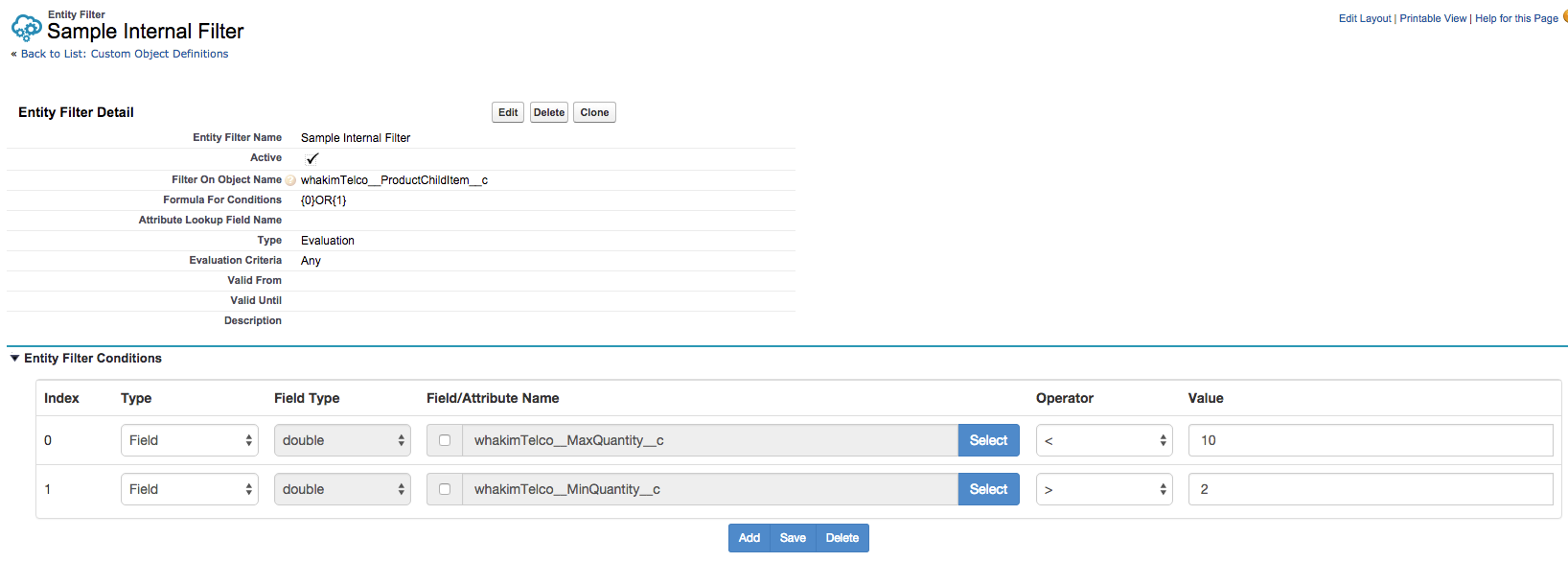
In the image below, the evaluation filter evaluates to true if any of the product children has a maximum quantity of less than 10 and a minimum quantity larger than 2. You would also use an Evaluation Entity Filter to act on accounts that have not used free installation in the past year. You can use Evaluation Entity Filters as arguments in Qualification Entity Filter conditions.
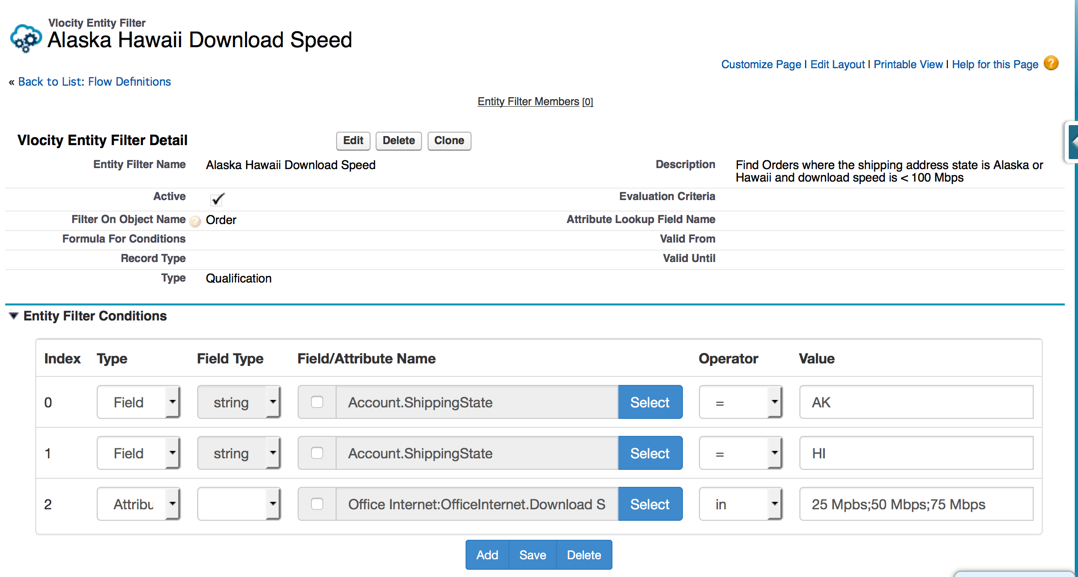
In Qualification Entity Filters, the input is a list of items and the output is a list of qualified items. Qualified items meet the filter conditions. Qualification Entity Filters quantify a set of objects against a set of conditions.
For example, you could return only those accounts where the shipping state is Alaska or Hawaii.
{0} AND ({1} OR {2}), and the results of conditions 0, 1, and 2 are TRUE, FALSE, and TRUE, respectively, then the final result will be evaluated as TRUE AND (FALSE OR TRUE). Here are some example of invalid Formula for Conditions:- Invalid:
{0} AND {{1} OR {2}}because the{1} OR {2}group is wrapped in curly brackets. The correct format is{0} AND ({1} OR {2}). - Invalid:
{0} And {1}because the word "And" is not a supported operator. The correct format is{0} AND {1}. - Invalid:
{0} Or {1}because the word "Or" is not supported. The correct format is{0} OR {1}.
Compound Entity Filters
When using entity filters of type filter, you provide a comma-delimited path to the list of objects to pass to the internal filter. That internal filter must be an evaluation filter and the evaluation criteria must be set.
Id,vlocity_cmt__ProductChildItem__c,vlocity_cmt__ParentProductId__cThe value consists of three comma-delimited values. The example describes the path from the product object to the product child items related lists.
-
Iddefines the field that holds the header object ID. -
vlocity_cmt__ProductChildItem__cdefines the API object name of the related list object. -
vlocity_cmt__ParentProductId__cdefines the lookup field from the related list object to the header object.
This example translates to:
SELECT allFields FROM vlocity_cmt__ProductChildItem__c WHERE vlocity_cmt__ParentProductId__c =: 'value in field Id' Entity Filters and Rule Types
Entity Filters behave slightly differently depending on their Rule type.
-
In Availability and Eligibility Rules, the Entity Filter qualifies products. The system expects the Entity Filter to run on the Product2 object. Entity Filters for Availability and Eligibility Rules run on the header level.
-
In Compatibility Rules, an Entity Filter works with the Rule Filter to further qualify an object. That is, the Rule Filter is a general qualifier and the Entity Filter narrows down the qualified products. The Entity Filter and the Rule must be run on the same object type. Entity Filters for Compatibility Rules run on the line-item level.
-
In Pricing Rules, the Entity Filter determines to which items the Rules are applied. Entity Filters for Pricing Rules run on the line-item level.
