
You are here:
Industries CPQ and Versioning
When versioning is enabled, Industries CPQ supports versioned products and shows the valid version. It builds product structures based on products' lifecycle status, their versioning dates, and the reference dates for orders, opportunities, and quotes.
When creating an order, opportunity, or quote, Industries CPQ displays the product versions that have a Lifecycle Status of Released. Orders, opportunities, and quotes also have reference dates that Industries CPQ uses to identify valid versions based on their versioning dates. Each version of a product has versioning start and end dates, and these dates can't overlap among the versions of a product.

For example, if a quote's creation date is July 23, 2021, the product list for the quote shows only released versions of products whose versioning dates include the quote's creation date.
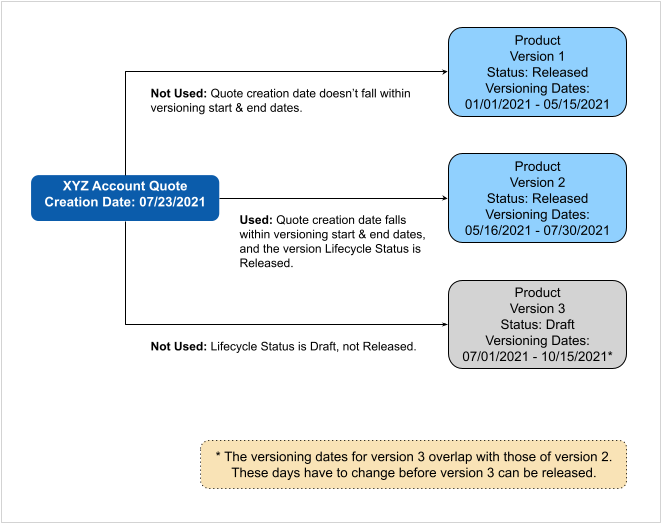
For opportunities, quotes, and orders, the reference date is set on the XLI, which is used to render the appropriate child product version. Any changes in the product catalog since the products were added to the Cart don't directly affect the open opportunities, quotes, and orders.
The following features in Industries CPQ use the valid product versions based on products' lifecycle status, their versioning dates, and the reference dates.
-
Selectable items in the Cart lists of products, promotions, and discounts
-
Validation Rules
-
Promotions and Discounts
-
Selecting add-on items from the Cart
-
Cardinality and attribute overrides for products
-
Asset-based ordering
-
Change of products, which now includes a change of versions
You can also check the version of products from the Cart:
-
From the product list for the Cart, click More to show product details including the version.
-
From the Cart, hover over line items to display its version.
Versioning affects the following processes for opportunities, quotes, and orders.
-
How do I upgrade to a newer version of a product? — The asset-based orders provide capabilities to manage the assetized version or upgrade to newer versions of the assetized products. The Change to Order process considers the assetized product versions by default in Industries CPQ. An agent can manually upgrade the assetized version to the latest version available as of the MACD transaction date.
For long-standing new quotes or orders that aren't submitted, new versions (introduced after the product were added to the Cart) aren't applied automatically. To use a newer version of a product, you can remove the product from the Cart and add the latest version.
-
What is the impact of versioning on In-Flight orders? — New product versions don't affect the in-flight and open quotes or orders. In-flight quotes continue to honor the captured product version. In-flight orders also continue to support the fulfillment of the captured product versions.
-
What is the impact of versioning on amended orders? — When an agent amends an order, it clones the original order with its XLIs and with the original reference dates.
-
When new XLIs (root products) are added, the Amend Order Date is used to determine the child product version.
-
When new child XLIs are added for existing root-level products, the reference date captured at the root-level product is used to determine a child product's version.
-
-
How do new opportunities, quotes, and orders use product versions? — For opportunities, quotes, and orders, the reference date is set on the XLI. Industries CPQ uses that date to determine the appropriate version for a child product. Any catalog changes that occur since the products were added to the Cart don't directly affect any open opportunities, quotes, or orders.
-
Does versioning affect OM Orchestration Plans? — The impact of new product versions depends on the design of decomposition rules and the orchestration plans. When a new version of an existing commercial product is created, the decomposition rules and orchestration plans from the base product are cloned to reflect the new product version. The cloned decomposition rules and orchestration plans can be enriched, if needed, to support the fulfillment of the new version.
-
How does versioning affect the conversion of Opportunity-to-Quote and Quote-Order flows? — The captured products versions in the XLIs are carried forward even though the Opportunity creation date, Quote creation date, and Order Date can be different.
