
You are here:
Pricing Variables in EPC
Pricing variables contain metadata that defines the pricing type. When you create a price list entry, you choose a pricing variable to be part of the price.
Pricing variables include several price settings:
-
The pricing is a regular charge or a penalty fee.
-
The charge frequency occurs once or on an ongoing basis, such as monthly.
-
The price is charged to the customer or to the company as a cost.
-
The payment type is currency or loyalty points.
In addition to the built-in pricing variables, you can create custom pricing variables.

If the default pricing variables are not enabled in your environment, a System Administrator can enable them by running the EPC Create Default Pricing Variables and Bindings job in Vlocity CMT Administration. For more information, see CME EPC Jobs Fresh Install vs. Upgrade.
If you need to set up pricing elements for usage-based pricing, see Usage-Based Pricing for Industries CPQ. To enable usage-based pricing, you must complete a set of steps in a specific order.
Some pricing variables are linked with pricing elements. When you create a pricing element, you choose the pricing variable that indicates the price type. See Create a Pricing Element Charge or Adjustment in the Pricing Designer.
You can bind pricing variables to a field for price calculation. For more information, see Pricing Variable Bindings.
You can apply one pricing variable to another. For example, the pricing variable to adjust a one-time standard price applies to the pricing variable One Time Std Price, as shown in the Applies to Variable field in the Pricing Designer and the Product Console.
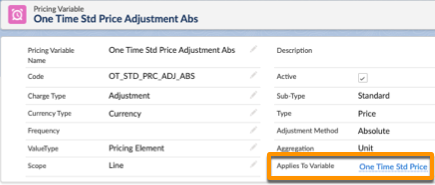
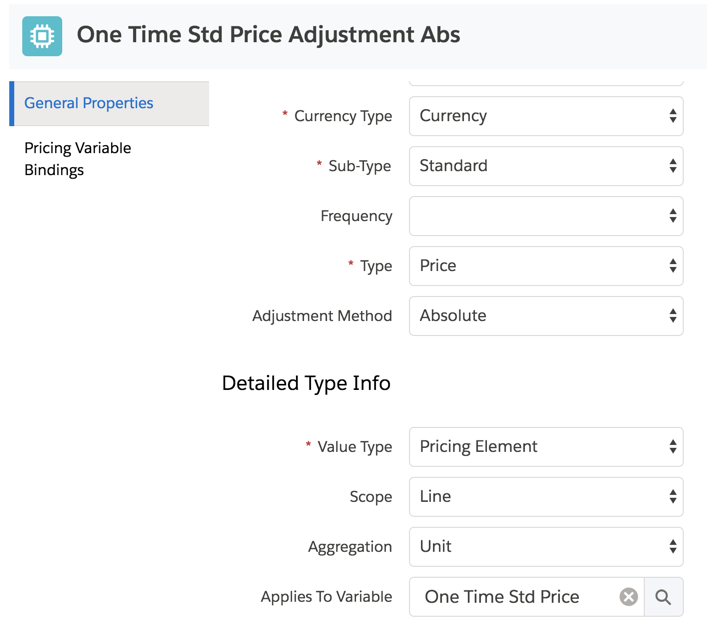
When you create a pricing element adjustment, you choose the pricing variable adjustment to use. For more information, see Create a Pricing Element Charge or Adjustment in the Pricing Designer.
- Create a Pricing Variable in Pricing Designer
Create a pricing variable and define the charge type, currency, frequency, and other settings. To create a price list entry, you choose a pricing variable to be part of the price. - Pricing Variable Bindings
The pricing variable binding associates the pricing variable to a field on the line item of the order, quote, or contract, or to the asset.
