
You are here:
Product Selling Period Definition in EPC
You set the product selling period fields in the product dialog or in the General Properties facet for products in Vlocity Product Console. This sets when products are available for sale to customers.
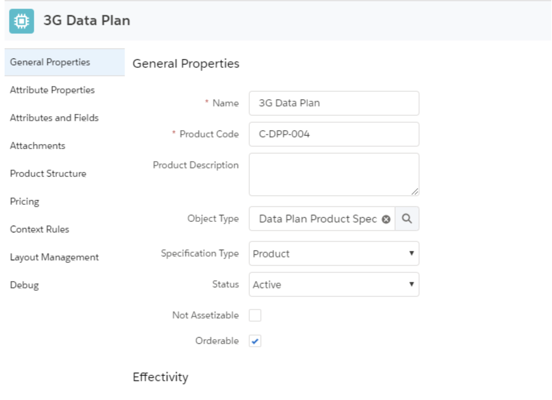
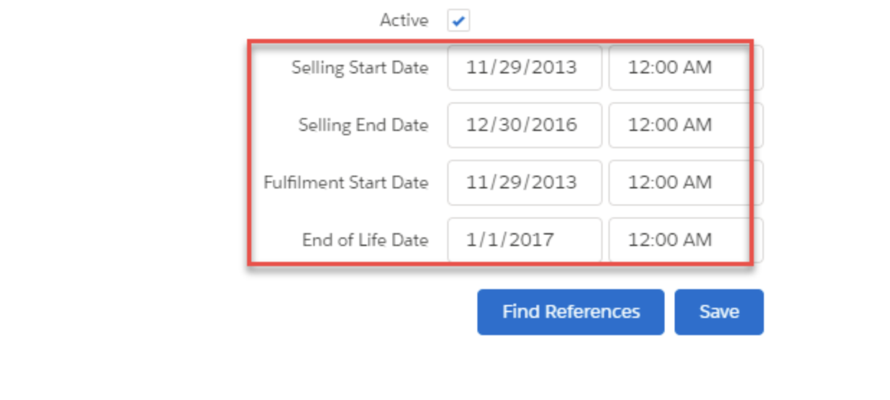
You can specify a date and time for each field. If no time is specified, it defaults to 12:00 AM. Alternatively, you can leave the date or time blank, implying that the product is available indefinitely. However, the following rule must always hold true:
SellingStartDate <= FulfillmentStartDate <= SellingEndDate <= EndOfLifeDate
The Product Console validates all entered dates and times using this rule and will not allow you to save products until the dates are set correctly.
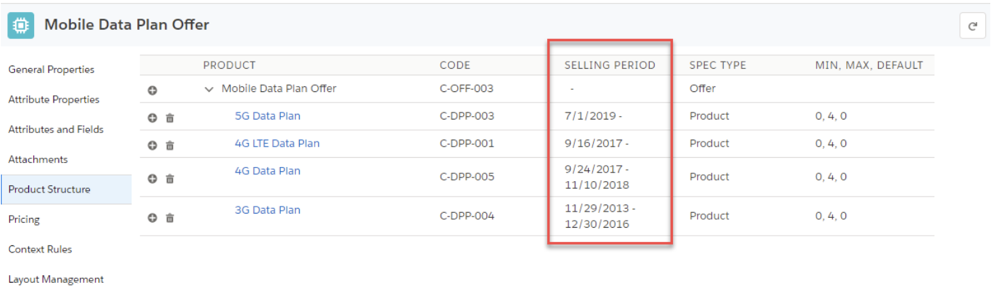
When a product is used in bundles, administrators must ensure that the selling periods of parent and child products are consistent. Specifically:
- Child Product's Selling End Date cannot be past the Parent Product's Selling End Date.
- If the Parent Product's Selling End Date has passed and the Child Product's Selling End Date is not configured, this configuration is not recommended and may result in unexpected behavior.
To assist administrators in managing these relationships, the Vlocity Product Console displays the Selling Period dates in the Product Structure facet. After you make changes to the product selling period fields, you must update the product hierarchy data in the platform cache by running Product Hierarchy Maintenance, Clear Managed Platform Cache, and Refresh Pricebook in this sequence
In the Vlocity Product Console, you can use the Find References button to find references to a given product in active promotions, product bundles, assets, quote line items, order line items and opportunity line items. This button assists administrators in determining the effect of changing product selling period and end of life dates. For more information, see Finding Product References in the Shared Catalog.

