You are here:
Promotions that Apply to Products in the Cart
When you create a promotion that applies to products in the cart, the promotion must be directly related to the product currently in the cart. If a bundle or single product currently in the cart has been used in a promotion, when you add the promotion to the cart, its promotional pricing applies to the bundle or the single product in the cart.
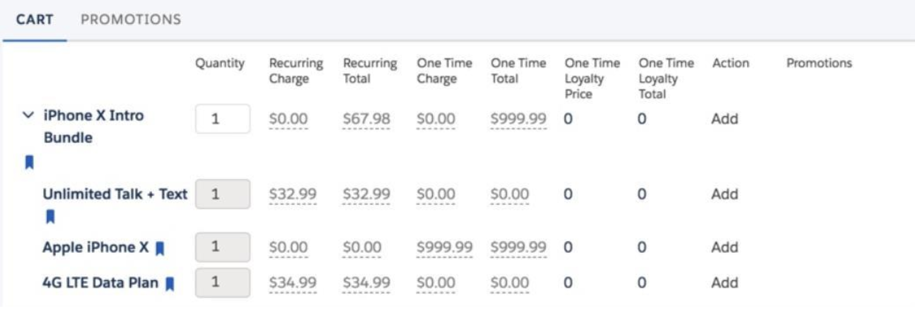
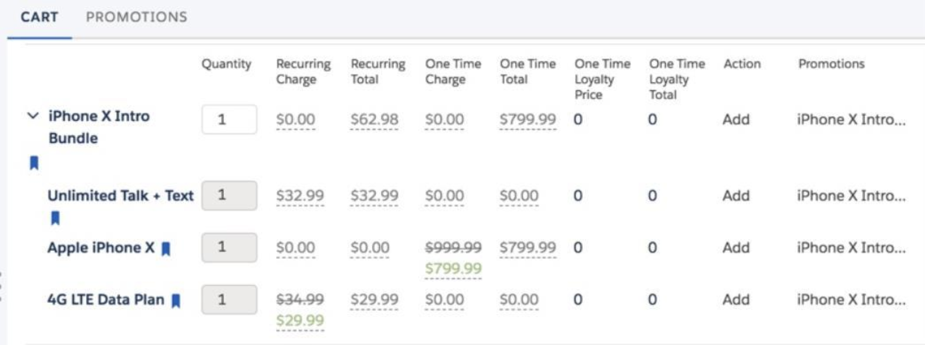
For example, you can create an iPhone X promotion that discounts the iPhone X by taking $200 off the original price. If the iPhone X has been added to the cart, when you add the iPhone X promotion, Vlocity CME applies the discount and the name of the promotion appears in the Promotions column next to the product line item.
Or you can create a promotion by adding a product bundle to the promotion, and discounting the products in the bundle. If the same product bundle you used for the promotion is in the cart, when you add the promotion, it applies the promotional discounts to the product bundle. The name of the promotion appears in the Promotions column next to the product line items.