You are here:
Rule Variables
Rule Variables can hold information passed to them by Entity Filters. You define a Rule Variable in a Rule and refer to it from the associated Entity Filter. You must create a Rule before you can create a Rule Variable.
Variables use the syntax {!$Variable.variableName}, where variableName is the name of the Rule Variable.
The Rule Variable includes the following fields:
-
Variable Name specifies the variable name, which you will refer to in the Entity Filter conditions using the format {!$Variable.variableName}.
-
Rule is a lookup to the associated Rule. Salesforce automatically populates the Rule field.
-
Type specifies the variable type:
-
If the variable has a single value, select sObject, String, or Id.
-
If the variable has more than one value, select List <sObject>, List <String>, or List <Id>.
-
-
Object Path is a comma-delimited value describing the path to the list of objects to use to populate the variable.
For example, if the object path is
AccountId,vlocity_cmt__AccountOffer__c,vlocity_cmt__AccountId__cthen,
AccountIddefines the field holding the header object ID.vlocity_cmt__AccountOffer__cdefines the related list object API object name.vlocity_cmt__AccountId__cdefines the lookup field from the related list object to the header object.
-
Entity Filter is a lookup to the Entity Filter used to qualify the objects that populate the variable.
-
Field Name to Assign specifies the object field used to populate the variable.
Suppose that you want to identify offers that a customer has rejected in the past year. You must check each Product against the Account Offers that a customer has rejected. This means you must check the vlocity_cmt__ProductId__c field. When you do that, you must store the Product IDs in a list to compare them. In the Rule Variable, you specify the path from the Product to the Account Offer using the Object Path field.
- Field Name to Assign:
vlocity_cmt__ProductId__c(custom field onvlocity_cmt__AccountOffer__c) -
Object Path:
AccountId,vlocity_cmt__AccountOffer__c,vlocity_cmt__AccountId__c(describes the path from the Opportunity object related list to the Account.) - Type: String
This example translates to the following SoQL query:
SELECT vlocity_cmt__ProductId__c FROM vlocity_cmt__AccountOffer__c WHERE vlocity_cmt__AccountId__c = <AccountId>This rule variable is providing the select portion of the entity filter, which itself acts as a where clause in a query.
Creating a Rule Variable
To create a Rule Variable:
- Create the Rule. For more information, see Go to Vlocity Rule Builder.
- After you save the rule, on the Vlocity Rule page, scroll down to the Rule Variables related list.
- Click New Rule Variable.
-
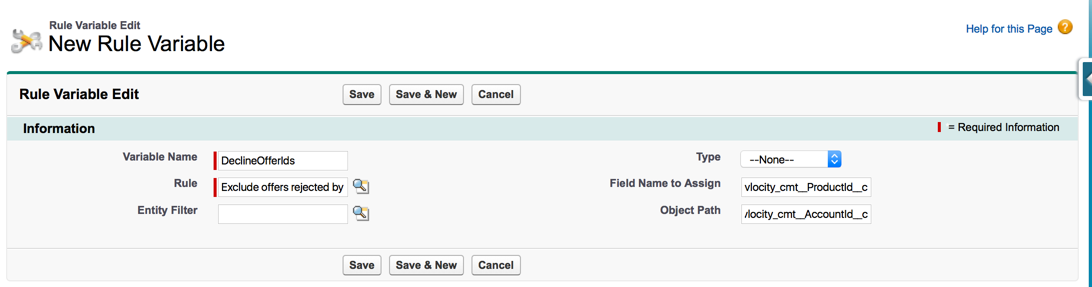
Enter the following information:
-
Variable Name: for example, DeclineOfferIds.
-
Entity Filter is a lookup to the Entity Filter associated with this variable, if that filter has been created.
-
Type specifies the variable type—
sObject,String,Id,List<sObject>,List<String>, orList<ID>. -
Field Name to Assign specifies the object field that populates the variable, for example
vlocity_cmt__ProductId__c. -
Object Path specifies the path from the parent object to the queried object, for example,
AccountId,vlocity_cmt__AccountOffer__c,vlocity_cmt__AccountId__c.
 Note
NoteSalesforce automatically enters the associated Rule name, for example, Exclude offers rejected by customers.
-
- Click Save.