
You are here:
Rules for Industries CPQ
Salesforce provides an Industries Configure, Price, Quote (CPQ) rules framework. Rules are associations of entity filters and actions. Entity filters evaluate objects for specific conditions. Rules execute actions on qualified objects.
A defined rule applies to an object, such as an Opportunity, Order, or a Quote. Rules are run based on the implementation that the interface calls. Rules can operate on any object, but they are usually used on CPQ objects. The Vlocity open interface implementations invoke the rules that you specify in flow steps.
A rule often includes an entity filter, which filters the objects on which to run. Each rule includes a rule action, which defines what the rule does. For every rule, the rule action is different. Rules can use entity filters to define what the rule is, how it’s used, and what it does.

Some examples of rules include:
-
Some products are not available to customers in Alaska and Hawaii.
-
Only high-value customers are eligible for a specific promotion.
-
If a customer orders high-speed Internet service, automatically add the hardware necessary to support that service.
-
If a customer orders 10 or more of a specific product, reduce the price for each product.
Rule processing occurs in the following sequence, using pricing as an example:
-
The interface calls an implementation.
-
The implementation specifies that a rule is applied to the order.
-
(Optional) The entity filter qualifies line items.
-
The rule action is applied to the qualified line items. For auto add rule action to work, the base product on which the action is applied should already be present in the cart.
-
The applied rule action changes the order.
-
More rules may run in a defined sequence to result in appropriate order pricing.
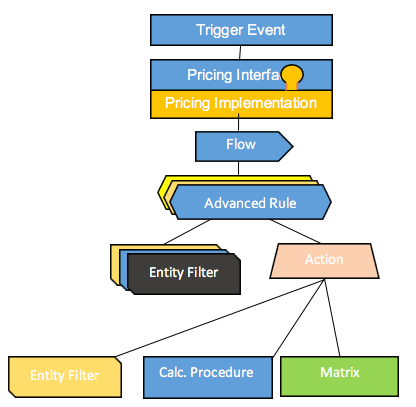
Rules execute with system, or org, privileges, and not those of the user triggering them. For example, a user who has no rights to see the customer class level can run rules that are based on the customer class level. If a rule must exclude certain products or pricing based on a user profile, the profile check must be a part of the rule itself.
- Rule Levels and Types
There are two Rules levels: Header-level Rules, and Item-level Rules. There are four Rule types: Availability, Eligibility, Compatibility, and Pricing. - Rule Objects
A Rule object is a header object with three related objects: Rule Filter, Rule Action, and Rule Variable. - Entity Filters
Each rule may have an entity filter, which filters out the orders on which to run, and a rule action, which defines what the rule does. Therefore, entity filters are also called rule action filters or rule filters. Rules use entity filters to determine which items in an order are subject to the rule action. Rules can contain one filter or many filters, depending on the business logic that the rule implements. Filters are reusable. For example, as part of a promotion, you might create a filter to identify premises where the service activation date is 45 days or less. After a filter is created, it's available for use in any rule that requires it. - Create a Rule Action Entity Filter
Entity filters filter the orders on which to run. An entity filter consists of one or more conditions that are based on fields or attributes. Entity filters apply those conditions to objects.
