You are here:
Apex CPU Time Limit Exceeded Error in Industries Order Management
When submitting an order, if you get an error saying Apex CPU time limit
exceeded, the most likely cause is that the LoggingEnabled custom setting is set to true. To resolve the problem, set LoggingEnabled to false.
The LoggingEnabled setting uses more processing power than is necessary for day-to-day operations. Support occasionally requests that customers turn it on for debugging, but otherwise, it's best to leave it off.
To set the LoggingEnabled custom setting to false, follow these steps:
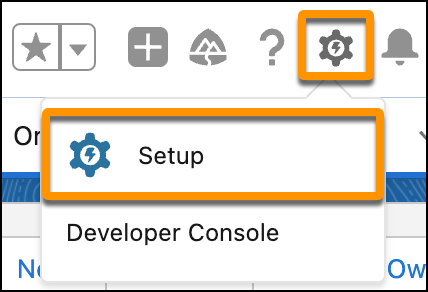
- In the Quick Find box of Lightning environment Setup, enter Custom Settings, then click Custom Settings.
-
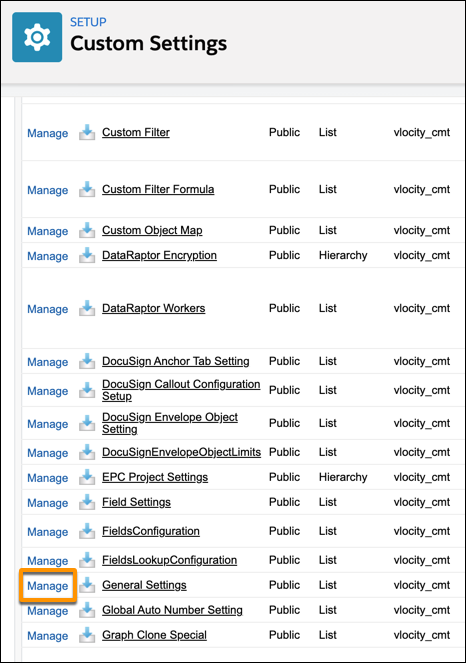
Find General Settings
and click the Manage link
next to it.
If General Settings isn't available, add a new entry under Custom Settings.
- In the Custom Settings, click New.
- In the Custom Settings Definition, add General Settings in the Label field and GeneralSettings in the Object Name field.
- Click Save.
-
Click the Edit link
next to
LoggingEnabled.
If LoggingEnabled setting isn't available, add a new entry under General Settings.
- In the General Settings, click New.
- In the Data Type, select Text.
- In the New Custom Field, add LoggingEnabled in the Field Label field and 8 in Length field.
- Click Next.
- Click Save.
-
Replace the text in the
Value field with the word
false and click
Save.
Logging is now disabled, and OM requires less processing, which reduces the likelihood of receiving the Apex CPU time limit exceeded error when you submit an order.