You are here:
Business Processes for Enterprise Sales Management (Managed Package)
Enterprise Sales Management supports business processes that a telecommunications sales team uses to acquire new customers, present available offers, and configure offers.
 This feature is part of the Communications Cloud managed package.
-
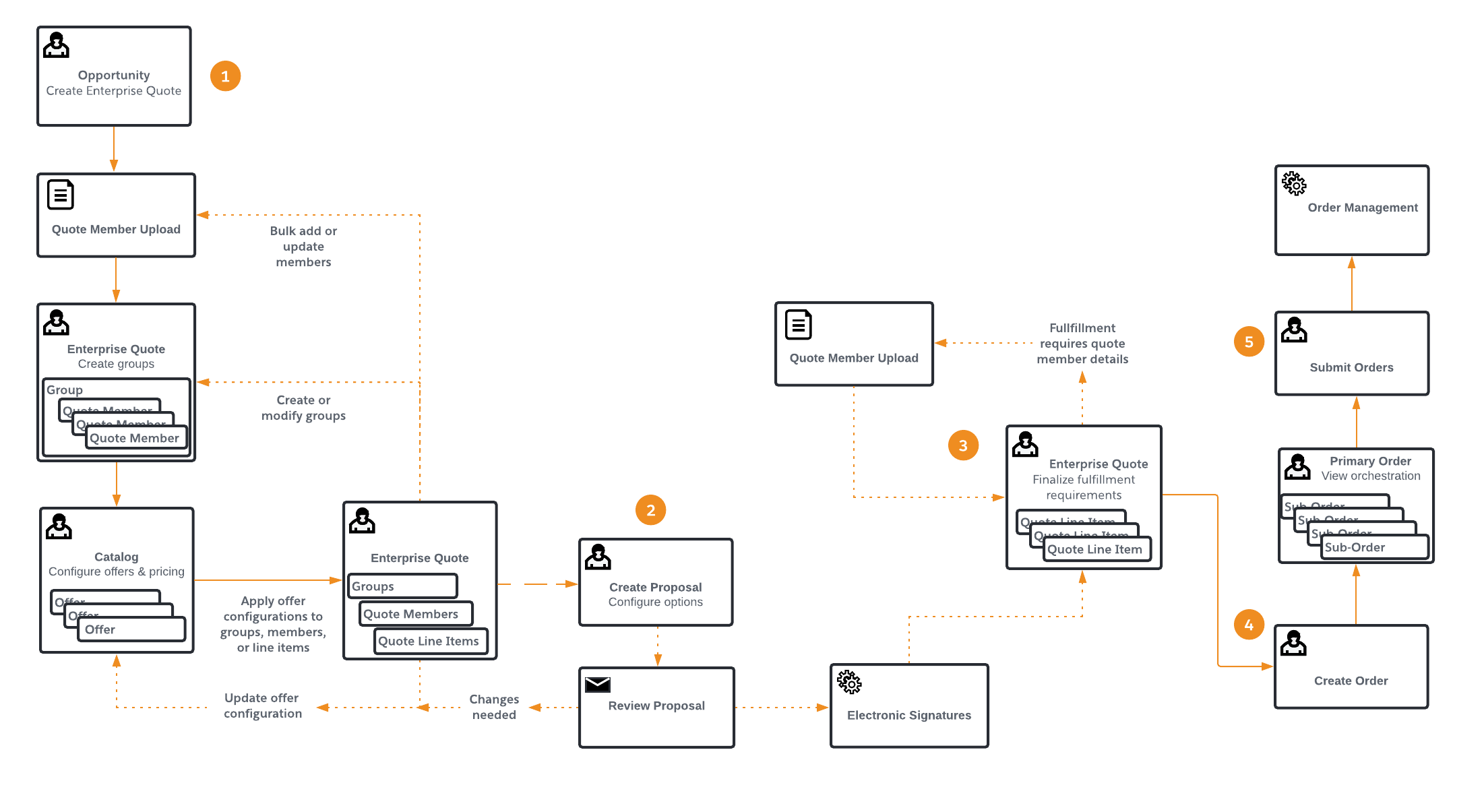
Create a sales opportunity. Negotiate with customers, review prices, and apply discounts and pricing overrides.
-
Use templates to prepare proposal documents for customers, which can include marketing material. (This requires Contract Lifecycle Management.)
-
Create a quote along with quote line items, finalize, and move to the order stage.
-
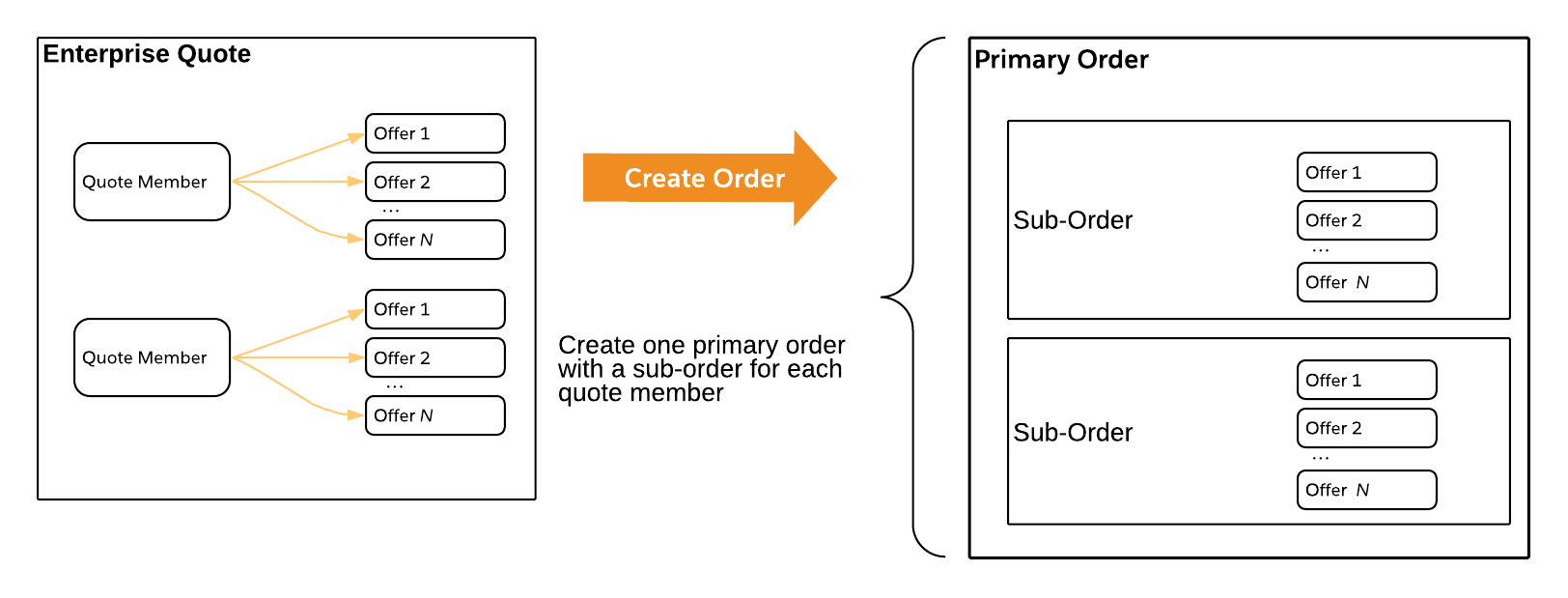
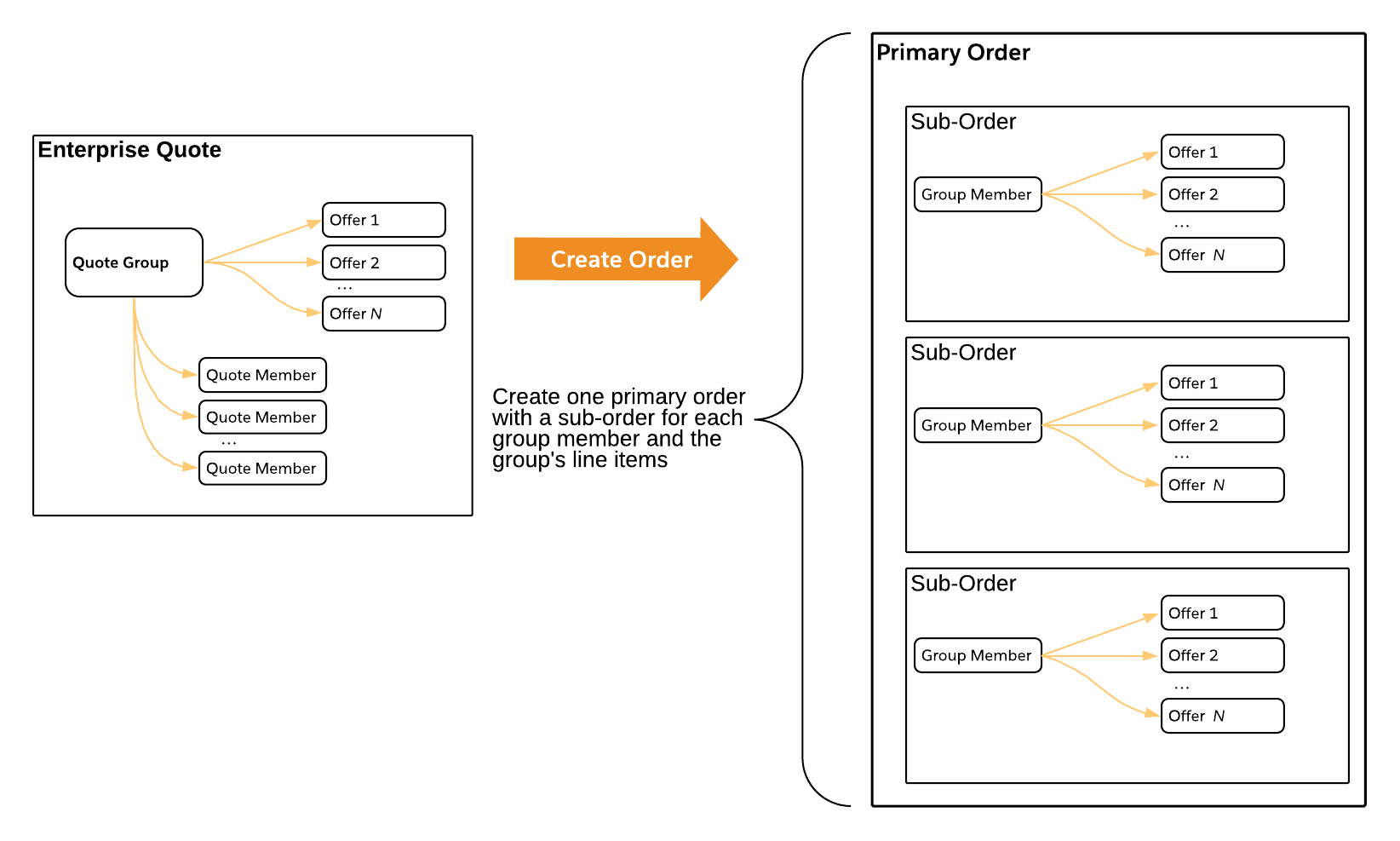
Create a primary order and sub-orders with all the offers configured for each member. A service account is created for each member of the order or for each member of the group, if the order is for a group. A service account is created if it doesn't already exist. If the quote is created without any service members, then no service account is created.
-
Submit the sub-orders using either Industries CPQ or Industries Order Management. The appropriate processes are used for decomposing and orchestrating an order, creating assets, and associating assets to a contract.
- Quote Negotiation for Enterprise Sales Management
You can prepare an enterprise quote and use it to negotiate with customers. - Proposal Development for Enterprise Sales Management
You can generate proposal documents based on an enterprise quote's offer configuration, pricing, and the account's discount scheme and contract term. - Order Creation for Enterprise Sales Management
Order creation transforms an enterprise quote to a primary order with sub-orders in a structure that is based on your offer configurations. Then, the order submission process passes those orders and sub-orders to the order manager for decomposition and orchestration. - Order Submission for Enterprise Sales Management
When you submit an order created by Enterprise Sales Management the corresponding sub-orders are passed to the order management process for decomposition and orchestration. Enterprise Sales Management product models specify order decomposition and orchestration associated with specific offers.
Quote Negotiation for Enterprise Sales Management
You can prepare an enterprise quote and use it to negotiate with customers.
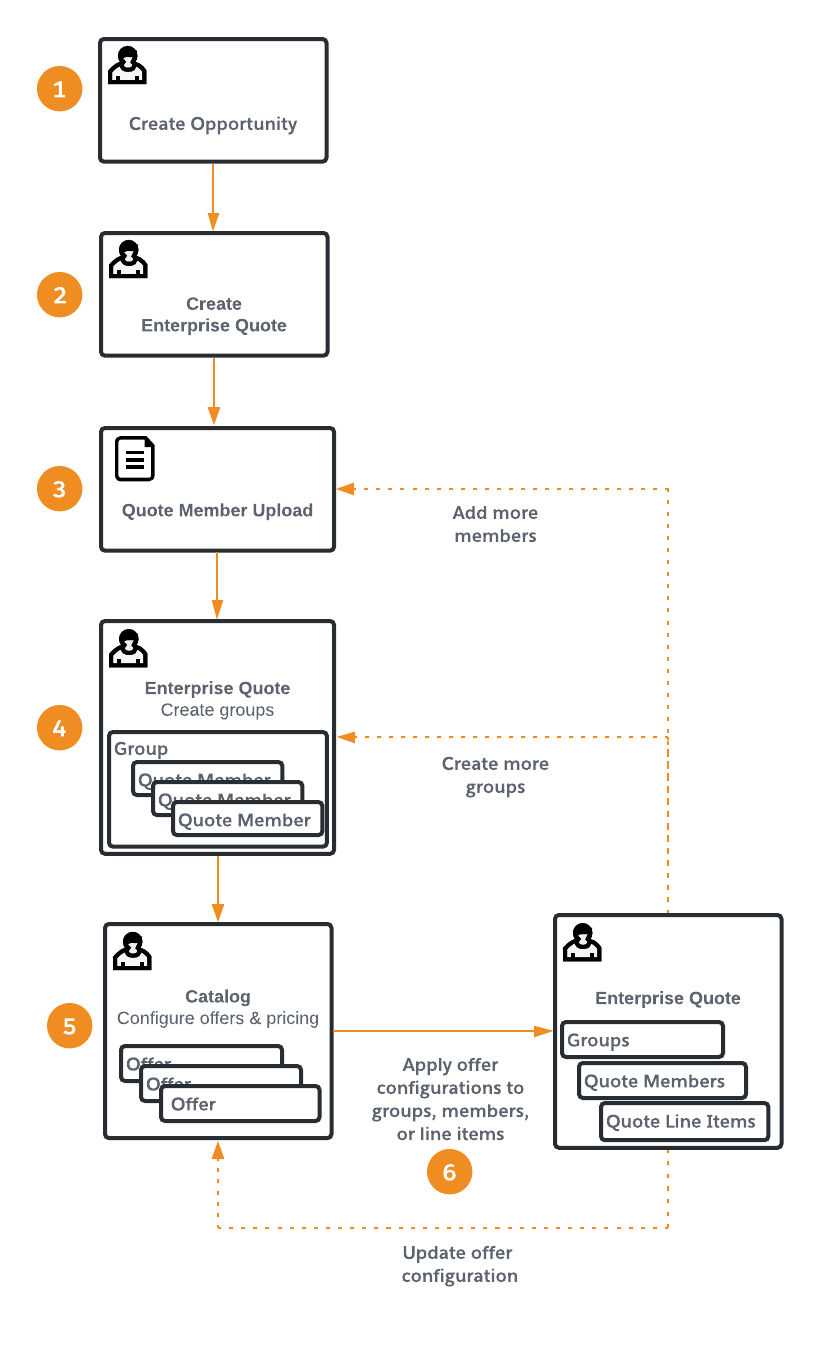
While negotiating contract terms and prices with your customers, sales teams will typically perform the following iterative steps:
-
Create an opportunity for the customer account.
-
Create an enterprise quote.
-
(Optional) Upload a list of locations or subscribers.
-
(Optional) Create groups. You can upload quote members, create groups, and edit quote members at any point before submitting the order.
-
Select and configure offers.
-
(Optional) Apply offers to groups, individual quote members, or quote line items that are not associated with any groups or members.
The sequence indicated here can vary. For example, you could select and configure offers even before you upload locations or subscribers.

You can optionally negotiate a frame agreement with a customer and use Vlocity Pricing Console to adjust a contract-based discount, which is used as the basis for multiple orders over time. You can adjust the duration of the frame agreement, the date range when it is effective, the negotiated discount, the price list that it applies to, and add any context rules.
Continue to Proposal Development for Enterprise Sales Management.
Proposal Development for Enterprise Sales Management
You can generate proposal documents based on an enterprise quote's offer configuration, pricing, and the account's discount scheme and contract term.
Once you create your enterprise quote and complete the Quote NegotiationQuote Negotiation for Enterprise Sales Management business process, use Contract Lifecycle Management (CLM) templates to automatically generate proposal documents. Proposals can include marketing material specific to the quote.
Each proposal record can have its own lifecycle if you need to iterate through the negotiation, proposal, contract, approval, and signature steps.
-
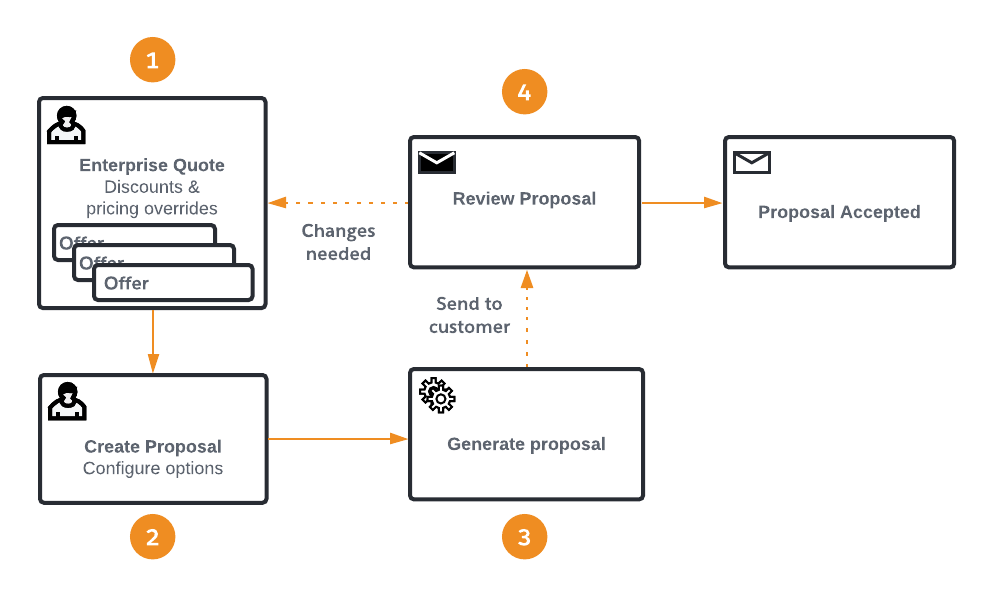
Apply discounts and any pricing overrides in each offer configuration of the enterprise quote.
-
Create a proposal from the enterprise quote and configure its options.
-
Generate proposal documents and send them to the customer for review.
-
Obtain pricing approvals or apply any needed changes to the enterprise quote and its offer configuration until approved.
Continue to Order Creation for Enterprise Sales Management.
Order Creation for Enterprise Sales Management
Order creation transforms an enterprise quote to a primary order with sub-orders in a structure that is based on your offer configurations. Then, the order submission process passes those orders and sub-orders to the order manager for decomposition and orchestration.
When your enterprise quote satisfies the order fulfillment requirements, including technical product, billing, and shipping requirements, you can create your order.
-
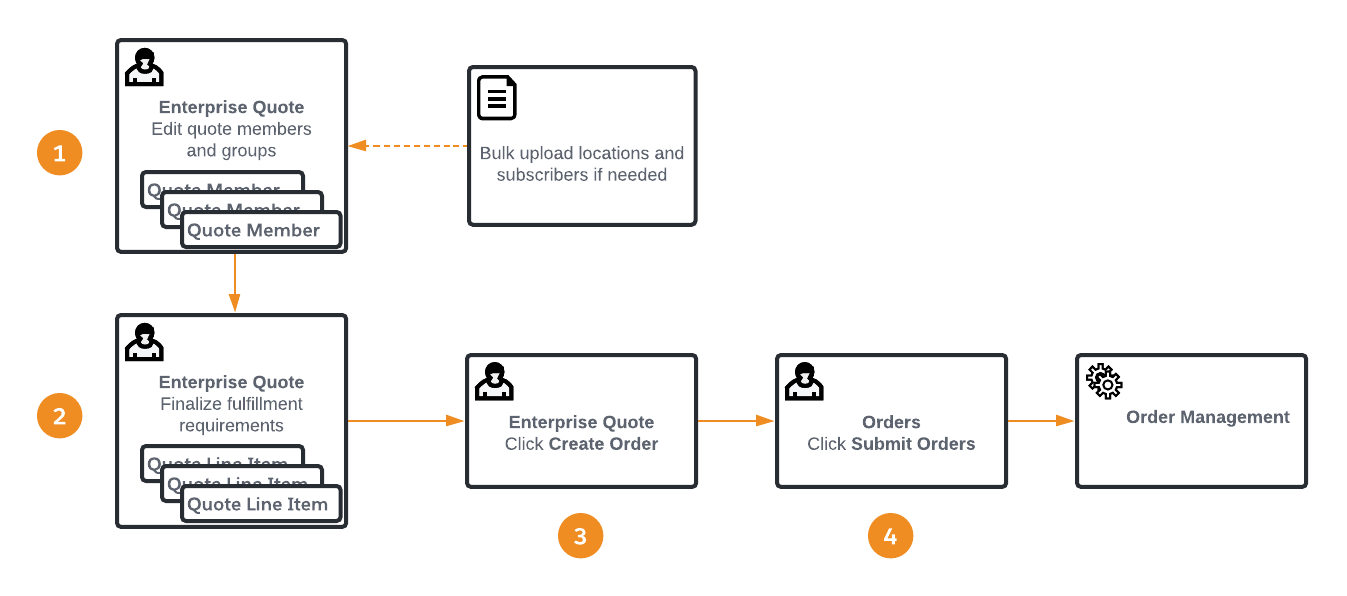
Adjust quote line items to satisfy any detailed order fulfillment requirements. This is sometimes done by a separate fulfillment team.
 Note
NoteEnterprise Sales Management allows you to continue to select and configure offers and apply discounts and pricing overrides. If you make any changes that do not conform with the signed contracts, return to Quote Negotiation for Enterprise Sales Management.
-
Create the order.
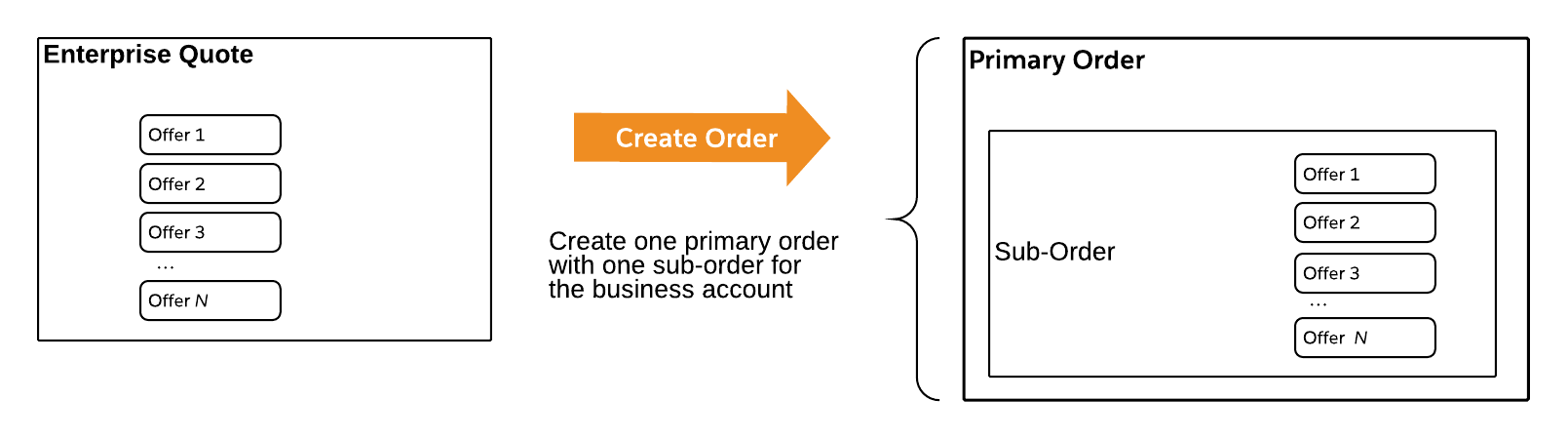
When you click Create Final Orders, the primary order is created along with the required sub-orders for each quote member. If the enterprise quote includes offer configurations that are not associated with any groups or quote members, one sub-order is created and assigned to the business account.
Continue to Order Submission for Enterprise Sales Management.
Order Submission for Enterprise Sales Management
When you submit an order created by Enterprise Sales Management the corresponding sub-orders are passed to the order management process for decomposition and orchestration. Enterprise Sales Management product models specify order decomposition and orchestration associated with specific offers.
This solution uses CPQ and Order Management Standard and includes decomposition and orchestration plans, including product assetization. You must add the order management configuration and flows specific to your business processes.
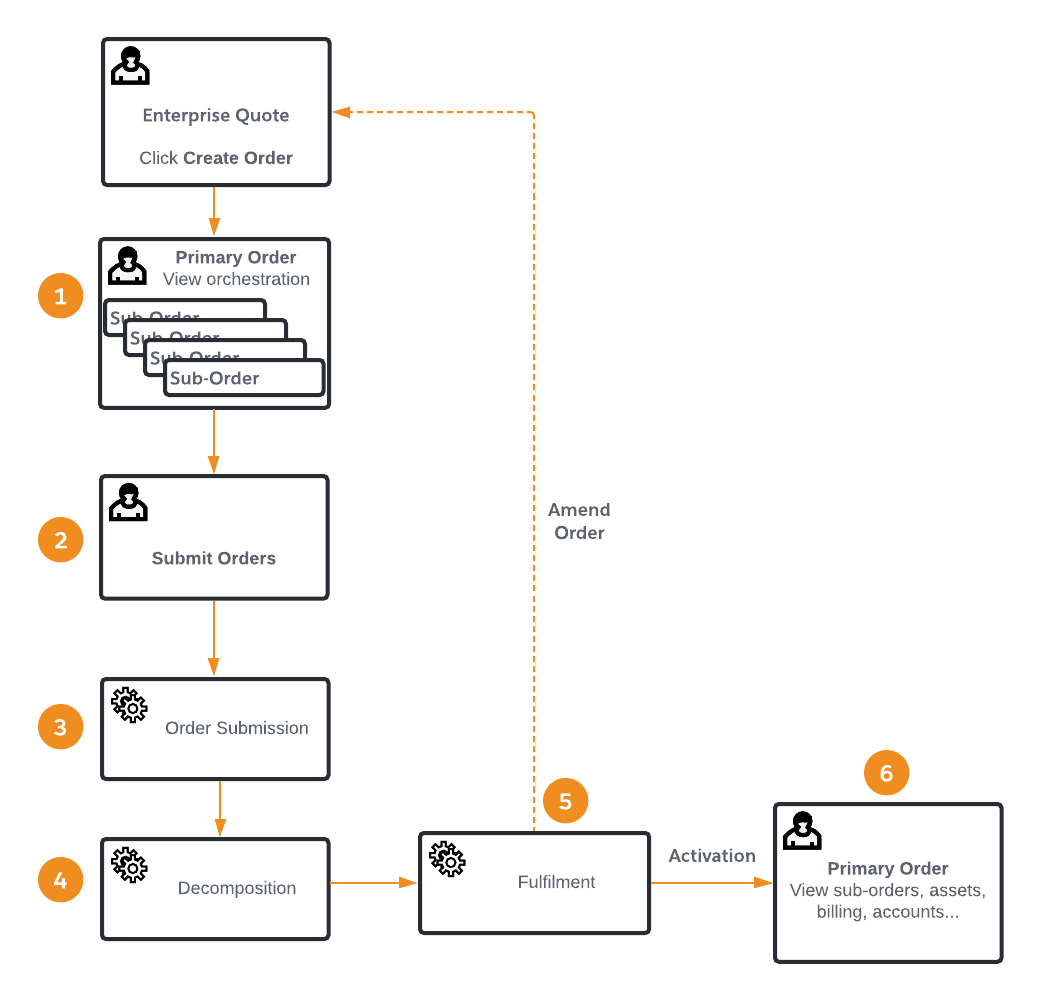
When you click Submit Orders:
-
Sub-orders are submitted to the specified order manager, either CPQ or Industries Order Management and the corresponding assets are created.
-
Service accounts are created for each quote member if they don't already exist and a service account is associated with the each sub-order.
-
The primary order provides aggregate visibility into the collection of individual sub-orders.
Enterprise quotes support flexible offer configurations that can be linked to individual quote members (locations or subscribers) or groups of quote members. You can also configure offers that are not linked to any groups or individual members. Depending on your enterprise quote's offer configuration, Enterprise Sales Management creates a primary order with one or more of the following sub-order scenarios: