Loading
Feature degradation | Gmail Email delivery failureRead More
Industries Order Management
Table of Contents
Select Filters

          No results
          No results
          Here are some search tips

          Check the spelling of your keywords.
          Use more general search terms.
          Select fewer filters to broaden your search.

          Search all of Salesforce Help
          Configure a Callout to Send Empty Attribute Values

          Configure a Callout to Send Empty Attribute Values

          By default, if an attribute value is empty, then Order Management doesn't send the attribute at all in a callout. It's as if it didn't exist. You can configure a callout to send along attributes and their values, even if those values are empty.

          Note
          Note

          This feature was introduced in Spring '21. If you're using a version older than that, then empty attribute values aren't passed.

          To configure a callout to send empty attribute values, follow these steps:

          1. If you're creating a new callout, then move on to step two.

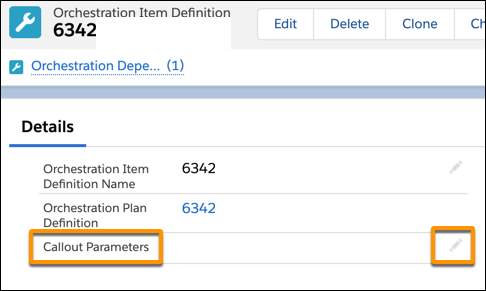
            Otherwise, in the Details section of the Orchestration Item Definition window for an existing callout, click the pencil icon to the right of Callout Parameters.

            The Orchestration Item Definition page, with Callout Parameters highlighted.
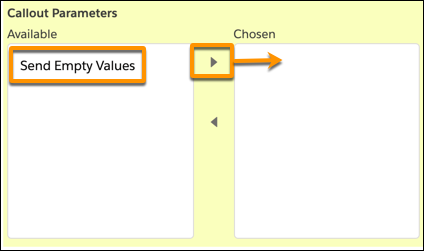
          2. From the Callout Parameters window, click Send Empty Values, then click the arrow to move "Send Empty Values" from the Available box to the Chosen box.
            The Callout Parameters box, with Send Empty Values highlighted.
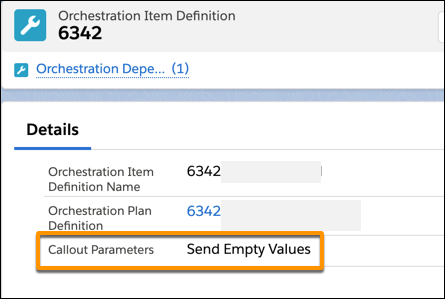
          3. Click Save to save your change. The Orchestration Item Definition window shows that the item is configured to send empty attribute values.
            The Orchestration Item Definition window, with Callout Parameters highlighted, showing "Send Empty Values."

          Orchestration items based on that definition will pass on all attributes, even if the attribute values are empty.

           
          Loading
          Salesforce Help | Article