You are here:
Configure Automatic Order-Submit Queuing
When orders are submitted from CPQ to Order Management Plus, they are placed in a persistent queue. If Order Management Plus is down or a catalog synchronization is in progress, the order is held in the queue until communication is restored.
After communication is restored, the order is then processed for fulfillment. Manual intervention is not required when attempting to submit orders to the system.
To configure automatic order-submit queuing, follow these steps:
- Click Setup.
- In the Quick Find / Search box, type Custom Settings.
- From the search results, click Custom Settings. The Custom Settings page appears.
- Beside XOMSetup, click Manage.
- Click OMPLSubmitMode.
- Configure the following XOMSetup settings:
OMPLSubmitMode:
Synchronous: If order submission fails, you must manually find the order and re-submit it to Order Management Plus when connectivity is restored.
Queueing: If order submission fails, the order is held in a persistent queue and re-submitted to Order Management Plus for processing when connectivity is restored.
OMPLCatalogSyncEventBatchSize: Batch size of catalog-sync event in terms of how many SyncDeltaObject__c objects are submitted to Order Management Plus in each payload. The default is 10.
OMPLSubmitQueueMaxLength: Maximum number of orders to place in the queue. Once this number is reached, the Order Submit operation does not place any more orders in the queue and informs you that submit has failed. The default is 1000.
OMPLStatus: Status of the Order Management Plus interface, such as Operational or Non operational.
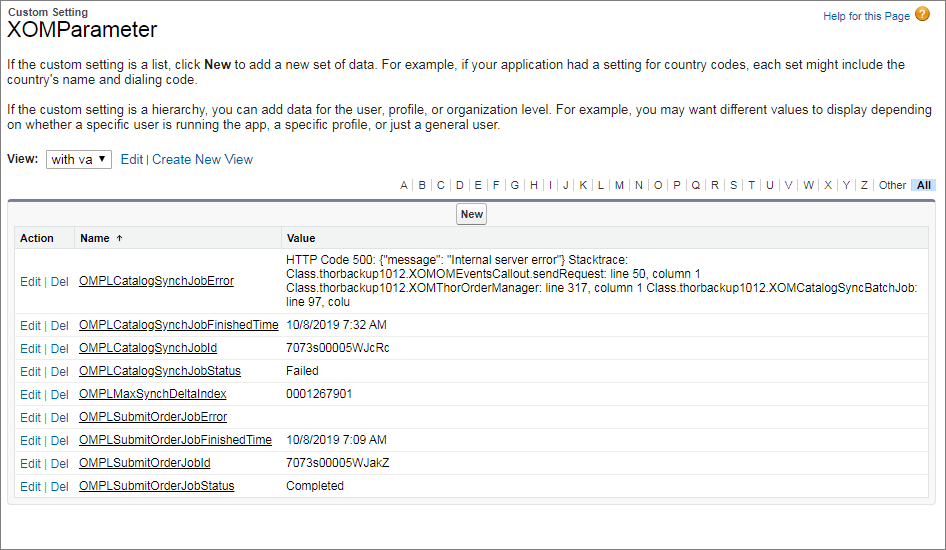
- From the Custom Settings page, click Manage beside XOMParameter. Order Management parameters relate to background jobs. The XOMParameter custom setting object saves Order Management Plus statuses, catalog index, and job statuses in the custom settings cache.
- Click Edit to change the value of any of the following XOM parameters:
OMPLMaxSynchDeltaIndex
OMPLCatalogSynchJobId
OMPLCatalogSynchJobError
OMPLCatalogSynchJobFinishedTime
OMPLSubmitOrderJobId
OMPLSubmitOrderJobStatus
OMPLSubmitOrderJobError
OMPLSubmitOrderJobFinishedTime