
You are here:
Create a System Interface for Integration
The System Interface defines the endpoint for an API URL that points to an external system. For example, /activate or /reserve. When you create a callout, you point to the system interface.
Before You Begin, Create a system record. See Create a System Record for Industries Order Management
The final callout combines the URL you put in the System record with the endpoint that you enter here in the System Interface record. For example, if you enter https://externalsystem.com in the System record, and /activate in the System Interface record, the callout is: https://externalsystem.com/activate
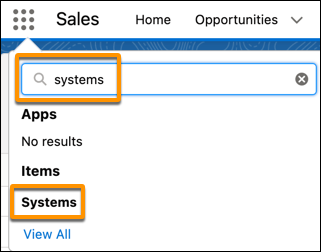
- Click the App Launcher:
- Start typing systems, then click Systems in the list of results.
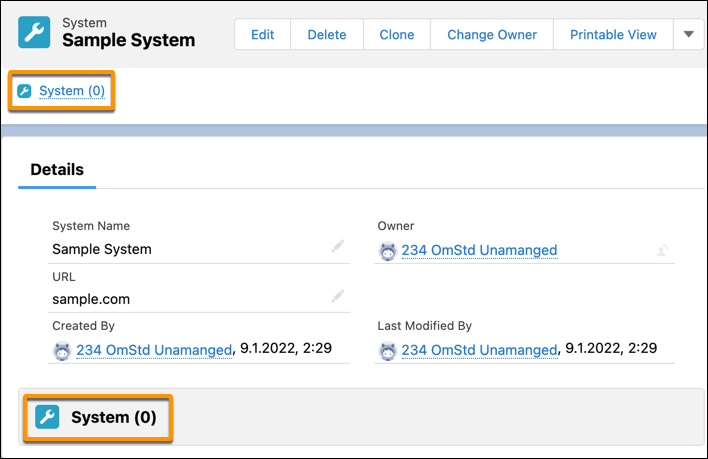
- On the System page, click either the System link at the top or bottom. The number in parentheses indicates how many system interfaces are associated with the system.
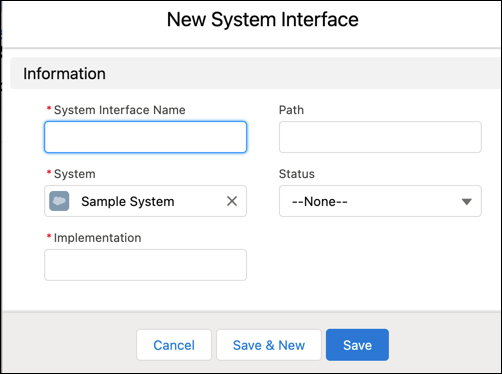
- Click New. The New System Interface window opens.
- Fill in the fields for the new System Interface.
- Click Save.


The System Interface is ready to be used in a callout.
Did this article solve your issue?
Let us know so we can improve!
