
You are here:
Custom Asynchronous Callouts
Configure a callout that waits for a response from a third-party application.
Industries Order Management commonly integrates with third-party systems by using asynchronous messaging where immediate responses from the third-party system aren't expected. For instance, third-party systems that interact with people or require any form of manual activities can take a long period of time to complete the original request made by Order Management. For example, an integration scenario may look as follows:
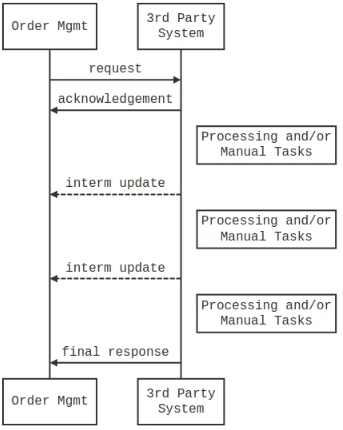
In the above scenario, the interim updates and final response may arrive hours, days, or even weeks after the initial request was submitted by the order management system. To configure an asynchronous callout, you can use the default implementation (XOMAsyncSystemInterface) that is provided when configuring the System Interface.
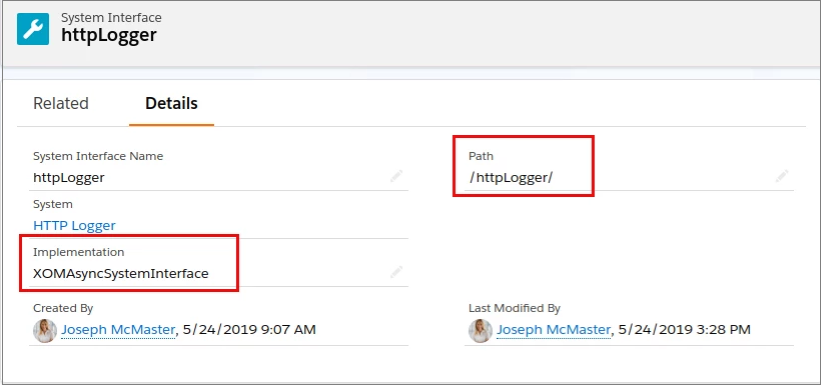
Example – Integration Procedure Asynchronous Callout
In the same way you called an Integration Procedure in synchronous mode from a Callout Task, you can also call an Integration Procedure in an asynchronous mode. For instance, you may use the Integration Procedure to make a request to an external system but expect one or more responses days or weeks later. Situations like this require an asynchronous interface and callback technique to update and complete the Orchestration Item.
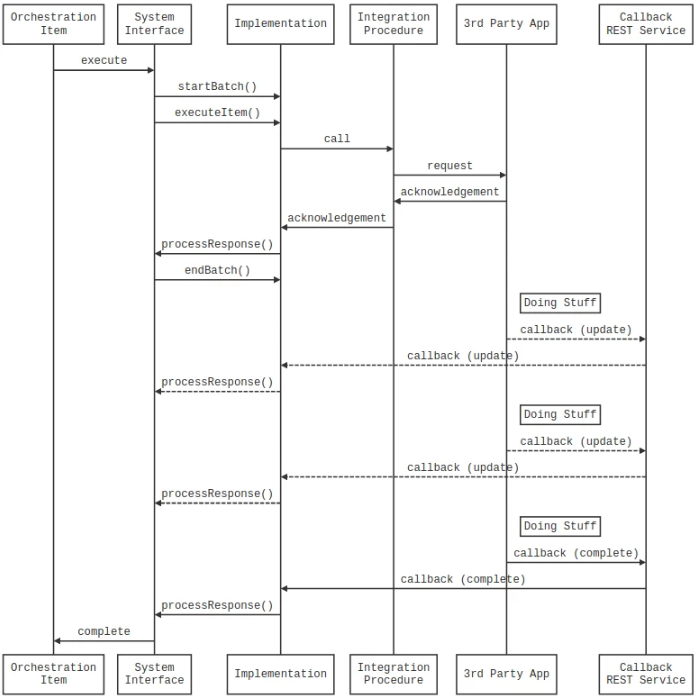
For the callbacks to work properly, the Callout Task Orchestration Item will send a unique callback URL that the third-party application can use to send any updates. The third-party system also needs to authenticate with Salesforce to make a successful callback.
The IntegrationProcedureAsyncSystemInterface.cls class extends the default XOM Asynchronous System Interface class used by Order Management to make an asynchronous callout using an Integration Procedure rather than a direct REST API Call. This class captures the IP response if there is one. The Orchestration Item is left in an Active state. The default callback handler sets the Orchestration Item to Completed. If you want different behavior, such as handling interim responses, then create your own callback handler and modify the callback URI sent in the request.
Import this Apex class into your org:
global class IntegrationProcedureAsyncSystemInterface extends vlocity_cmt.XOMAsyncSystemInterface {

   /**
    * Default Constructor
    */
   global IntegrationProcedureAsyncSystemInterface() {

       super();
   }
/**
    * This method is a part of the ISystemInterface. It is invoked at the start of the batch
    *
    * @param url   base URL the batch is started for
    * @param path  path this batch is started for
    */
   global override void startBatch(String url, String path) {}

   /**
    * Executes a Callout OrchestrationItem
    *
    * @param url   base URL to send the request to (in this class it is ignored)
    * @param path  path to send the request to (in this class it is interpreted as the Integration Procedure API Key)
    * @param item  OrchestrationItem that needs to be executed
    */
   global override void executeItem(String url, String path, vlocity_cmt__OrchestrationItem__c item) {

System.debug('JOE - Orchestration Item -> ' + JSON.serialize(item.getPopulatedFieldsAsMap()));

       // Get the Order SObject - the technique will differ depending on if this orchestration item is related to an Order Item or a Fulfillment Request Line
       Id orderId = null;
       if (item.vlocity_cmt__OrderItemId__c != null) orderId = item.vlocity_cmt__OrderItemId__r.OrderId;
       else {

           vlocity_cmt__OrchestrationItem__c orchItem = [SELECT vlocity_cmt__OrchestrationPlanId__r.vlocity_cmt__OrderId__r.Id FROM vlocity_cmt__OrchestrationItem__c WHERE Id = :item.Id];
           orderId = orchItem.vlocity_cmt__OrchestrationPlanId__r.vlocity_cmt__OrderId__r.Id;
       }
       vlocity_cmt.XOMOrderDomainObject orderObj = ((vlocity_cmt.XOMOrderService)vlocity_cmt.XOMObjectFactory.getService(Order.SObjectType)).getObject(orderId, true);

 // The Payload sent to the Integration Procedure is generated by an Optional Request DataRaptor configured on the Orchestration Item Definition
       // If no Request DataRaptor is provided it will default to something like this:
       //
       // {
       //   "responseUri" : "/services/apexrest/vlocity_cmt/asyncCallback/a2b1U000000kpOzQAI",
       //   "order_id" : "8011U000000tpvgQAA",
       //   "account_id" : "0011U00000RAyv0QAD",
       //   "order_items" : [ {
       //       "order_item_id" : "8021U0000029DzJQAU",
       //       "action" : "Add",
       //       "specified_by" : {
       //           "specification_id" : "01t1U000000rIocQAE",
       //           "specification_name" : "Test Product"
       //       },
       //       "described_by" : []
       //   } ]
       // }
       //
       Map<String, Object> ipInput   = (Map<String, Object>)JSON.deserializeUntyped(super.generatePayload(item, orderObj));
       Map<String, Object> ipOptions = new Map<String, Object>();

 // Add any extra information to the payload that might be useful and otherwise not available via the DataRaptors configured in the Callout
       ipInput.put('orchestration_item_id',   item.Id);
       ipInput.put('orchestration_item_name', item.Name);
       //ipInput.put('responseUri', 'your override value');   // Override the default callback URI if you have written your own callback handler

       // Call the Integration Procedure
       System.debug('JOE - Attempting to call Integration Procedure "' + path + '"');
       System.debug('JOE - IP Input -> ' + JSON.serialize(ipInput));
       Map<String, Object> ipOutput = (Map <String, Object>) vlocity_cmt.IntegrationProcedureService.runIntegrationService(path, ipInput, ipOptions);

       // process any response
       processResponse(item, ipInput, ipOutput);

 }

   /**
    * This method is called from executeItem to handle the response from the Integration Procedure.
    * By default it does nothing (but some logging), but it could be customized to do something more.
    *
    * @param item      The Orchestration Item
    * @param ipInput   The request sent to the Integration Procedure
    * @param ipOutput  The response from the Integration Procedure
    */
   global virtual void processResponse(vlocity_cmt__OrchestrationItem__c item, Map<String, Object> ipInput, Map<String, Object> ipOutput) {

       // Do nothing by default
       System.debug('JOE - IP Output -> ' + JSON.serialize(ipOutput));

       // For debugging, store the Request in the Orchestration Item SObject
       item.vlocity_cmt__Request__c = JSON.serialize(ipInput);
       item.vlocity_cmt__Response__c = JSON.serialize(ipOutput);
       update item;
   }

   /**
    * This method is called at the end of the batch
    *
    * @param url   base URL for the batch
    * @param path  path for the batch
    */
   global override void endBatch(String url, String path) {}

  /**
    * This method is called by the Callback service when a callback is received from an external system.
    *
    * NOTE! The default XOMAsyncResponseRESTService class will NOT call this method.  Instead it will call the super class
    *       method XOMAsyncSystemInterface.processResponseDeferred(), so do not expect anything you put into this method to
    *       be executed unless you create your own callback handler which explicitly creates and instance of this class and
    *       calls this method!
    *
    * @param item      OrchestrationItem that needs to be executed
    * @param url       base URL (XOMAsyncResponseRESTService sets this to null)
    * @param path      path to send the request to (XOMAsyncResponseRESTService sets this to null)
    * @param orderObj  The order Object related to this Orchestration Item
    * @param res       The Response object to process (XOMAsyncResponseRESTService only sets the body, no headers, etc.)
    *
    */
   global virtual override void processResponseDeferred(vlocity_cmt__OrchestrationItem__c item, String url, String path, vlocity_cmt.XOMOrderDomainObject orderObj, System.HttpResponse res) {

       // Customize this as needed if using your own callback handler
       super.processResponseDeferred(item, url, path, orderObj, res);
   }
}
Example – Custom REST Callback
In the previous example, you simply relied on the default XOMAsyncResponseRESTService class to handle the callback from a third-party application. If you are in a situation where you need to change the callback behavior, such as supporting interim updates, you may need to write your own Callback Service and use a slightly different callback URL.
Consider this example of a custom callback to complete an item and store it, rather than initializing the AsyncSystemInterface implementation to call the 'processResponseDeferred()' method to store the response.
item.Response__c = <>;
item.ExecutionLog__c = <>;
item.TimestampCompleted__c = <>;
item.LeadTimeCompleted__c = <>;
item.State__c = 'Completed;
update item;
