
You are here:
Decomposing Multiple Products to a Single Technical Product
Industries Order Management enables you to reuse the results of a particular decomposition, rather than re-instantiate the decomposition.
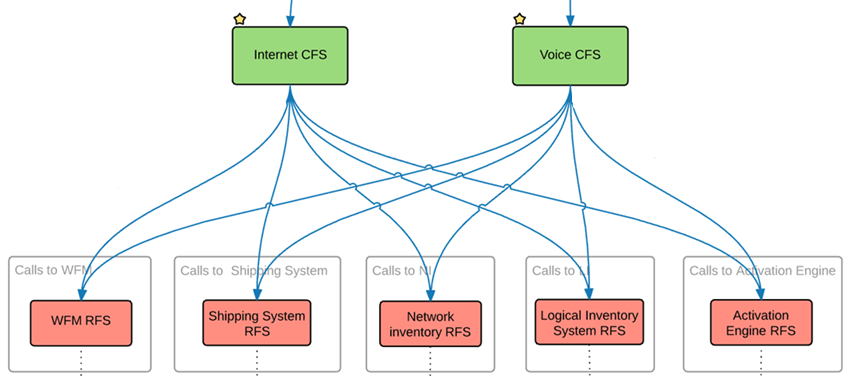
Multiple products that are on the same order can be decomposed to a single shared technical product to fulfill these products. For example, you may have Internet service and a Voice service that are provisioned similarly by sending requests to the same downstream systems. Even though there are two services, you can send one request to each system.
To do so, you can create a decomposition relationship where Internet CFS and Voice CFS decompose into a single RFS that is specific to a downstream system with a single fulfillment request for both products.
Attributes from both Internet CFS and Voice CFS combine into the single destination RFS.
If products in the order have an attribute with the same name, only one value of the last edited or added attribute passes to the FR.
M:1 Decomposition Modeling Example
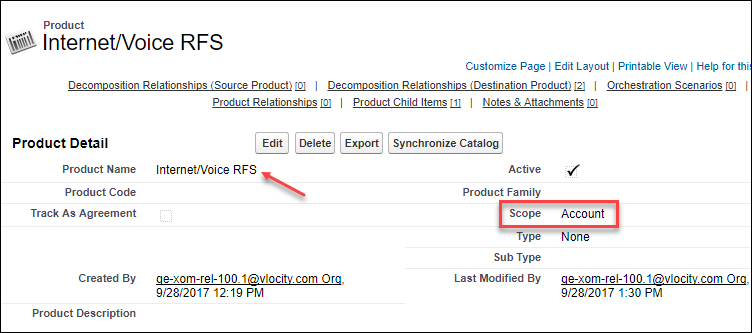
To generate a single fulfillment request, when configuring the shared RFS from the Products tab, you must set the value for the Scope field for your technical product to Account. (For information about the different technical product scopes, see Setting the Product Scope.)
If the Scope field does not appear in your environment, edit the page layout to add the field.
This example shows that two products on the same order are decomposed to a single fulfillment request:
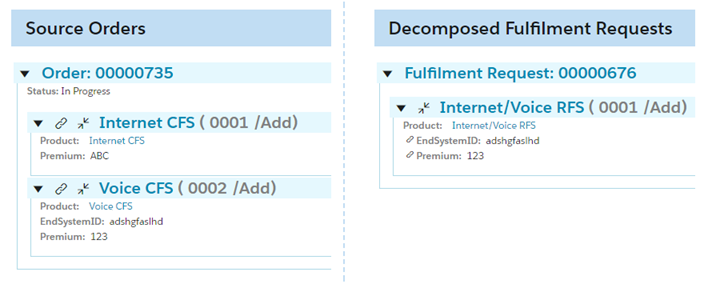
If you have set the value of the Scope field for your product to Order Item, then you would see in Decomposed Fulfillment Requests two Internet/Voice RFSs.

When designing a M:1 decomposition, you cannot create a multi-level M:1 decomposition. You cannot specify a commercial product from the first level and a technical product from the second level and aggregate those in a technical product in the third level. Instead, you can aggregate commercial products from the first level into technical products, either on the second or third levels.
- Setting the Product Scope
Order Management generates a number of Fulfillment Request Lines (FRL) for downstream order items as a result of the decomposition process. Sometimes there is a need to merge several instances of the same technical product into the same FRL on the downstream order item. - Account Scope
Setting the Scope for a technical product to Account creates a single instance of the technical product Fulfillment Request Line. Only one inventory item for the technical product exists for the given account. If there is another order requesting the same bundle, then the decomposition process generates a FRL based on the existing inventory item. - Order Item Scope
If Scope for the Technical product is set to Order Item, then the corresponding instances are merged within the following structure and the decomposition source takes a direct parent order item. - Relies On Scope
Setting the scope to Relies On results in a single technical product for all commercial items that rely on each other. - Configure Relies On Scope
Assign the Relies On scope to a technical product, then in an order, create an Order Product Relationship between the commercial products that decompose to that technical product. - Downstream Order Item Scope
Setting the Scope for a technical product to Downstream Order Item results in no merge of a technical product. - Top Order Item Scope
Setting the Scope to Top Order Item generates a single instance of the item for the specified Top (Root) Order Item. Supported in Order Management Standard only. - Order Scope
Setting the technical product scope to Order creates a single instance of the technical product (Fulfillment Request Line) per order. But, unlike the Account scope, for every subsequent order that requests the same bundle, one inventory item fulfillment request per technical product is created.
