
You are here:
Industries CPQ in LWC
For Winter '22 and later, Industries CPQ is available in a Lightning Web Components (LWC) interface. Open the Industries CPQ app from the Salesforce app launcher. The Cart for Industries CPQ has a new LWC layout. You can select Add Products to open the Cart in LWC from an order or quote from the Industries CPQ app or from another app, such as Sales. You can also open the Cart from the Assets tab for an account.
The new Lightning Web Components (LWC) interface offers improved usability and performance for Industries Configure, Price, and Quote. The new interface aligns with Salesforce's standards for LWC and offers more intuitive, consumer-like experiences. The LWC interface is more responsive than the Angular interface, and calls to backend APIs are optimized. These changes mean a better purchasing and sales experience for your clients and your sales representatives.
The Industries CPQ app is available from the app launcher.
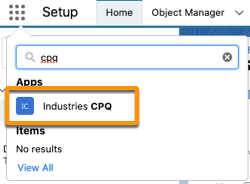
After you open Industries CPQ, the first tab is the title, and you can't interact with it.
Use the tab after the title to open the different Industries CPQ pages.
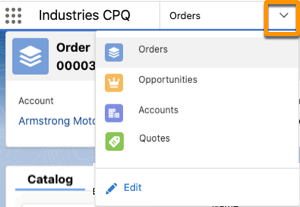
You can also open the Cart in LWC from an order or quote in another app, such as Sales, or from the Assets view. See Open the Industries CPQ Cart in LWC.
The Cart for Industries CPQ has a new layout that uses LWC.
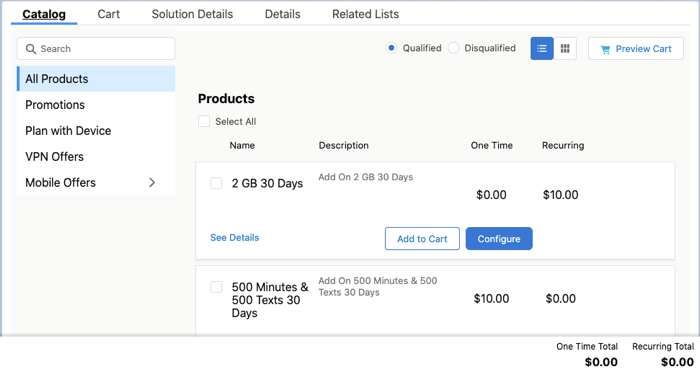
The Cart has four main tabs that you use when creating or modifying an order or quote.
-
Catalog — Shows the products and promotions in the product catalog that's associated with the selected price list for the order or quote. Search and configure products and promotions before you add them to the Cart. You can also select and configure multiple items. To see the Cart from the Catalog tab, click Preview Cart to show a smaller view of the Cart on the right.
 Note The order of products in a product list matches the sequence in which an API returns the responses. The original sequence number assigned to a product does not affect its position in the list.
 -
Cart — Shows the Cart items and all applied promotions and discounts as the main view. Click Add Products to show a smaller Catalog Preview on the left.
Product Sequence Number — Product sequence numbers cannot be used to control the display order of line items, product groups, or child products in FlexCard or LWC based carts.
-
Solution Details — Shows the Cart and includes the View By feature. You can group products by specific fields to review and modify similar items.
-
Details — Shows the order or quote fields, such as the price list, order name, billing address, and other fields. To modify an order field, click its edit icon
 . The details tab is where the user can change the price list used by the
cart.
. The details tab is where the user can change the price list used by the
cart.
Industries CPQ in LWC includes the following features.
-
Asset Viewer with bulk asset change
-
Catalog browsing
-
Product and bundle configuration before adding to the Cart
-
Persistent Cart
-
Asset pricing improvements
-
Search products, promotions, discounts
-
Manual adjustments
-
Improved quote and order line display
-
Quote and order line grouping
-
Move asset to quote or order
-
Discount approval
-
Custom discounts
-
Multi-site quotes and orders
-
In-flight amendments
Currently, Industries CPQ in LWC doesn't support these features:
-
Multi-Language Support
-
Right-to-Left text
-
The Collapsible Hierarchy setting
The following table answers questions about Industries CPQ in LWC.
Question |
Answer |
|---|---|
Must a customer migrate to Industries CPQ in LWC after an org is upgraded to Winter '22? |
No, using Industries CPQ and Cart in LWC isn't a requirement after upgrading to Winter '22. The Angular JS version of the Cart can co-exist with the Cart in LWC in the same deployment. The Cart in Angular JS will eventually be obsolete following the feature retirement process. Which Cart to use depends on the stage of a project.
|
Can my project avoid migrating to Industries CPQ in LWC and stay in the Angular JS version? |
For the short-term, yes. But the Cart in Angular JS will eventually be obsolete because Google ends its official support for Angular JS in December 2021. |
For customers upgrading Industries CPQ in Angular JS, is the migration automated from Angular JS to LWC? |
No, the migration isn’t automated. Angular CPQ and LWC CPQ are two different applications. The architecture, style, logic to express the style, structure of the pages are different. Some code logic can be reused. Customizations for Angular JS must be manually added for Industries CPQ in LWC. |
Can Industries CPQ support both the Angular JS pages and LWC pages for CPQ? Can they co-exist? |
Yes, technically these two pages can co-exist inside the same FlexiPage via the Lightning App Builder. The direction is to retire all Angular JS pages. Industries CPQ in LWC is built from scratch using FlexCards that generate LWCs in runtime. Industries CPQ in LWC doesn't use any existing Angular JS pages. |
My project implementations are in progress. What customizations should be avoided to reduce the impact of migration? |
Because there’s no auto-migration, minimize customizations to avoid manually adding them for LWC. |
Can Industries CPQ in LWC be used in a browser on a tablet? Can it be used in the native Salesforce app? |
Industries CPQ in LWC is built using OmniStudio FlexCards. For information on the browsers and screen resolutions that OmniStudio supports, see Browser Requirements. Industries CPQ in LWC doesn't currently support the Salesforce mobile app. |
Does Industries CPQ in LWC use OmniScript? Can it be configured? |
Industries CPQ in LWC is built with FlexCards. FlexCards can be used within OmniScript as custom LWC. Customers can add steps during the product configuration flow or any flow that is built using OmniScript. |
Is Salesforce going to continue to support the Cart in Angular JS based on the cards framework? |
Salesforce will support the Cartin Angular JS as long as customers are using it. The Cartin Angular JS will eventually be retired following the Salesforce feature retirement process. |
If I customize Industries CPQ in LWC (such as adding OmniScript steps), how does the upgrade work? |
OmniScript steps remain the same. Any customizations in FlexCards components must be manually added with the FlexCard Designer after an upgrade. |
Does Industries CPQ in LWC support OmniOut? |
Not in Winter '22 and Spring '22. We have some FlexCard component and headless utility files that make direct VIP calls via remote actions. They need to be converted to use the data source SDK that can switch between on-platform (remote actions) and off-platform (apexRest) calls to VIP. Salesforce plans the conversion and thorough testing in Summer '22. |
Does Industries CPQ in LWC support anonymous browsing? |
No, Industries CPQ in LWC is designed to support logged-in users. |
Are there examples of how to customize the LWC for Industries CPQ? |
See Examples of LWC Customizations for Industries CPQ and the FlexCard Designer trailhead. |
Do I need to manually install LWC CPQ Cards? |
Yes, you must manually import all the FlexCards using IDX Workbench. See Deploy Industries CPQ in LWC for Winter '22 . |
Is Salesforce going to develop new features in Angular JS for Industries CPQ? |
Starting in Spring '22, Salesforce will minimize new features developed in Angular JS and eventually address only bug fixes. The plan is to retire the Cart in Angular JS at a future date following the feature retirement process. |
