
You are here:
Orchestration Plan Definition
Industries Order Management uses orchestration plan definitions to specify how to fulfill orders across a set of fulfillment systems. Orchestration plan definitions group order processing tasks for the fulfillment requests that were created by the decomposition process.
Each orchestration plan is a collection of orchestration items that run in the correct sequence to fulfill the requests. Each plan forms a single swimlane in an orchestration process. An orchestration process is dynamically generated for each order based on orchestration scenarios that associate orchestration plans with commercial or technical products.
Orchestration plan definitions are made up of of orchestration item definitions and orchestration scenarios. An orchestration plan definition may include both automated interactions with fulfillment systems as well as manual tasks that must be completed by users with specific skillsets. Tasks in the workflow are called orchestration items, and can execute in sequence or in parallel according to any dependencies that are detected between orchestration items in the flow.
Plans are reusable components that can be associated with multiple products.

The Orchestration Plan Definition tab lets you:
-
View or create orchestration plans.
-
View or create orchestration items, conditions, and dependencies.
-
View or create orchestration scenarios.
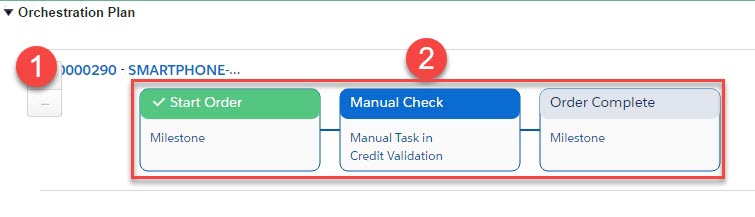
In this example:
-
An orchestration plan is for an order.
-
Orchestration items are color-coded to indicate the item's current status.
At design-time, you can visualize what the orchestration plan might look like at runtime. You can see the Orchestration Plan Definitions and associated Orchestration Items Definitions from the Scenario page to get an idea of what the eventual project structure will look like for this orchestration scenario.
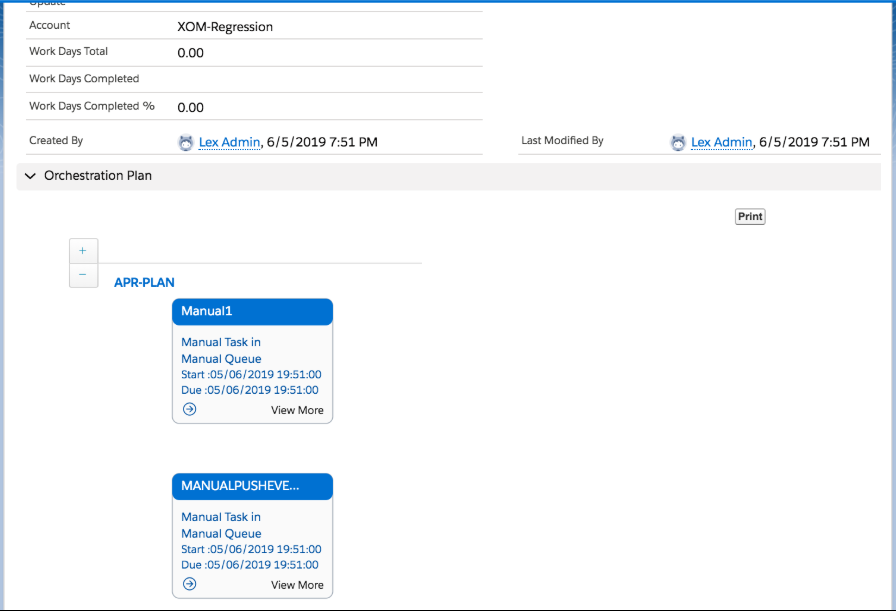
The preview shows all the possibilities.
You can update the Orchestration Plan Definition by doing any of the following:
-
Add or delete an Orchestration Item with or without dependencies.
-
Delete an Orchestration Item Dependency.
-
Update an Orchestration Item Name.
-
Update an Orchestration Plan Name.
-
Update an Orchestration Item Scope.
-
Update an Orchestration Plan Scope.
As an Order Management implementation user, you can use the Print button on the Orchestration Plan to print or download a view.
To print the orchestration plan, click Print and follow the prompts.
Guidelines for Designing Orchestration Plan Definitions
Orchestration plan definitions are very flexible, and can group processing tasks using a variety of different organizing principles. Salesforce recommends the following guidelines when designing orchestration plan definitions:
-
Create a master end-to-end plan to sequence the major milestones of all orders, such as the start of the order and the completion of the order.
-
Create separate orchestration plan definitions for each macro logical function, for example, provisioning, logistics, inventory, or billing.
-
Simplicity should be the goal, avoiding loops unless absolutely required.
-
Creating assets should occur as an Auto Task as the final orchestration item prior to the Complete Order milestone. When the assetize auto-task runs, it creates or updates assets and inventory items at the same time. Typically, assets are only created after fulfillment flow is completed.
