
You are here:
Product Class Decomposition
The product catalog can define multiple products of the same type. Typically, these products require the same fulfillment in Order Management, which means that they decompose the same way.
Rather than creating the same decomposition relationships and their mappings for each individual product, you can define a product class and use the class to define the decomposition. When you associate this product class with the commercial products and create just one decomposition relationship, Order Management knows to use the decomposition relationship defined in the class so all the similar products decompose to the same technical product.
Product class is Vlocity enhancement to Salesforce for the purposes of Order Management. From a Salesforce perspective, a product class is any product that has the record type set to Class. Hence, “product class” is an abbreviated reference to such products. A product class is not a commercial product or part of the commercial catalog. A product class is also not a technical product or specification. A Product Class is a mechanism used by Vlocity to categorize certain products to simplify the order decomposition process. You can use a product class to differentiate between an abstract product and real products.
For example, you can use a product class to identify similar types of products, such as cloud storage products, that have the same behavior in order decomposition. You may also have similar mobile phones that share the same fulfillment process. Another example is a quad play home internet package that includes similar routers, requiring a technician to install the routers at a customer site.
The following example shows you how to create a new product class, in this case, Cloud Storage, associate similar products to the Cloud Storage class, and create just one decomposition relationship so all the similar Cloud Storage products decompose to the same technical product.
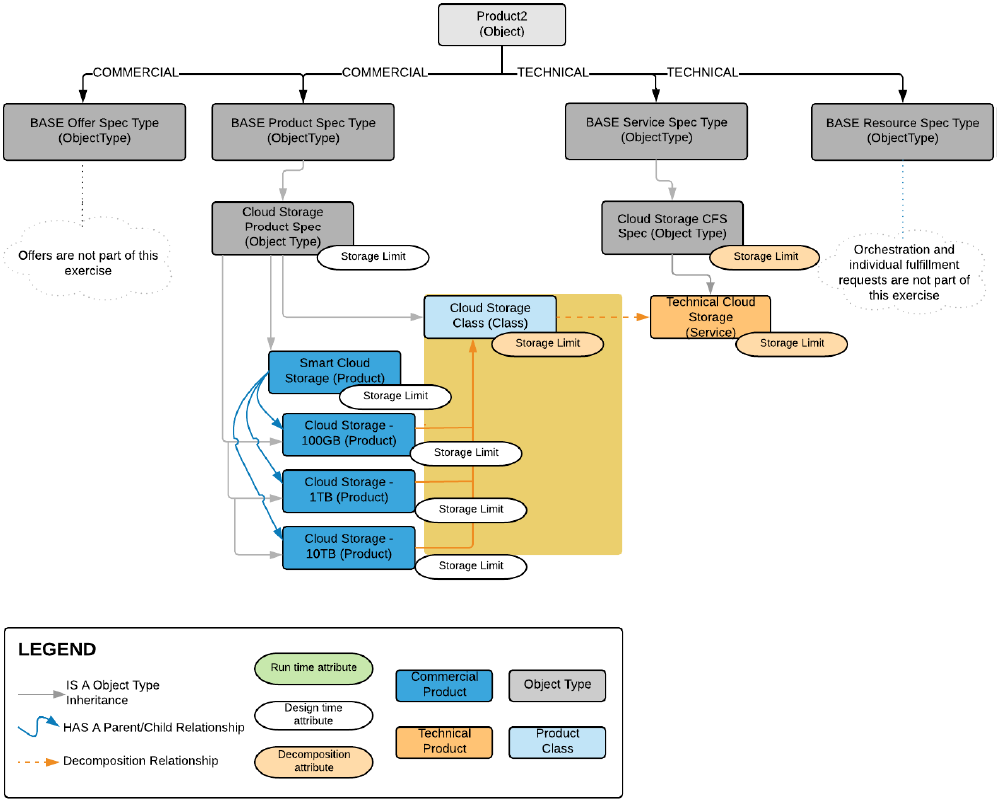
In the above diagram:
Each child product in the Smart Cloud Storage bundle represents a different commercial product, describing a set storage limit.
The Cloud Storage products inherit the Storage Limit attribute, along with its associated picklist, from the Cloud Storage Product Spec object type.
The Cloud Storage Class product class is the key to setting up a single decomposition relationship for similar products. The Cloud Storage Class product class is the source product in the decomposition relationship.
Technical Cloud Storage is the destination product in the decomposition relationship. Regardless of the child product in the bundle selected for an order based on the storage limit, this one decomposition relationship is all that is needed to decompose the order to fulfillment requests.
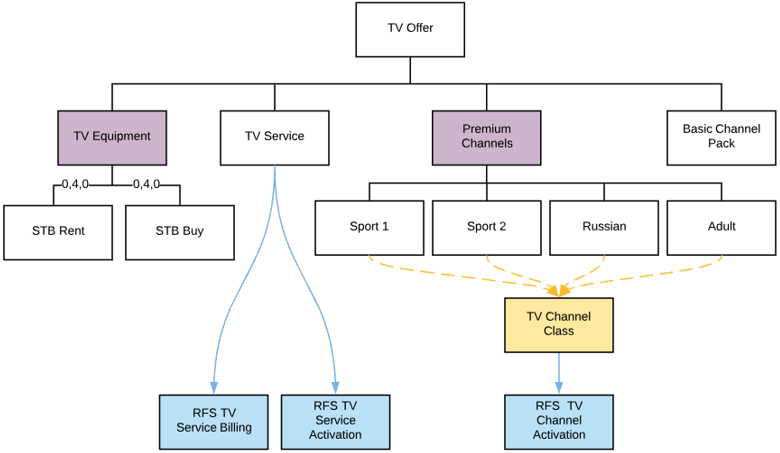
In the following example, every premium channel needs provisioning. The responsible person would do the following things:
Create a product with record-type as Class and name it "TV Channel Class". See Create a Product Class.
Ensure the product has the same attribute definition as the products it represents. Use ObjectType modelling for this. See Associate Child Products in a Bundle with a Product Class.
Create a technical product for RFS TV Channel Activation.
Define the decomposition relationship between the TV Channel Class and the RFS TV Channel Activation and configure the attribute mapping. See Create a Decomposition Relationship.
Set the Parent Class field in all the premium channels to TV Channel Class.
Apply the same treatment to the STB service.
- Create a Decomposition Relationship
Create a single decomposition relationship between the source product class and the destination technical product. - Associate Child Products in a Bundle with a Product Class
After you've built the product class, you can link it to each tiered product. - Create a Product Class
Create a product class and use the class to define the decomposition. This saves you time over having to create the same decomposition relationships and their mappings for each individual product. - Test a Product Class Decomposition Relationship
To test if a decomposition relationship works, place an order for a bundle, select any one of the product tiers based on the attribute, and decompose the order to the same technical product.
