
Loading
Industries Order Management
Table of Contents
Select Filters

          No results
          No results
          Here are some search tips

          Check the spelling of your keywords.
          Use more general search terms.
          Select fewer filters to broaden your search.

          Search all of Salesforce Help
          Schedule and Manage an Order Management Purge Job

          Schedule and Manage an Order Management Purge Job

          Once the purge job settings are configured, you must schedule the job from the Vlocity XOM Administration panel. You can also stop the job from there, and view its status.

          Before You Begin, configure the settings for the job: See Configure Settings for the Order Management Purge Job

          1. In Lightning Experience, click the App Launcher: Lightning App Launcher icon
          2. Begin to type XOM Administration until Vlocity XOM Administration appears in the list.
          3. Click Vlocity XOM Administration. The Vlocity XOM Administration panel opens.
          4. Click the Schedule button next to Orchestration Data Purge Job. The purge job is scheduled.
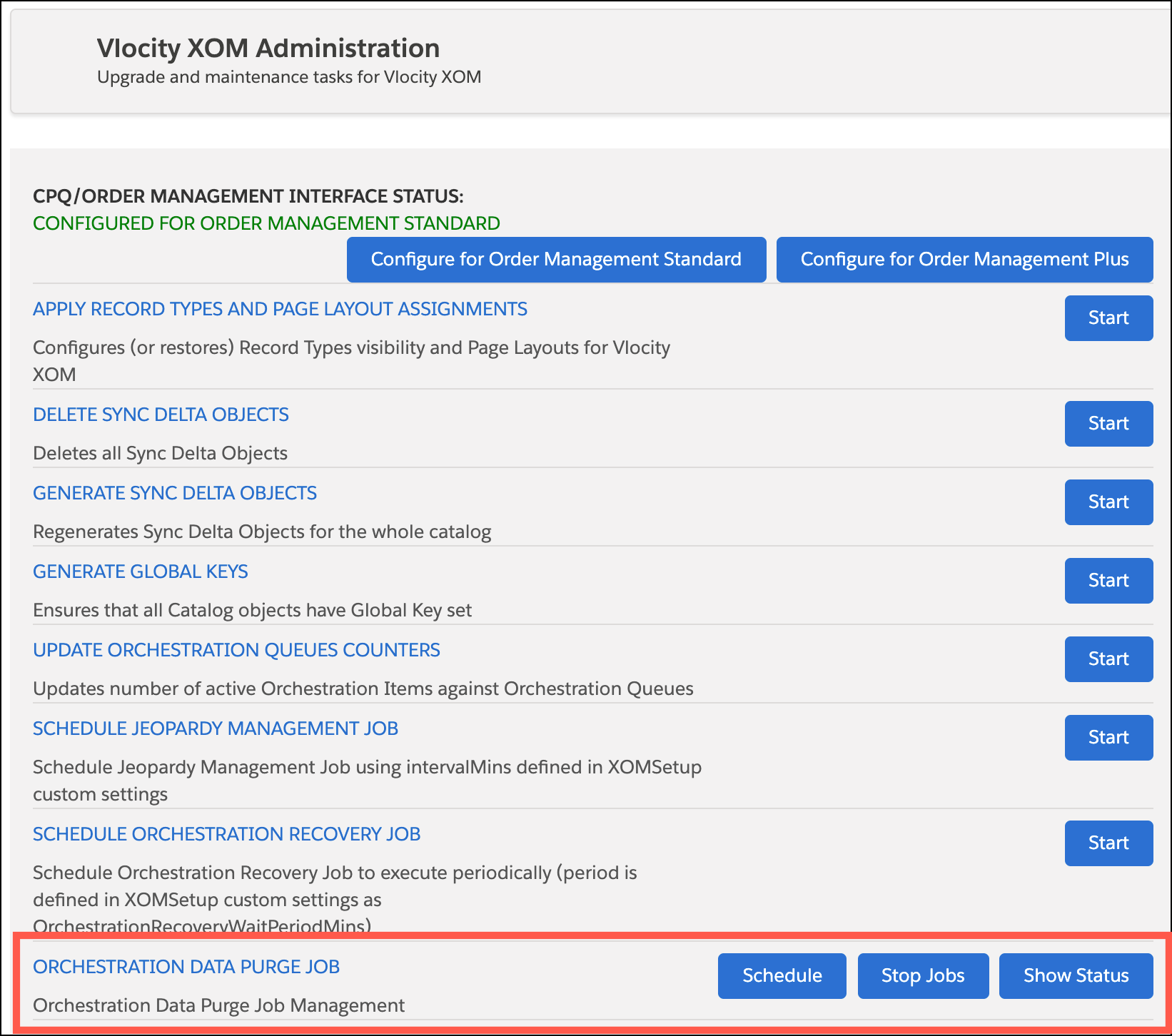
            Click the Status button to see details of the job, and click Stop to stop purge jobs from running (this button will also stop any currently running purge jobs).

            The Vlocity XOM Administration window, with a box around the Orchestration Data Purge Job list item.
           
          Loading
          Salesforce Help | Article