
You are here:
Unlock a SIM Card (Managed Package)
If a subscriber's SIM card gets locked, for example by entering an incorrect PIN, the subscriber can request a SIM unlock code to unlock their SIM card and reset their PIN. This workflow enables agents to verify the subscriber's ICCID and then provide the SIM unlock code as requested by the subscriber.
 This feature is part of the Communications Cloud managed package.
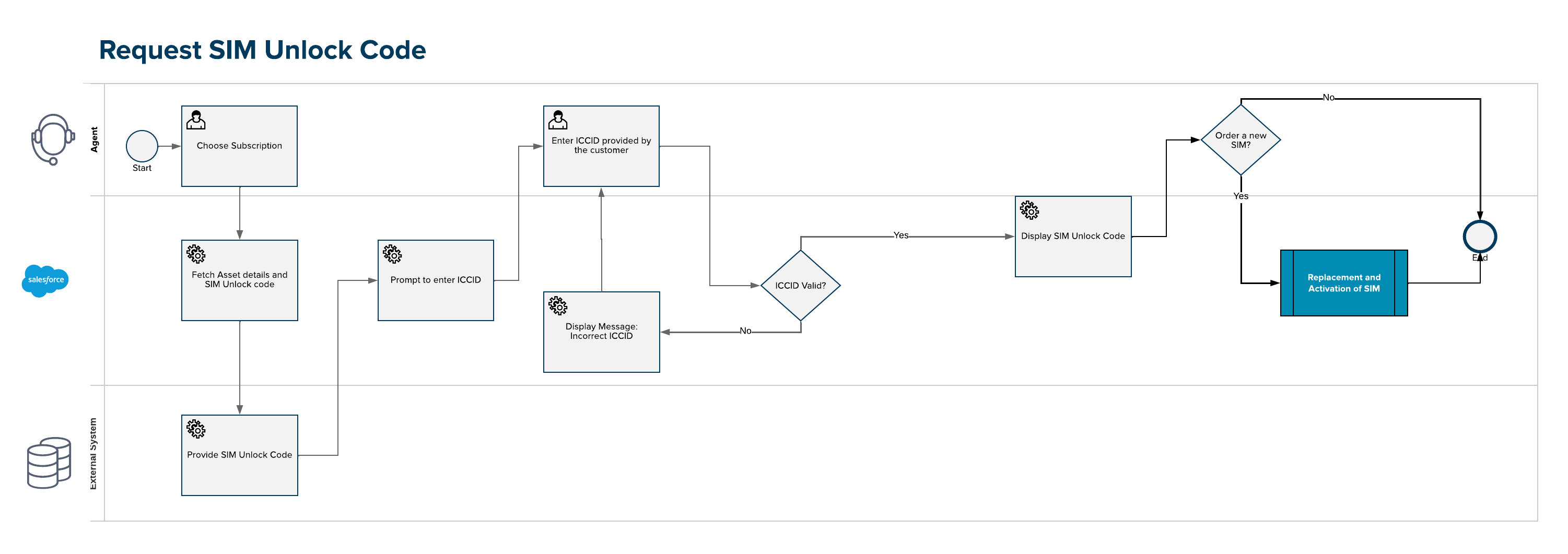
If a customer's SIM card gets locked (for example, by entering an incorrect PIN), the customer can request a SIM unlock code to unlock their SIM card and reset their PIN. The user initiates the process for a specific mobile subscription on behalf of the customer. The process requires the SIM ICCID to be specified for verification. After the customer provides the ICCID, the agent enters the ICCID which is validated against the one stored in the SIM asset. When successfully validated, the SIM unlock codes are retrieved from an external system and displayed. The agent then provides the details to the customer to enable them to unlock their SIM card.
The following diagram shows the sequence of actions in the Unlock a SIM Card process.
- Use Interaction Launcher to verify a subscriber and start a customer interaction.
- On the subscription card, click Actions, scroll down to the SIM section, and click Request SIM Unlock Code.
-
Enter the ICCID provided by the subscriber and click Verify.
 Tip
TipTo find the ICCID to use with sample data for testing purposes, you can go to the customer's Account page, and on the Related tab scroll down to the Billing Assets section. The number in the Serial Number column is the ICCID for the mobile number.
- Communicate the SIM unlock code to the subscriber and then click Close to exit the workflow.
