
You are here:
Create Products in the Product Designer
The Product Designer is the administration application for the product catalog. It provides a unified user experience with improved efficiency and agility to launch products quickly to market. It gives both business and IT users access to all the product management capabilities they need.

The Product Designer has several benefits:
-
Defines pricing.
-
Improves usability for product definition, pricing, and structure.
-
Increases productivity for product marketing and admin users.
-
Provides a cohesive view of shared catalog elements across Configure Price Quote (CPQ), Contract Lifecycle Management, and Order Management.
-
Provides omnichannel capabilities directly within the catalog.
-
Decreases time to market for new products.
The Product Designer provides seamless integration between the shared product catalog and the ability to configure, price, and quote the products in the catalog.
Product managers use Vlocity Product Designer to:
-
Define and maintain product entities.
-
Manage product structure, rules, and offers.
-
Build foundational constructs, including attributes and picklists.
-
Build metadata constructs, such as product object types.
Catalog administrators use the Product Designer for the following tasks:
-
Work with predefined objects, for example, to create reusable object types that define properties, such as attributes and fields.
-
Define common layouts for product entities, such as offers or product specifications, that are instantiated from the object types.
-
Perform initial setup tasks for EPC implementation.
The Product Designer can co-exist with the existing Vlocity Product Console. You can view and manage products created using the Product Console in the Product Designer with few exceptions, as long as the product attributes are assigned to the General Properties layout. For more information, see Upgrade Existing Object Types for use in Product Designer.
Open the Product Designer
-
Complete the setup described in Configure Vlocity Product Designer for Salesforce Industries Communications, Media, and Energy.
-
Click the App Launcher and enter Vlocity Product Designer in the Quick Find box.
-
Click the Vlocity Product Designer app.
Navigate the Vlocity Product Designer
When you open Vlocity Product Designer, the first tab is the title, and you can't interact with it.
Use the tab after the title to manage the different product catalog entities. The navigation menu lists the product entities that you can manage.
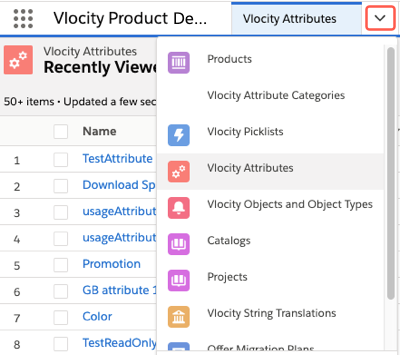
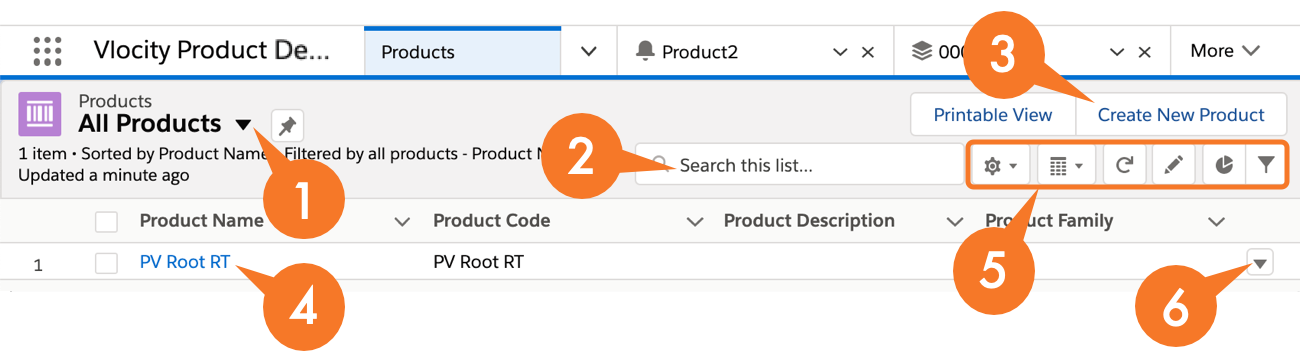
When you select an entity, an entity manager opens in that tab, such as Vlocity Objects and Object Types. The following image and list describe the common features of the new interface of the Vlocity Product Designer.
-
Change views, such as Recently Viewed or All. You can pin a view as the default.
-
For the Products manager, Salesforce recommends that you make All Products the default view. After you select All Products, click the pin icon to make it the default view.
-
For the Vlocity Objects and Objects Types manager, Salesforce recommends that you do not use the New button or click objects to edit from the list view. Instead, click Product2 Object to create, edit, and delete objects.
-
-
Search for a specific entity.
-
Create a new entity.
-
From the list of entities, click the name to edit the entity's properties.
-
Use the controls to update and modify the entity list.
-
Select an action for an entity, such as delete or edit.
When you create or edit an entity, it opens in a new tab.
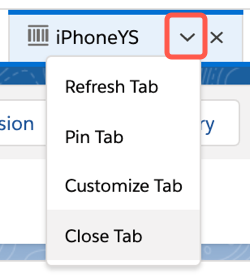
Each tab has an action menu that you can use to refresh the tab's content, pin the tab (so that it opens when you open the Vlocity Product Designer), or rename the tab.
- Plan Your Product Catalog
With EPC, you can create an offering to sell to customers, such as an iPhone 11. Before creating an offering, you must create other entities, such as object types, attributes, and product specifications. You can then create bundled offerings and set pricing. - Product Lifecycles in EPC
Using the Shared Catalog or EPC, you can configure products at any level in the bundle, add new products, and importantly, maintain the product entities through their entire product lifecycle. EPC and the Shared Catalog supports the commercial product lifecycle by allowing you to define current, future, past and retired products. - Picklists and Attributes in EPC
Products may or may not have attributes. A product that does not have attributes comes only in one form, and customers do not make any decisions about the features of the product, such as a headset or a computer cord that come in one color. - Create Object Types in the Product Designer
An object type that you create serves as a template that stores the configuration of attributes, fields, and layouts. Object subtypes (or child object types) or associated products inherit the configuration of the base object's layout, fields, and attributes. You can modify this configuration for each object type. But you must modify it before you create object subtypes so that they inherit the newly modified configuration. - Product and Offer Specification in EPC
With the Summer '21 release, product specifications and offerings are separate, but offers can inherit characteristics from product specifications. You can manage and configure an offer independently of a product specification. The offer specifications feature is available only with Product Designer in Communications Cloud. - Offer Bundles, Cardinalities, and Relationships for Product Designer
A product bundle is a set of products sold together. In Energy & Utilities Cloud, a bundle typically consists of a Commodity Offer and Commodity Components such as a Standing Charge and a Unit Rate. - Offer Pricing for Product Designer
You can price products and promotions according to your business requirements. You can also adjust prices (by a percentage or amount) or override prices (set new prices) for products. - Create Promotions and Offers for Product Bundles in the Product Designer
You can select a child product in the structure and modify an existing promotion, add a promotion, or create an offer-level adjustment or override. From a child product, you can define contextual adjustments or overrides for bundled products. For example, you can create a promotion to give a new residential customer a reduced Unit Rate for six months. - Product Versioning
With the Product Designer , you can create and configure a product, Vlocity picklist, or Vlocity object type to track any changes. - Track Product Catalog Changes with Projects
EPC Projects track all the changes to entities in your product catalog. You can use projects as a history for change management. - Upgrade Existing Object Types for use in Product Designer
If an existing product created in Vlocity Product Console uses facets other than General Properties, you must manually modify the associated object type layout definition to make the product compatible with Vlocity Product Designer.
