
You are here:
Transformation of Multiplay Offers
Communications Service Providers always need to find ways to attract new customers and retain their existing customers. One of these methods is to introduce new offers for the same services and products with more attractive prices and marketing. An existing customer who wishes to benefit from new offers and prices has the choice of migrating their plan to new offers. This involves moving from one product bundle to another, for example, migrating a mobile plan to a better mobile plan.

Transforming a multiplay offer usually involves reducing the price or improving the service.
A common scenario is upgrading a mobile offer with a better data plan. Initially, the plan may not be shareable, but you want to change to a family plan with unlimited talk and text, and data plan options, such as 3 GB, but shared among the members of the plan. The SIM may be shared with up to 10 mobile numbers, plus roaming and HD streaming. A constraint with a limited plan may be that you need to pay a higher price when upgrading to 5 GB or 10 GB. With Change of Plan, you can transform the old mobile plan to the new family plan, with the same or better services and more data.
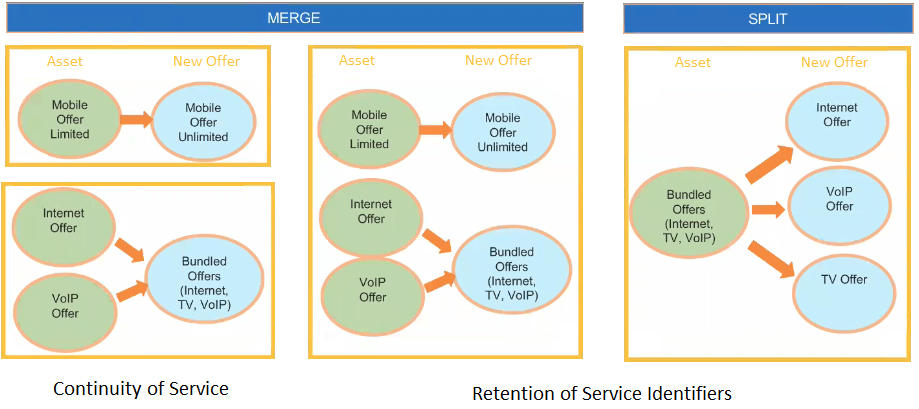
Merging Multiple Existing Offers into a Single New Offer
As a service provider, you can merge individual offers that belong to different product families into a new single multi-play bundle.
For example, a customer already subscribes to individual plans for Internet, VoIP, and TV service. You can merge individual internet and VoIP plans into a Triple Play Bundle that includes Internet, VoIP, and TV by adding a TV plan, and you can also upgrade the plan to include more data.
At this point, the customer is eligible to migrate the existing top-level Internet Bundle to the Internet Bundle in a MultiPlay Offers, such as such as Triple Play. The triple play root-level offer contains Internet, VoIP, and TV bundled as immediate children.
When migrating plans from a source to target, the transform function compares the two product/service structures to find a match. When a match is found, the transform function uses an action/sub action combination. The action may be set as Disconnect for the old product, and the sub action is Replace with the new product or service. For example, the 2 GB service may be a permanent disconnect, and the 3 GB service may be a permanent Add. This represents a soft disconnect to Order Management so you do not actually lose your associated device. So, Change of Plan allows you to move from one product bundle to another, which gives you more flexibility in terms of features, as opposed to one feature, such as a Internet service, that would only require a MACD order.
As another example, a customer already has two individual mobile plans that are not sharable. The customer is eligible to migrate an existing individual mobile bundle to a top-level mobile family bundle.
As a service provider, you can merge individual offers that belong to the same family into a new single sharable service bundle, for example, you can merge individual mobile plans into new sharable mobile plan. This could also involve merging several disjointed services, such as Internet, TV, mobile, that may have been purchased at different times, into one service bundle, such as Triple Play. The old customer assets are marked as inactive and disconnected, and the new assets become active.
Another example of merging disjointed offers may be that you want to disconnect your TV, but the service provider offers you triple play or a promotion and add VoIP, faster internet, but for $100/mo. The old, lower-performing package was $60/month.
The old internet gets disconnected and mapped to the new internet. Triple Play, Internet 100MB now becomes an active asset and increases from $180 per month to $250 per month. New channels are added for TV. VoIP can be added, but may not be needed.
You can also go back and split the Triple Play into only what you need: Internet and TV (based on price), but not VoIP, which gets disconnected. There could be a Double-Play offer with TV Plus, for an additional $5 per month, and Internet for $100 per month.
-
The first-level parent of both the child products must match.
-
The child products must not be virtual items in the Target Bundle.
Transform Multiplay Offers feature is currently supported in both the hybrid cart and the enhanced CPQ cart.
Splitting a Single Existing Offer into Multiple New Offers
Change of Plan enables you to split a single multi-play bundle into individual offers that belong to different product families.
For example, a customer has already subscribed to a Triple Play Bundle with Internet, VoIP and TV service. The customer is eligible to migrate the existing top-level Triple Play Bundle to a standalone Internet Bundle, VoIP and TV Bundle. The triple play root-level offer contains Internet, VoIP and TV bundled as immediate children. The customer wants to split the single multi-play bundle into Individual Offers that belong to different product families. To accomplish this, you can split the Triple Play Bundle (Internet, VoIP, TV) into new Individual Internet, VoIP and TV plans, or you can split the bundle into new Individual Internet and VoIP plans, and disconnect the existing VoIP plan.
After splitting the bundle, the subscriber may want to merge and upgrade the two remaining services into a double-play offer that has higher internet speeds or more channels, but at the same price or a slightly higher price.
You can also split a single, sharable service bundle into Individual Offers that belong to the same family, for example, you can split an individual Mobile line from a shared service into separate new individual Mobile plan.
If you want to disconnect all the components of an offer, go to Industries Cart and use the 'Delete' Option against that line item.
