
You are here:
Vlocity Cards for CPQ
Industries Cart is Industries Communications' shopping-cart UI, developed using the Vlocity Cards Framework.
You can modify the appearance and behavior of the cart to customize it according to your specific business requirements. The Vlocity Cards Framework provides configurable cards, layouts, and templates, which are UI building blocks included out-of-the-box with the Salesforce Industries Communications managed package.
Layouts can call omnichannel web APIs to retrieve data. Templates and cards display that data. The cards-based CPQ user interface uses the HybridCPQ Visualforce page, not the typical Console Cards page.
You can use Assets Visualforce pages to render assets on the Account record detail pages. You can use the Review Order Cart read-only Visualforce page to render a read-only review cart on the Order record detail pages. Cards, templates, and layouts control these areas as well.
Salesforce Industries Communications, Media, and Energy uses the following Cards, Layouts, and Templates.

To implement Vlocity Cards for usage-based pricing for energy, see Usage-Based Pricing for Industries CPQ.
Name |
Element |
Description |
Related To |
Data Source |
|---|---|---|---|---|
layout |
Provides structure for the cards-based Assets and Review Cart Visualforce pages. |
None |
||
template |
Provides space for the cards-based Assets and Review Cart Visualforce pages. |
n/a |
||
layout |
Provides structure for assets that are listed by contract on the cards-based Assets and Review Cart Visualforce pages. |
Dual
|
||
template |
Groups assets by contract IDs. |
n/a |
n/a |
|
card |
Renders the date picker and other items in the header portion of the space that displays the assets in the cards-based Assets and Review Cart Visualforce pages, when assets are grouped by contract. |
comp-assets-products (template) |
||
template |
Provides space for assets that are listed by contract on the cards-based Assets and Review Cart Visualforce pages. |
n/a |
||
template |
Renders the banner at the top of the cards-based Assets and Review Cart Visualforce pages. |
n/a |
||
card |
With the comp-assets-header-card template, renders the banner at the top of the cards-based Assets and Review Cart Visualforce pages. |
None |
||
layout |
Provides the structure for the banner at the top of the cards-based Assets and Review Cart Visualforce pages. |
Dual
|
||
template |
Provides the space for the banner in the cards-based Assets and Review Cart Visualforce pages. |
n/a |
||
layout |
Provides the structure for the info panel in the cards-based Assets and Review Cart Visualforce pages. |
None |
||
template |
Renders the info panel in the cards-based Assets and Review Cart Visualforce pages. |
n/a |
||
template |
Renders the space for assets that are not grouped by contract in the cards-based Assets and Review Cart Visualforce pages. |
n/a |
||
layout |
Provides structure for assets that are not associated with contracts on the cards-based Assets and Review Cart Visualforce pages. |
Dual
|
||
card |
Renders the date picker and other items in the header portion of the space that displays the assets in the cards-based Assets and Review Cart Visualforce pages, when assets are not grouped by contract. |
Sample |
||
template |
Provides space for assets that are not associated with contracts on the cards-based Assets and Review Cart Visualforce pages. |
n/a |
||
comp-assets-product-children (layout) |
layout |
Provides the structure for each child product item on the cards-based Assets and Review Cart Visualforce pages. |
Parent |
|
template |
Provides the space for each child product item on the cards-based Assets and Review Cart Visualforce pages. |
comp-assets-product-children (layout) |
n/a |
|
card |
Renders each child product on the cards-based Assets and Review Cart Visualforce pages. |
comp-assets-product-item (template) comp-assets-product-children (layout) |
None |
|
template |
Displays the details of the child element in an asset bundle in the cards-based Assets and Review Cart Visualforce pages. |
comp-assets-product-children (layout) |
n/a |
|
card |
Renders the space for products listed by contracts on the cards-based Assets and Review Cart Visualforce pages. |
None |
||
template |
Provides the space for products listed by contracts on the cards-based Assets and Review Cart Visualforce pages. |
n/a |
||
layout |
Provides the structure for the space for assets that are not grouped by contract in the cards-based Assets and Review Cart Visualforce pages. |
comp-assets-products (template) |
None |
|
template |
Renders the header portion of the space that displays the assets in the cards-based Assets and Review Cart Visualforce pages. |
n/a |
||
card |
Renders the products on the Promotions tab on the cards-based Assets and Review Cart Visualforce pages. |
comp-assets-promotions (layout) |
None |
|
layout |
Provides the structure for the Promotions tab on the cards-based Assets and Review Cart Visualforce pages. |
Dual
|
||
template |
Provides the space for the Promotions tab on the cards-based Assets and Review Cart Visualforce pages. |
n/a |
||
layout |
Provides the structure for the Review Cart Visualforce page. |
None |
||
template |
Provides the space for the Review Cart Visualforce page. |
n/a |
||
layout |
Provides the structure for the main panel of the Review Cart Visualforce page. |
Dual
|
||
template |
Provides the space for the main panel of the Review Cart Visualforce page. |
n/a |
||
layout |
Provides the underlying structure for the CPQ interface. |
None |
||
template |
Provides a three-column cart interface with the total bar along the bottom of the page. |
n/a |
||
template |
Provides the text and buttons and their format for the cart header. |
n/a |
||
layout |
Calls the |
Dual
|
||
template |
Renders the Payment Choice drop-down list in Industries Cart. |
n/a |
||
layout |
Renders the picklist that displays the price lists in the upper left corner of Industries Cart. |
Dual
|
||
template |
Calls |
|
||
template |
Provides the structure for the cart header. |
n/a |
||
template |
Contains CSS variables used in other templates. |
n/a |
||
template |
Contains CSS variables used in other templates and themes. |
n/a |
||
template |
Empty template to create a custom view. |
cpq-cart-applied-promotions-card and cpq-cart-promotions (card) |
n/a |
|
template |
Displays the bundle hierarchy in Industries Cart. |
comp-assets-product-item-child (card) comp-assets-product-item-child (template) cpq-product-cart-item-child (card) cpq-product-cart-item-child (layout) |
n/a |
|
card |
Renders the information in the Line Item Details dialog box. |
None |
||
layout |
Provides the interface for the Line Item Details dialog box. |
or cpq-cart-item-details card |
||
template |
Provides the structure for the cards in the Line Items Details dialog box. |
n/a |
||
layout |
Provides the Cart Item Lookup Field dialog box. |
|
||
template |
Provides the structure for the Cart Item Lookup Field dialog box. |
n/a |
||
card |
Renders each individual applied promotion in the cart. |
None |
||
layout |
Renders the list of applied promotions in the cart. |
Dual
|
||
template |
Retrieves the list of applied promotions in the cart. |
n/a |
||
cpq-config-attr-custom-action-template1 and cpq-config-attr-custom-action-template2 |
template |
Created to support custom actions in the Industries Cart information panel. Adds functionality with a lookup field for a phone number. |
none |
n/a |
card |
Displays the cart header content. |
|
||
layout |
Provides the header for the cart. |
None |
||
template |
Sample template to show how to provide a custom template for a field in the Industries Cart information panel. |
none |
n/a |
|
layout |
Displays the sidebar that contains the Product list and Promotions list. |
None |
||
template |
Provides structure for the Product list and Promotions list in Industries Cart. |
n/a |
||
cpq-mixin |
template |
Generates padding styles for the product name in a hierarchy in Industries Cart. |
All templates |
n/a |
cpq-product-card-config-card |
card |
Contains the editable fields that the user can update on the product configuration panel. |
None |
|
layout |
Renders the configuration panel in the cart. |
None |
||
template |
Provides the structure for the configuration panel in the cart. |
n/a |
||
flyout |
Displays the Price Details dialog box. |
None |
||
template |
Provides structure for the Price Details dialog box. |
n/a |
||
template |
Renders the Payment Choice drop-down list for a single line item in Industries Cart. |
n/a |
||
flyout |
Displays the Apply Discount dialog box |
None |
||
template |
Provides structure for the Apply Discount dialog box. |
n/a |
||
card |
Renders each child-level line item in Industries Cart. |
None |
||
layout |
Displays child-level product information in Industries Cart. |
cpq-product-cart-item-child (template) cpq-cart-item-child-products card |
Parent |
|
template |
Provides the structure for the child-level product information in Industries Cart. |
n/a |
||
OBSOLETE cpq-product-cart-item-delete |
||||
card |
Displays each line item in a cart. |
None |
||
template |
Provides the structure for the Line Item Details dialog box. |
n/a |
||
template |
Provides the structure for each line item in the cart. Display the root level product information in the cart. |
n/a |
||
layout |
Provides the structure for the product cart. |
|
||
template |
Provides the structure for the cart. |
n/a |
||
layout |
Renders custom actions in the CPQ user interface. |
Custom |
||
template |
Provides a very basic structure on which you can base custom actions. |
n/a |
||
card |
Displays the details for one product in the Product Details dialog box. |
None |
||
layout |
Renders the filterable attributes list panel, including the Reset and Apply buttons. |
|
||
template |
Renders the filterable attributes list panel, including the Reset and Apply buttons. |
n/a |
||
template |
Provides the structure for each product in the Product Details dialog box. |
n/a |
||
layout flyout |
Renders the Product Details dialog box. |
|
||
template |
Provides the base structure for the Product Details dialog box. |
n/a |
||
card |
Displays each product in the product list in the cart. |
None |
||
template |
Provides the structure for each product in the product list in the cart. |
n/a |
||
layout |
Renders the product list in the cart, including the search box and filter. |
|
||
template |
Provides the structure for the product list in the cart. |
n/a |
||
card |
Renders each individual promotion line item in Industries Cart. |
None |
||
template |
Provides the structure for an individual promotion line item in Industries Cart. |
n/a |
||
layout |
Renders the Promotions list in Industries Cart. |
Dual
|
||
template |
Provides the structure for the Promotions list in Industries Cart. |
n/a |
||
layout |
Provides the container for the template to customize prompts in Industries Cart |
n/a |
||
template |
Enables customizing prompts in Industries Cart. |
n/a |
||
template |
Contains CSS variables used in other templates. |
all CPQ templates |
n/a |
|
card |
Renders the total bar in the cart. |
None |
||
layout |
Renders the total bar in the cart. |
|
||
template |
Provides the structure for the total bar in the cart. |
n/a |
||
template |
Provides the text and buttons, as well as their styling, for the total bar in the cart |
n/a |
The following templates, layouts, and card were deleted from Salesforce Industries Communications, Media, and Energy Summer '17:
-
cpq-product-addon (template and layout)
-
cpq-product-addon-item (card)
-
cpq-product-addon-item-same-section (template)
-
cpq-product-addon-item-separate-section (template)
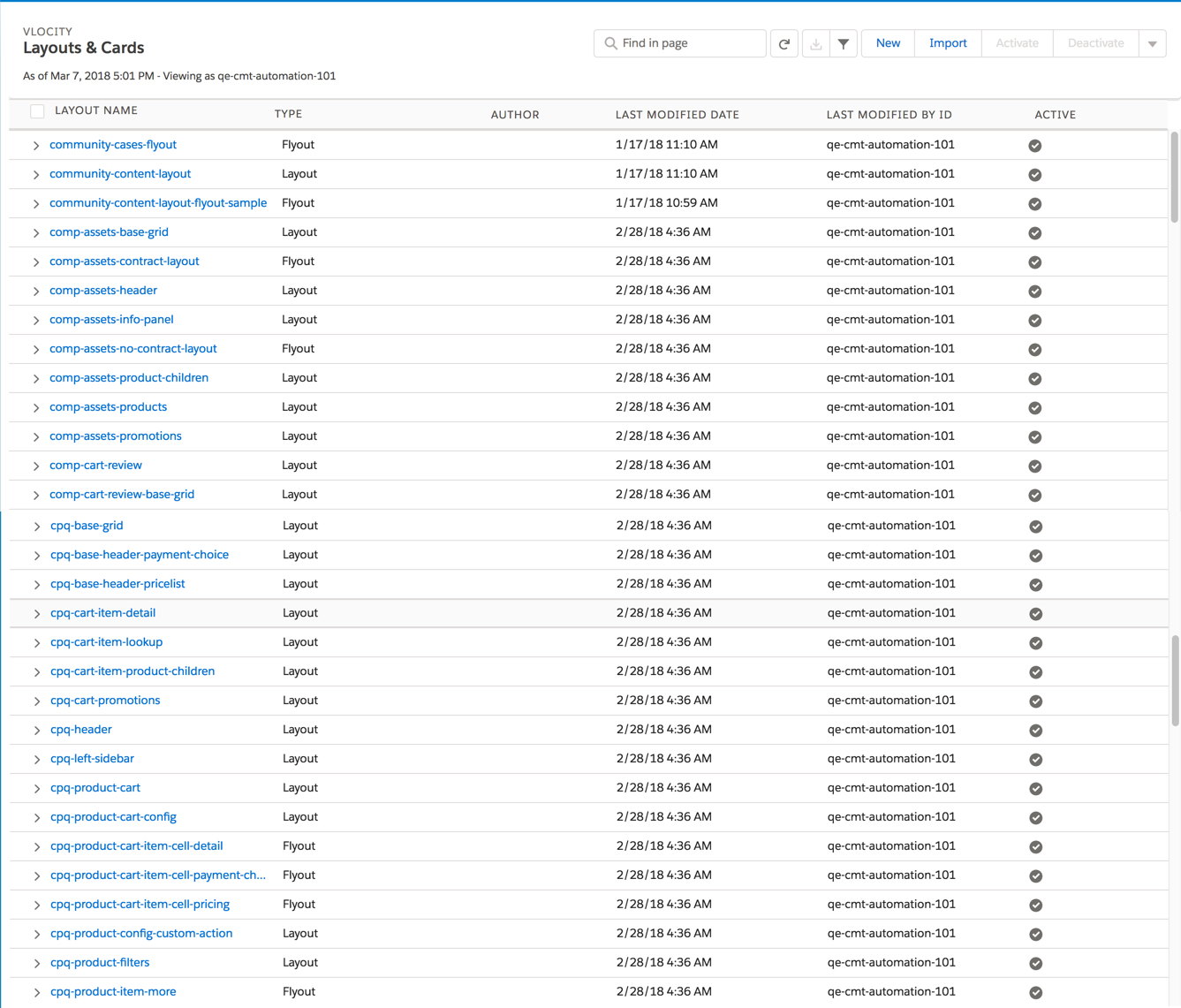
All layouts are listed on the Vlocity Cards tab. If you experience errors while importing Omnistudio Data Mappers associated with Vlocity cards while the OmniStudio Standard Runtime setting is turned on, the issue is likely because of naming conflicts. To resolve this issue, uniquely rename the DRs to ensure they don't conflict with any existing elements.
-
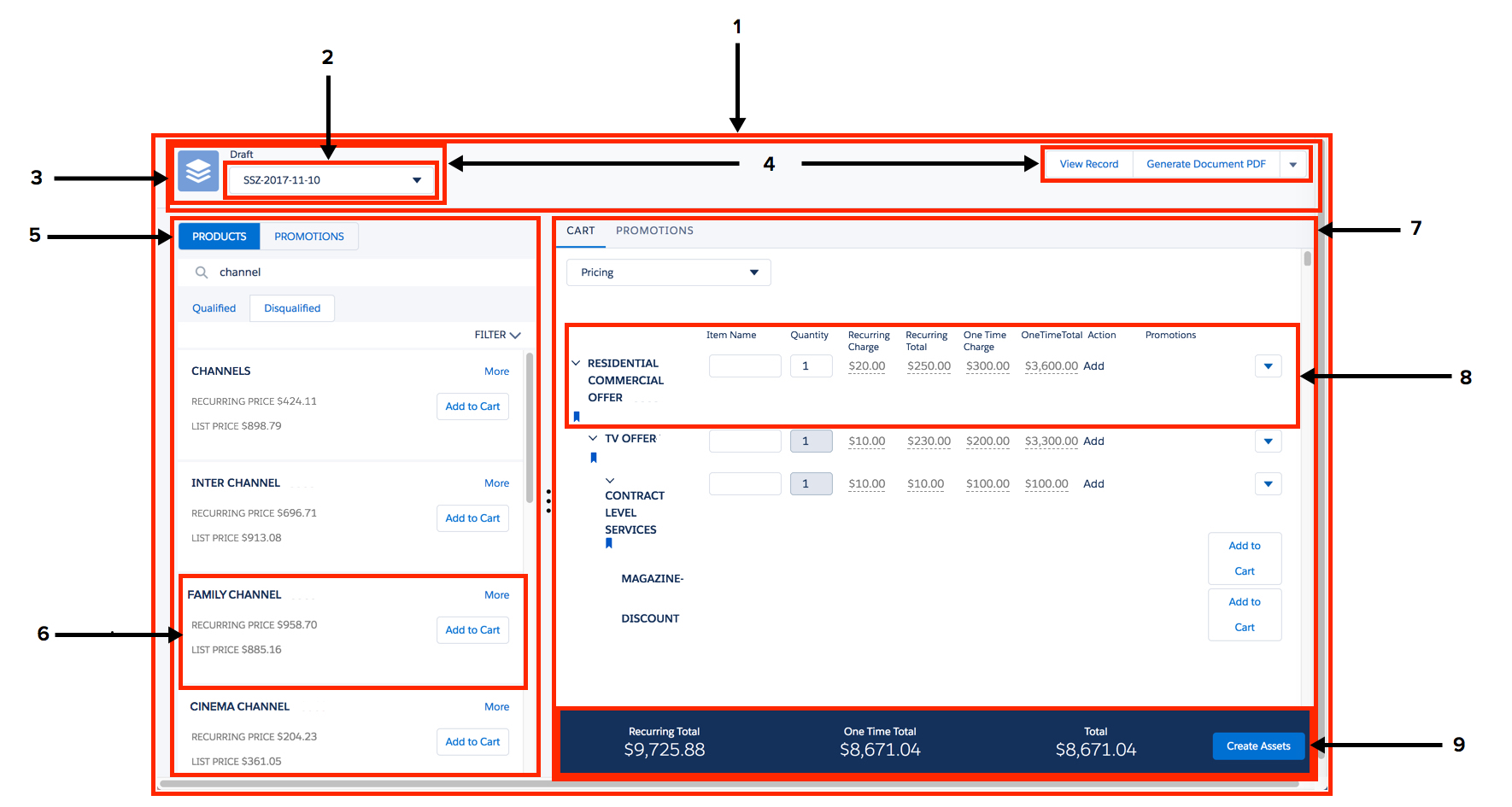
cpq-base-grid layout and cpq-base-grid template
-
cpq-base-header-pricelist layout and cpq-base-header-pricelist template
-
cpq-base-header template and cpq-header layout
-
cpq-base-header layout, cpq-base-header-card template, and cpq-header card
-
cpq-product-list layout and cpq-product-list template
-
cpq-product-item card and cpq-product-item template
-
cpq-product-cart layout and cpq-product-cart template
-
cpq-product-cart-item template and cpq-product-cart-item card
-
cpq-total-bar layout, cpq-total-bar template, cpq-total-bar-card card, and cpq-total-card template
-
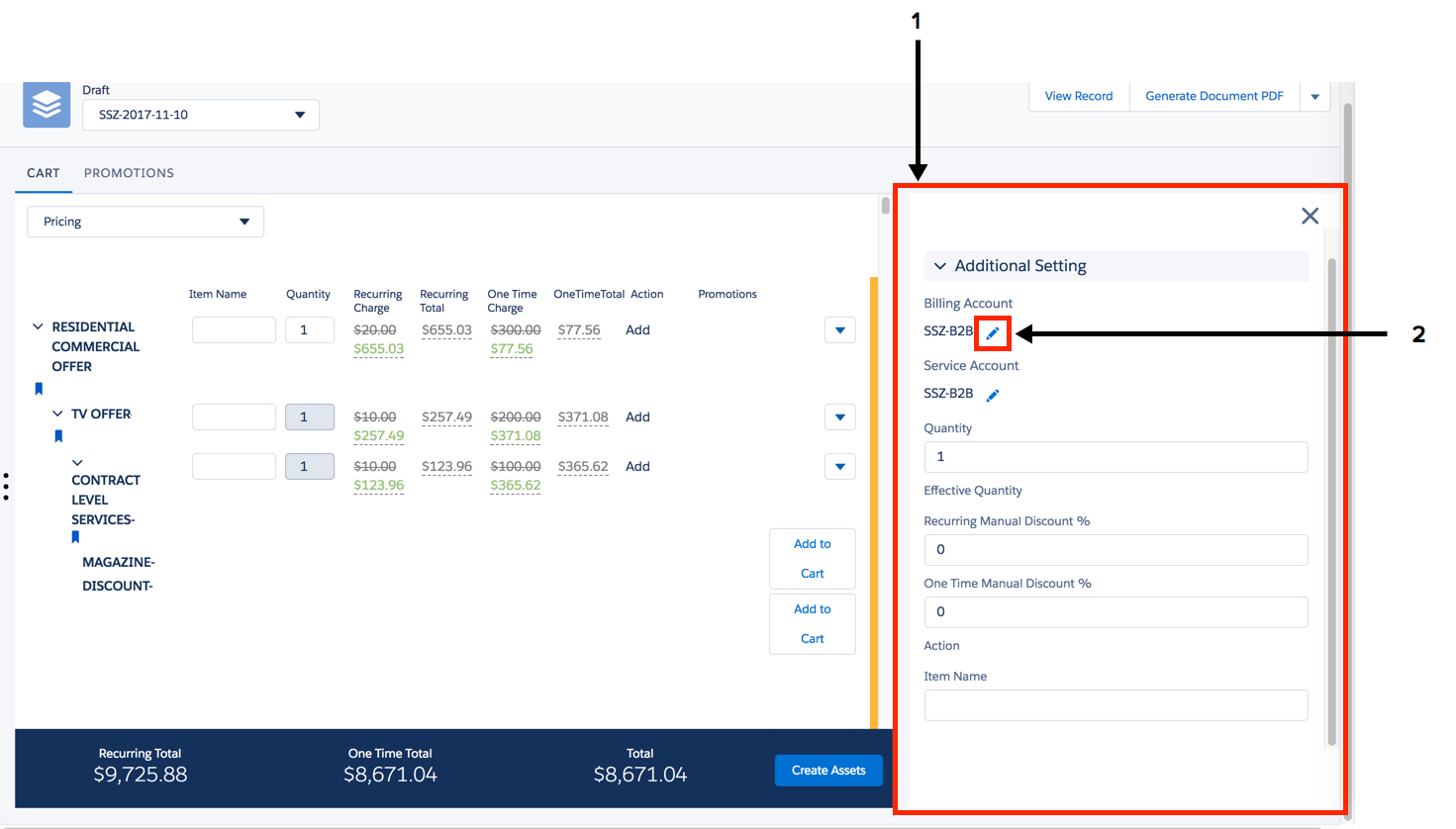
cpq-product-cart-config layout and cpq-product-cart-config template
-
Click to look up a specific object, such as a service account or location.
-
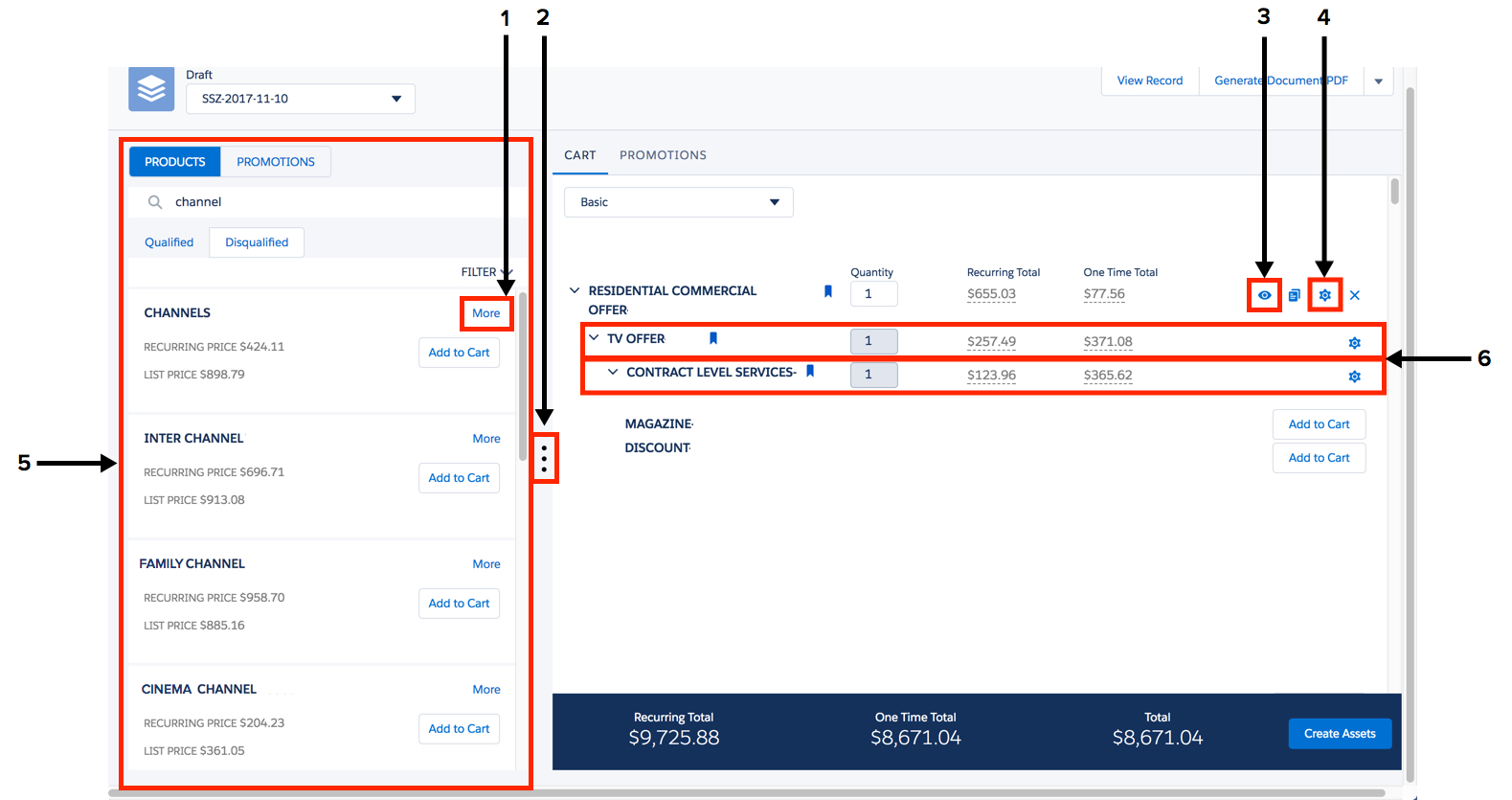
Click for product details. Opens the Product Details dialog box, which uses the cpq-product-details card, cpq-product-item-more layout, and cpq-product-item-details template.
-
Click to display or hide the Products or Promotions list.
-
Click for line item details for the root item. Opens the Line Item Details dialog box.
-
Click to open the configuration panel.
-
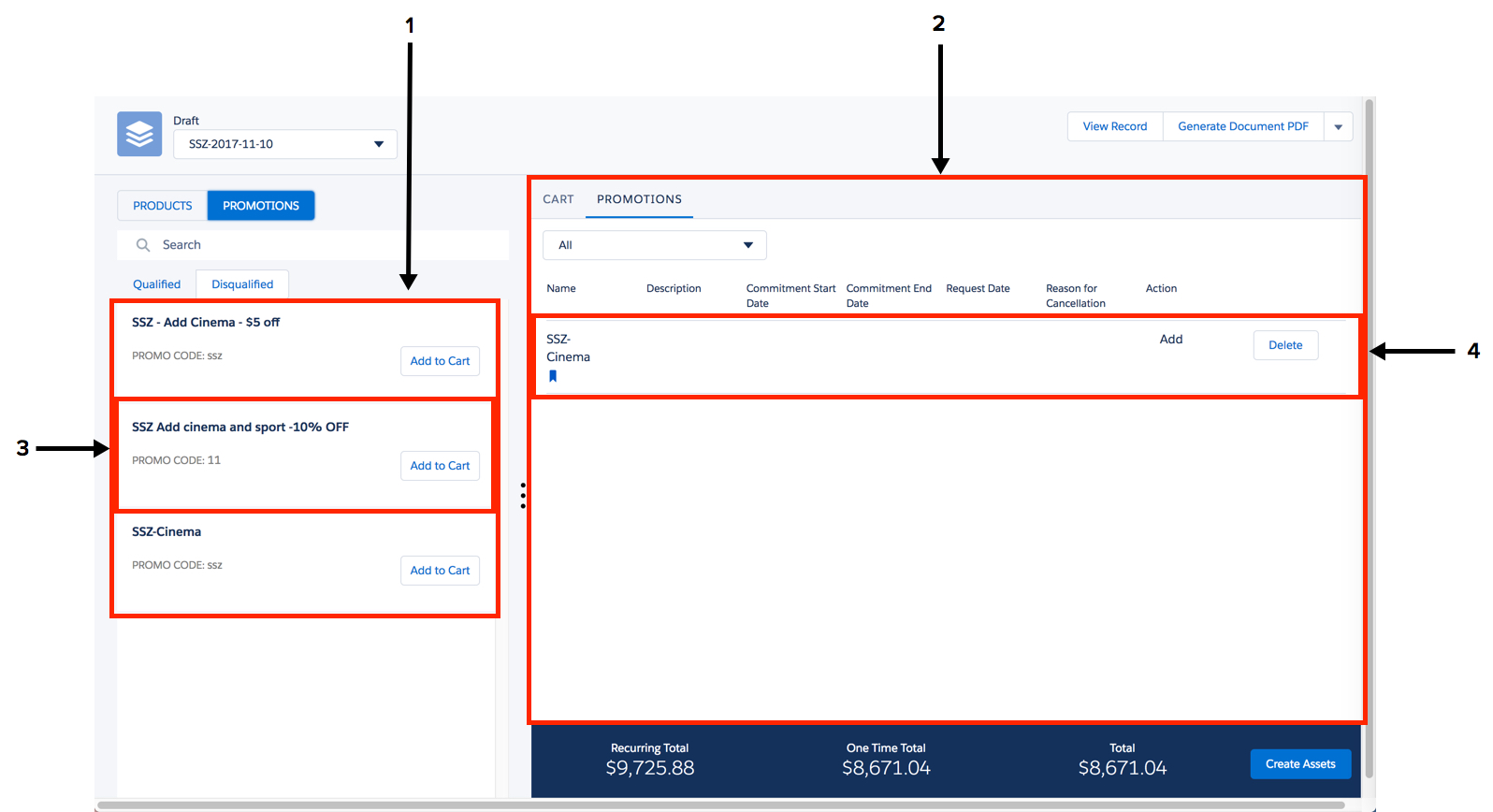
Products and Promotions lists, cpq-left-sidebar template and cpq-left-sidebar layout
-
Child line items in Industries Cart, cpq-product-cart-item-child layout, cpq-product-cart-item-child template, and cpq-product-cart-item-child card
-
cpq-promotions-list layout and cpq-promotions-list template
-
cpq-cart-promotions and cpq-cart-promotions template
-
cpq-promotion-item template and cpq-promotion-item card
-
cpq-cart-promotions card
-
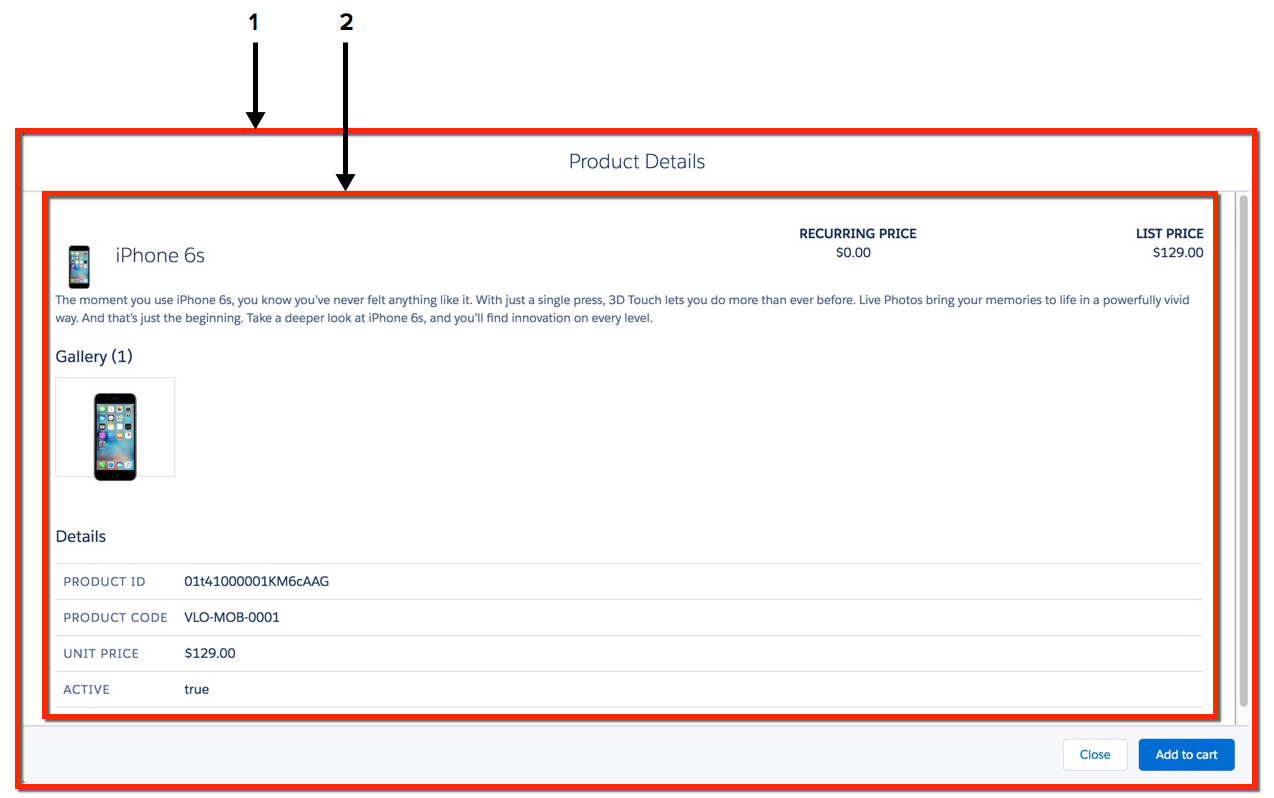
cpq-product-item-more layout and cpq-product-item-more template
-
cpq-product-details card and cpq-product-item-details template
Configure the card to determine which details are displayed.
-
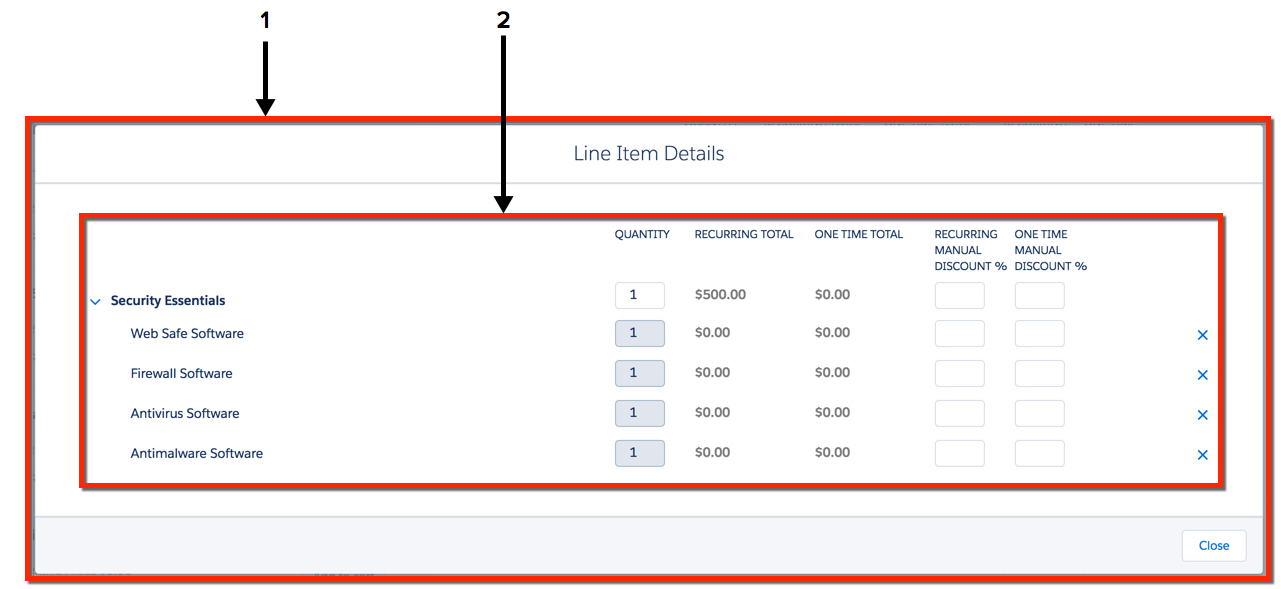
cpq-cart-item-detail layout and cpq-cart-item-details template
-
cpq-cart-item-detail card and cpq-product-cart-item template
-
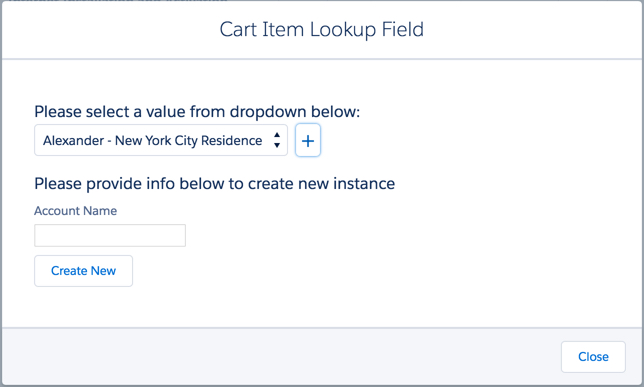
cpq-cart-item-lookup layout and cpq-cart-item-lookup template
-
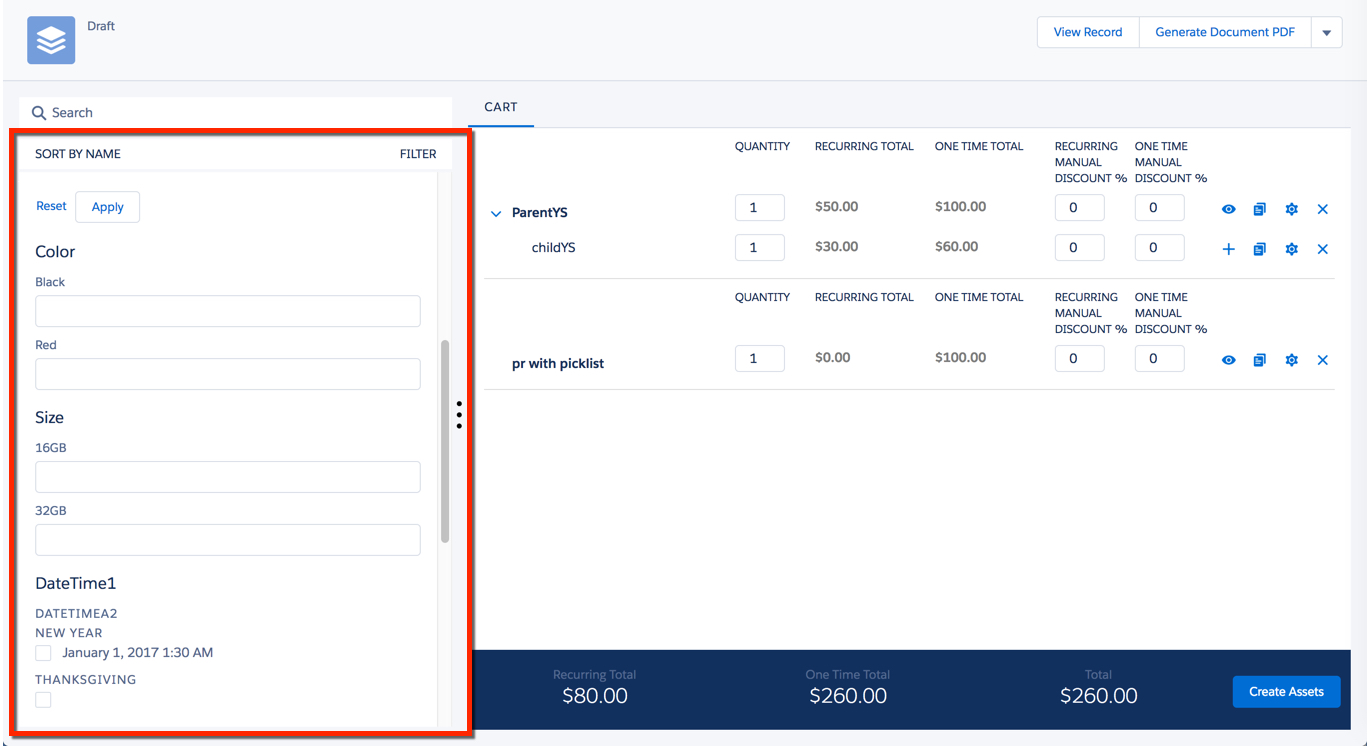
cpq-product-filters layout and cpq-product-filters template
-
cpq-product-filters layout and cpq-product-filters template
-
comp-assets-header
-
comp-assets-products
-
comp-assets-contract
-
comp-assets-product-item
-
comp-assets-product-item-child
-
comp-assets-product-children
-
comp-assets-base-grid
-
comp-assets-contract
-
comp-assets-header
- comp-assets-base-grid (template)
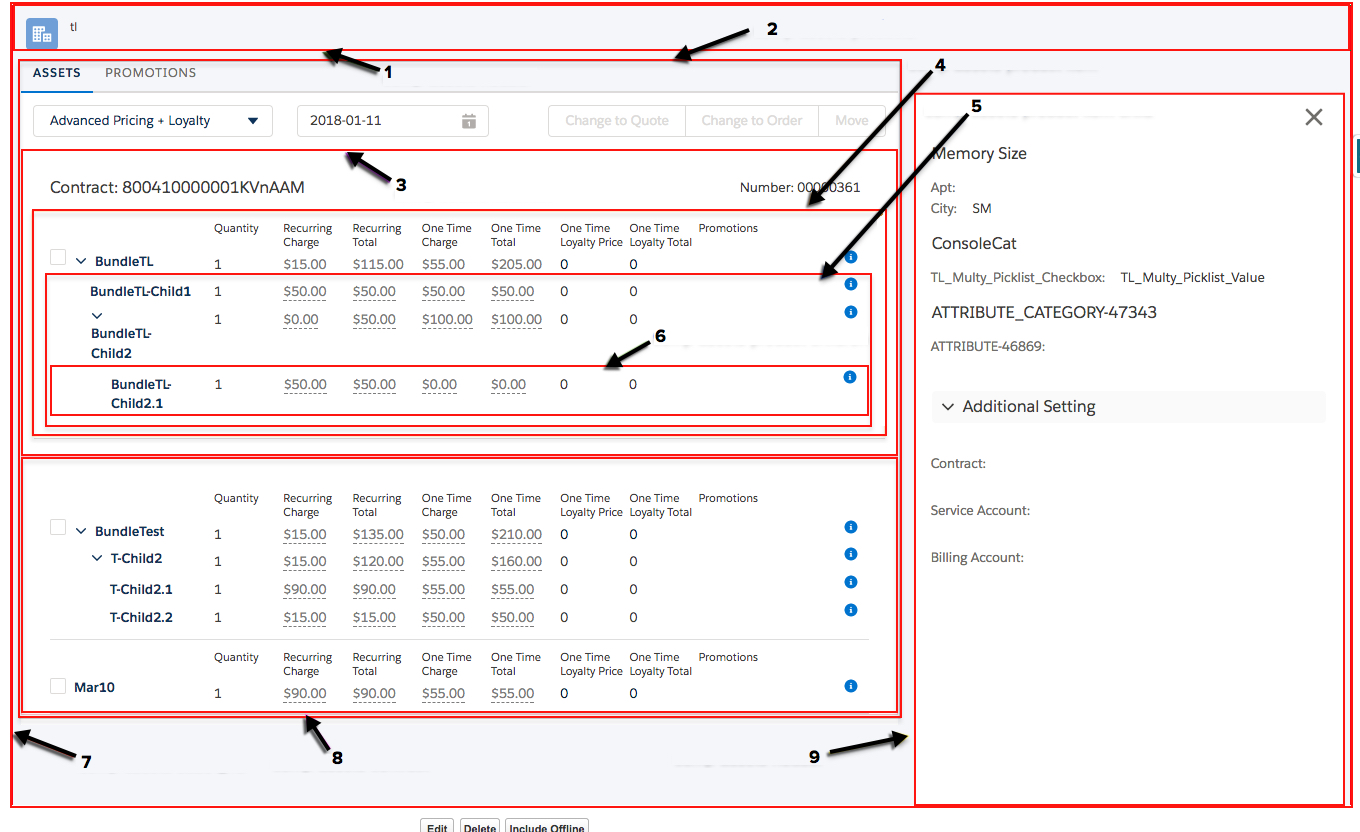
The comp-assets-base-grid template provides a space for the Assets and Review Cart cards-based Visualforce pages. - comp-assets-contract (template)
The comp-assets-contract template provides the space for assets that are listed by contract on the cards-based Assets and Review Cart Visualforce pages. - comp-assets-contract-layout
The comp-assets-contract layout provides the structure for assets that are listed by contract on the cards-based Assets and Review Cart Visualforce pages. - comp-assets-contract-load (template)
The comp-assets-contract-load template groups assets by contract IDs. - comp-assets-header (card)
The comp-assets-header card, with the comp-assets-header-card template, renders the banner at the top of the cards-based Assets and Review Cart Visualforce pages. - comp-assets-header (layout)
The comp-assets-header layout provides the structure for the top of the cards-based Assets and Review Cart Visualforce pages. - comp-assets-header-card (template)
The comp-assets-header-card template renders the top of the cards-based Assets and Review Cart Visualforce pages. - comp-assets-info-panel (layout)
The comp-assets-info-panel layout provides the structure for the info panel in the cards-based Assets and Review Cart Visualforce pages. - comp-assets-info-panel (template)
The comp-assets-info-panel template renders the information panel in the cards-based Assets and Review Cart Visualforce pages. - comp-assets-load (template)
The comp-assets-load template renders the space for assets that are not grouped by contract in the cards-based Assets and Review Cart Visualforce pages. - comp-assets-no-contract (card)
The comp-assets-no-contract card renders the date picker and other items in the header portion of the space that displays the assets on the cards-based Assets and Review Cart Visualforce pages, when the assets are not grouped by contract. - comp-assets-no-contract-layout
The comp-assets-no-contract-layout provides structure for assets that aren't associated with contracts on the cards-based Assets and Review Cart Visualforce pages. - comp-assets-base-grid (layout)
The comp-assets-base-grid layout provides the underlying structure for the Assets and Review Cart cards-based Visualforce pages. - comp-assets-product-children (template)
The comp-assets-product-children template provides the space for each child product item on the cards-based Assets and Review Cart Visualforce pages. - comp-assets-product-item (card)
The comp-assets-product-item card renders the space for products listed by contracts on the cards-based Assets and Review Cart Visualforce pages. - comp-assets-product-item (template)
The comp-assets-product-item template provides the space for products listed by contracts on the cards-based Assets and Review Cart Visualforce pages. - comp-assets-product-item-child (card)
The comp-assets-product-item-child card renders each child product on the cards-based Assets and Review Cart Visualforce pages. - comp-assets-product-item-child (template)
The comp-assets-product-item-child template displays the details of the child element in an asset bundle in the cards-based Assets and Review Cart Visualforce pages. - comp-assets-products (layout)
The comp-assets-products layout provides the structure for the space for assets that are in the cards-based Assets and Review Cart Visualforce pages. - comp-assets-products (template)
The comp-assets-products template renders the product assets. - comp-assets-promotions (layout)
The comp-assets-promotions layout provides the structure for the Promotions tab on the cards-based Assets and Review Cart Visualforce pages. - comp-assets-promotions (template)
The comp-assets-promotions template provides the space for the Promotions tab on the cards-based Assets and Review Cart Visualforce pages. - comp-assets-promotions-card
The comp-assets-promotions-card Renders the products on the Promotions tab on the cards-based Assets and Review Cart Visualforce pages. - comp-cart-review (layout)
The comp-cart-review layout provides the structure for the main panel of the Review Cart Visualforce page. - comp-cart-review (template)
The comp-cart-review template provides the space for the main panel of the Review Cart Visualforce page. - comp-assets-no-contract (template)
The comp-assets-no-contract template provides space for assets that are not associated with contracts on the cards-based Assets and Review Cart Visualforce pages. - comp-cart-review-base-grid (layout)
The comp-cart-review-base-grid layout provides the structure for the Review Cart Visualforce page. - comp-cart-review-base-grid (template)
The comp-cart-review-base-grid template provides the space for the Review Cart Visualforce page. - cpq-base-grid (layout)
The cpq-base-grid layout provides the underlying structure for the CPQ interface. The template provides a three-column interface with the header bar at the top of the page and a total bar at the bottom of the page. - cpq-base-grid (template)
The cpq-base-grid template provides a three-column cart interface with the header bar at the top of the page and the total bar at the bottom of the page. - cpq-base-header (template)
The cpq-base-header template provides the structure of the cart header. - cpq-base-header-card (template)
The cpq-base-header-card template provides the structure for the cart header. - cpq-base-header-payment-choice (layout)
The cpq-base-header-payment-choice layout calls the getListsOfValues API to provide the user payment choices in Industries Cart. - cpq-base-header-pricelist (layout)
The cpq-base-header-pricelist layout renders the picklist that displays the price lists in the upper left corner of Industries Cart. - cpq-base-header-pricelist (template)
The cpq-base-header-pricelist template callschangePricelistto assign the price list the agent selects. - cpq-base-theme-variables (template)
The cpq-base-theme variables template contains CSS variables that are used in other templates. - cpq-base-variables (template)
The cpq-base-variables template contains CSS variables used in other templates and themes. - cpq-card-blank (template)
The cpq-card-blank template is an empty template. You can use cpq-card-blank to create a custom view in the cpq-product-cart-item card state. - cpq-card-mixin (template)
The cpq-card-mixin template displays the bundle hierarchy in Industries Cart. - cpq-cart-item-detail (card)
The cpq-cart-item-detail card renders the information in the Line Item Details dialog box. Each card contains the information for one product, or line item, in the cart. Use the line item details to modify the attributes of any item inline. - cpq-cart-item-detail (layout)
The cpq-cart-item detail layout provides the interface for the Line Item Details dialog box. - comp-assets-contract (card)
The comp-assets-contract card renders the date picker and other items in the header portion of the space that displays the assets on the cards-based Assets and Review Cart Visualforce pages, when the assets are grouped by contract. - cpq-cart-item-details (template)
The cpq-cart-items-details template provides the structure for the cards in the Line Items Details dialog box. - cpq-cart-item-lookup (layout)
The cpq-cart-item-lookup layout renders the Cart Item Lookup Field dialog box. - cpq-cart-item-lookup (template)
The cpq-cart-item-lookup template provides the structure and user interface elements for the Cart Item Lookup Field dialog box. - cpq-cart-promotions (card)
The cpq-cart-promotions card renders each individual applied promotion in the cart. - cpq-cart-promotions (layout)
The cpq-cart-promotions layout renders the list of applied promotions in the cart. - cpq-cart-promotions (template)
The cpq-cart-promotions template retrieves the list of applied promotions in the cart. - cpq-config-attr-custom-action-template1 and cpq-config-attr-custom-action-template2
The cpq-config-attr-custom-action-template1 and cpq-config-attr-custom-action-template 2 templates support custom actions in the Industries Cart information panel. Specifically, these templates add a lookup field for a phone number. - cpq-header (card)
The cpq-header-card displays the content of the cart header. This card has three states. - cpq-header (layout)
The cpq-header layout provides the header for the cart. - cpq-base-header-payment-choice (template)
The cpq-base-header-payment-choice template renders the Payment Choice drop-down list in Industries Cart. - cpq-input-custom-template-sample
The cpq-input-custom-template-sample template is an example of a custom template for a field. - cpq-left-sidebar (layout)
The cpq-left-sidebar layout displays the Products list and Promotions list in Industries Cart. - cpq-left-sidebar (template)
The cpq-left-sidebar template is a wrapper for the cpq-product-list and cpq-promotions-list cards and layouts. - cpq-product-addon (layout)
The cpq-product-addon layout provides the information necessary when a product includes additional items. - cpq-product-addon-item (card)
The cpq-product-addon-item displays the information necessary when a product includes additional items, including the line items, child products, promotions, and grouping items. - cpq-product-addon-item-separate-section (template)
The cpq-product-addon-item-separate-section template provides the structure for the line items in a cart when some products include additional items. - cpq-product-cart (layout)
The cpq-product-cart layout renders the cart, including any relevant error messages. - cpq-product-cart (template)
The cpq-product-cart template provides the structure for the cart. - cpq-product-cart-config (layout)
The cpq-product-cart-config layout renders the configuration panel in the cart, including only the close and Save buttons. - cpq-product-cart-config (template)
The cpq-product-cart-config template provides the structure for the configuration panel in the cart. - cpq-product-cart-item (card)
The cpq-product-cart-item card displays each line item in a cart. - cpq-product-cart-item (template)
The cpq-product-cart-item template provides the structure for the Line Item Details dialog box. - cpq-product-cart-item-cell-detail (flyout)
The cpq-product-cart-item-cell-detail flyout displays the Price Details dialog box. - cpq-product-cart-item-cell-detail (template)
The cpq-product-cart-item-cell-detail template provides the structure for the Price Details dialog box. - cpq-product-cart-item-cell-payment-choice (template)
The cpq-product-cart-item-cell-payment-choice template renders the Payment Choice drop-down list for a single line item in Industries Cart. - cpq-product-cart-item-cell-pricing (flyout)
The cpq-product-cart-item-cell-pricing flyout displays the Apply Adjustment dialog box. - cpq-product-cart-item-cell-pricing (template)
The cpq-product-cart-item-cell-pricing template provides the structure for the Apply Adjustment dialog box. - cpq-product-cart-item-child (card)
The cpq-product-cart-item-child card displays each child-level product line item in Industries Cart. - cpq-product-cart-item-child (layout)
The cpq-product-cart-item-child layout displays child-level product information in Industries Cart. - cpq-product-cart-item-child (template)
The cpq-product-cart-item-child template provides the structure for the child-level product information in the cart. - cpq-product-config-custom-action (layout)
The cpq-product-config-custom-action layout can render custom actions in the CPQ user interface. You can use the cpq-product-config-custom-action layout when you must customize the default look and feel of a field, or when you must add your own custom implementation. You can also use this layout when an attribute requires an external data source to populate it. For example, for a telephone reservation, you can call out to an external system. - cpq-product-config-custom-action (template)
The cpq-product-config-custom-action template is associated with the cpq-product-config-custom-action layout. It provides a very basic structure on which you can base custom actions. - cpq-product-details (card)
The cpq-product-details card displays the details for one product in the Product Details dialog box. - cpq-product-filters (layout)
The cpq-product-filters layout renders the filterable attributes list panel, including the Reset and Apply buttons. - cpq-product-filters (template)
The cpq-product-filters template provides the structure for the filterable attributes list panel, including the Reset and Apply buttons. - cpq-product-item (card)
The cpq-product-item card displays each product in the product list the cart. - cpq-product-item (template)
The cpq-product-item template provides the structure for each product in the product list in the cart. - cpq-product-item-details (template)
The cpq-product-item-details template provides the structure for each product in the Product Details dialog box. - cpq-product-item-more (layout)
The cpq-product-item-more layout renders the Product Details dialog box. - cpq-product-item-more (template)
The cpq-product-item-more template provides the base structure for the Product Details dialog box. - cpq-product-list (layout)
The cpq-product-list layout renders the product list in the cart. - cpq-product-list (template)
The cpq-product-list template provides the structure for the product list in the cart. - cpq-promotion-item (card)
The cpq-promotion-item card renders each individual promotion line item in Industries Cart. - cpq-promotion-item (template)
The cpq-promotion-item template provides the structure for an individual promotion line item in Industries Cart. - cpq-promotions-list (layout)
The cpq-promotions-list layout renders the Promotions list in Industries Cart. - cpq-promotions-list (template)
The cpq-promotions-list template provides the structure for the Promotions list in Industries Cart. - cpq-slds-prompt (layout)
The cpq-slds-prompt layout contains the cpq-slds-prompt template, which can be customized to create prompts in Industries Cart. - cpq-slds-prompt (template)
The cpq-slds-prompt template enables you to customize prompts in Industries Cart. - cpq-theme-variables (template)
The cpq-theme-variables template contains variables used in other templates. - cpq-total-bar (layout)
The cpq-total-bar layout renders the total bar in the cart. - cpq-total-bar (template)
The cpq-total-bar template provides the structure for the total bar in the cart. - cpq-total-bar-card
The cpq-total-bar-card card renders the total bar in the cart. - cpq-total-card (template)
The cpq-total-card template provides the text and buttons, as well as their styling, for the total bar in the cart.
