
You are here:
Pricing Designer
Pricing Designer is a unified user experience to create and maintain product pricing, promotions, associated pricing rules, and related pricing metadata. To make work easier for pricing design staff, it focuses on the EPC features they need.
Pricing Designer has enhanced searching and improved performance. It also aligns with the move to LWC design in Salesforce for a common user experience. It is focused on users who administer pricing and promotions for new and existing products.
Pricing Designer supports creating and managing pricing:
-
Promotions
-
Discounts
-
Price lists
-
Pricing plans
-
Pricing variables
-
Time plans
-
Time policies
The following image shows Vlocity Product Console with the dashboard on the left and the Vlocity Pricing Designer on the right. It shows the entities that managed in the Vlocity Pricing Designer.
Promotions and Discounts are both listed in Promotions in the Pricing Designer. The following image shows the features in the Product Console that are in the Pricing Designer. All the items in the Pricing section of the Product Console are in the Pricing. In the Product Management section of the Product Console, Promotions and Discounts are managed in Promotions in the Pricing Designer.
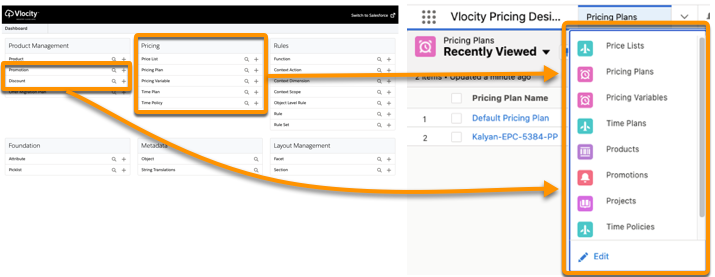
The Vlocity Pricing Designer can co-exist with the existing Vlocity Product Console. You can view and manage pricing entities created using the Vlocity Product Console in the Vlocity Pricing Designer. But to use the Versioning or Offer Specification feature, you can only use the Vlocity Pricing Designer and Vlocity Product Designer. These features aren't available in the Vlocity Product Console.
Open the Vlocity Pricing Designer
Before you can use the Vlocity Pricing Designer, you must complete the steps in Configure Pricing Designer.
-
Click the App Launcher and enter Vlocity Pricing Designer in the Quick Find box.
-
Click the Vlocity Pricing Designer app.
Common Controls in the Vlocity Pricing Designer
When you open Vlocity Pricing Designer, the first tab is the title, and you can't interact with it.
Use the tab after the title to manage the different pricing entities. The  navigation menu lists the product entities that you can manage.
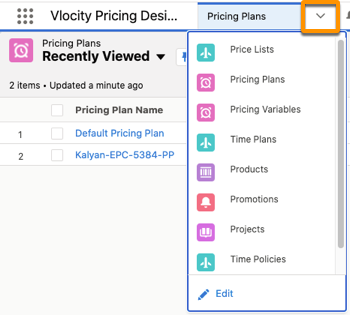
When you select an entity, an entity manager opens in that tab, such as Vlocity Objects and Object Types. The following image and list describe the common features of the Vlocity Pricing Designer.
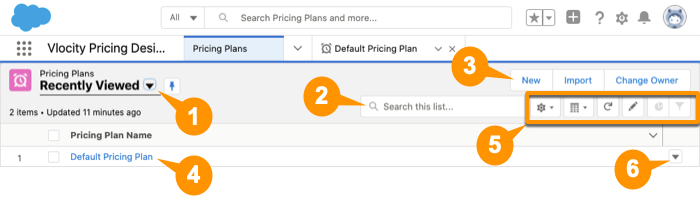
-
Change views, such as Recently Viewed or All. You can pin a view as the default.
-
Search for a specific pricing entity.
-
Create a new pricing entity.
-
From the list of pricing entities, click the name to edit an entity's properties.
-
Use the controls to update and modify the entity list.
-
Select an action for an entity, such as delete or edit.
When you create or edit an entity, it opens in a new tab.
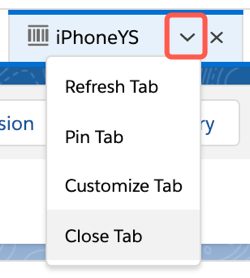
Each tab has an action menu that you can use to refresh the tab's content, pin the tab (so that it opens when you open the Vlocity Pricing Designer), or rename the tab.
- Pricing Metadata for EPC
To price a product, you must create pricing metadata, such as pricing variables and pricing elements, that you can reuse across products and prices. - Promotions in the Product Catalog
Promotions offer a variety of capabilities. You can configure the cart so that agents or customers can add a promotion list to the cart. You can create more than one promotion to apply to a product or product bundle. You can apply promotions to new or existing line items in the cart. You can use follow-on promotions, apply penalty fees, and define service continuation after a promotion expires. - Attribute-Based Pricing
Product attributes describe product characteristics. You can use product attributes for many purposes such as filtering, order decomposition, and fulfillment, and also to determine the correct price for a given product configuration. - Pricing Plans in EPC
Using a pricing plan, Salesforce Industries Communications, Media, and Energy supports different pricing calculations and storage for different line items. For example, some devices, premium support, and installation may have different price calculation methods. A pricing plan can calculate tier-based costs, promotion discounts, agent discounts, taxes, and more. - Usage-Based Pricing for Industries CPQ
Before you start using the Multi-Site Quote and Order Capture feature, you must enable usage pricing. - Cost and Margin in EPC
When you create a cost for a product, you can classify it as a one-time cost or a recurring cost. Margins are calculated automatically based on the cost and prices that you have defined for each line item and the product bundle. - Pricing Using PricingRulesImplementation
Salesforce Industries Communications, Media, and Energy supports multiple pricing paradigms. Salesforce recommends using the current paradigm, which assigns prices using price lists. But you can also assign prices using price books and the PricingRulesImplementation. This is the original pricing paradigm supported by Salesforce Industries Communications, Media, and Energy releases 15 and earlier, supported for backward compatibility.
