
You are here:
Batch Management Workflows
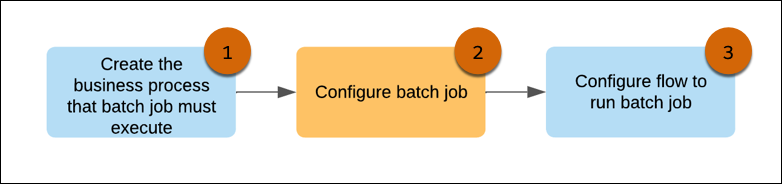
Batch Management has two distinct workflows: configuring a batch job for a business process and the automated workflow of batch job runs. Review the steps involved in each workflow for an overview of how to work with Batch Management.
Required Editions
Batch Job Configuration Workflow
-
Create the business process that you want to execute by using a batch job.
Business Process Type Details Business processes executed on Salesforce Flow Create a flow for the business process and active it. The flow must consist of a Text type input variable that the batch job can use to identify the records to send the flow for processing.
Business processes managed in other Salesforce products Complete the prerequisite tasks required for the business process in the Salesforce product. If the business process is part of Salesforce products such as Business Rules Engine, complete the Business Rules Engine-specific tasks for the business process.
-
Create a batch job to execute the business process.
Select the process type that represents the Salesforce product where the business process is configured and select the execution process that represents the business process.
-
Configure a flow to run the batch job.
Run Type Details If the batch job is run independently Create a flow and use the Batch Job action to run the batch job. If the batch job is run as part of a larger business process orchestration Add the Batch Job action to the flow that handles the business process orchestration. Only active batch jobs are available as actions on the Flow Builder. The action name on the Flow Builder is the same as the API name of the batch job. The configuration of the flow and the placement of the Batch Job action in the flow decides when the batch job is run.
Automated Batch Job Runs
Every time a batch job is run, it executes the business process in parts. Here's the sequence in which a batch job is run.
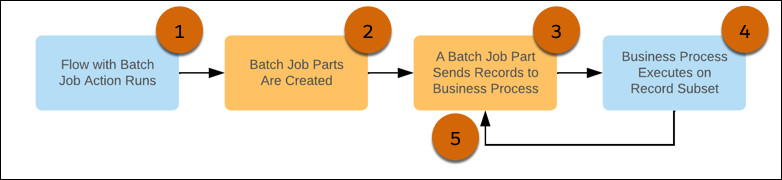
- The flow that runs is batch job starts.
- The batch job creates child parts consisting of record subsets for the business process to handle in sequence.
- A batch job part releases its record set to the business process.
- The business process is executed for the batch job part's record set.
- After the business process is executed for a batch job part, the next batch job part sends its record set to the business process.
Every time a batch job is run, a record for the run is created in Monitor Workflow Services. Use this record to:
- Track the status of the run.
- Cancel in-progress runs if necessary.
- Review the records that failed and submit the failed records.
When you submit failed records, a new run starts with only the failed records.
