
You are here:
Create a Service Type Integration
Service type integrations enable Salesforce to communicate with your external system while your agent waits.
Required Editions
| Available in: Lightning Experience |

Note Data Consumption Framework for a service type integration doesn’t address governor
limits because the framework uses the existing Continuation framework. However, Data
Consumption Framework enhances the Continuation framework because you can use an integration
definition to connect to your external system. This standard, best-practice pattern makes
managing your configuration easier.
-
Set up the provider class and integration response.
The provider class contains the business logic to process the data gathered by your agent and to makes the API call to the external system. The provider class implements the ServiceIntegrationProvider interface and returns IntegrationCalloutResponse. To know more about the available methods, see Service Integration Provider Interface.
-
Enable MuleSoft.
Create a named credential if you are using a third-party middleware instead of MuleSoft and aren’t utilizing Mulesoft Direct for deploying Mulesoft integration apps. The named credential configures the endpoint details in Salesforce.
-
Create an integration definition.
The integration definition maps the named credential to the provider class. The configuration is retrieved by Data Consumption Framework and passed into the provider class.Note the integration definition name. You enter the name in the IntegrationDefinition field in the integration procedure.
-
Create an integration procedure.
- For Remote Class, enter industriesintegrationfwk.IntegrationHandler.
- For IntegrationDefinition, enter the name of your Integration Definition.
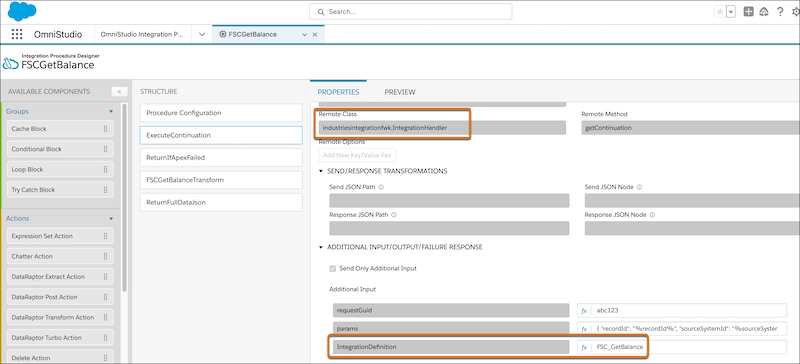
The integration procedure is a configuration that’s passed into the provider class. The integration procedure maps the named credential to the class. Integration procedures read and write data from external systems. You can use Lightning Web Components instead of integration procedures.
- Service Integration Provider Interface
TheServiceIntegrationProviderinterface specifies three methods that you must implement before you create an integration definition.
Did this article solve your issue?
Let us know so we can improve!
