
Dynamically Identify the Documents to Upload for an Assessment
Use the Document Matrix element in Discovery Framework–based Omniscripts to streamline the assessment process and ensure that respondents upload the correct documents.
Required Editions
| View supported product editions. |
Add the Discovery Framework Document Matrix element to an assessment form to dynamically generate the list of documents that respondents must upload based on their responses. Before you get started, you must set up the document types and document categories. Then, you can define the decision criteria that the Document Matrix element uses to dynamically identify the required documents. The documents that the respondents upload are automatically saved as document checklist items and attached to the assessment record.
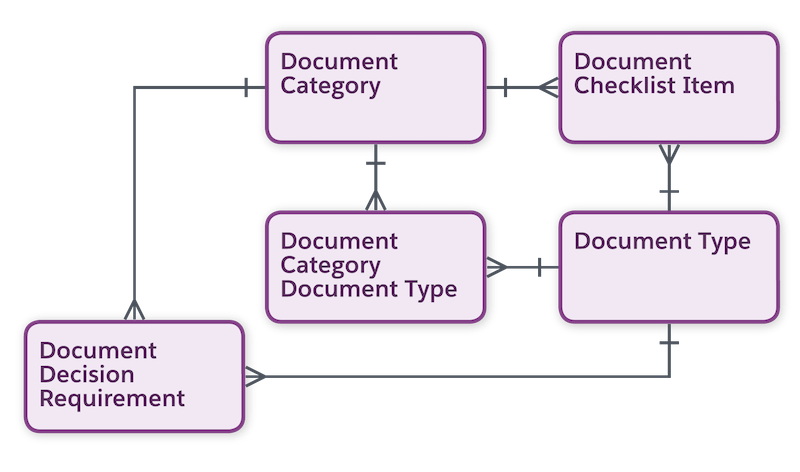
Your users can upload documents only if they’re assigned the Document Checklist Item permission set and Run Decision Table permission. The document matrix component isn't available for Experience Cloud sites and guest users.
Explore and Learn
Watch this video how to learn to streamline the assessment process and ensure respondents upload correct documents by using the Discovery Framework Document Matrix element for a Financial Services scenario.
If you aren’t able to watch the view in full screen, open the
video on a new tab:  Streamline Document Uploads in
Assessments Using Discovery Framework Document Matrix Element.
Streamline Document Uploads in
Assessments Using Discovery Framework Document Matrix Element.
- Set Up Document Types for Document Matrix
Define common required document types to associate a new document checklist item with a document type. For example, set up document types such as Driving License, SSN, and Birth Certificate. - Set Up Document Categories
Define document categories to organize document checklist items into logical groups. For example, create the categories Identity Proof, Address Proof, and SSN. - Associate a Document Type with a Document Category
Use the Document Category Document Type junction object to link a document type to a document category. For example, associate the document types Driving License and SSN with the Identity Proof document category. - Define Business Rules
Use the Document Decision Requirement object to specify the criteria that the Document Matrix element uses to determine which documents the respondent must upload for an assessment. - Create a Decision Table for the Document Matrix Element
After you’ve defined the document decision rules in a document decision requirement record, create a decision table to determine the outcome. - Add a Document Matrix Element to an Assessment Form
The Document Matrix element for Discovery Framework–based Omniscripts uses a decision table to determine which documents a respondent must upload when submitting an assessment. For each required document, a File input element is automatically added to the assessment form layout at runtime.
