
You are here:
Omnistudio Client-Side Document Generation
Sales reps can generate documents on demand with a simple click of a button. Generate contracts, proposals, quotes, reports, non-disclosure agreements, service agreements, and more. Client-side document generation is ideal for lightweight documents with less than 200 quote lines.

For generating more complex documents or in large volumes, see Omnistudio Server-Side Document Generation.
To help you choose which generation engine to use, seeClient-Side and Server-Side Omnistudio Document Generation Compared.
Get started using the sample Client-Side Omniscript, or create your own Omniscripts, by cloning and customizing the sample Omniscript to generate documents.
Omnistudio client-side document generation supports Google Chrome, Mozilla Firefox, and Apple Safari browsers. Make sure that your browsers are up to date. Older versions of supported browsers aren't guaranteed to support client-side document generation feature. For more information, see Supported Browsers and Devices for Omnistudio Document Generation.
Client-side document generation happens directly in the standard Salesforce user interface. The following diagram provides and example.
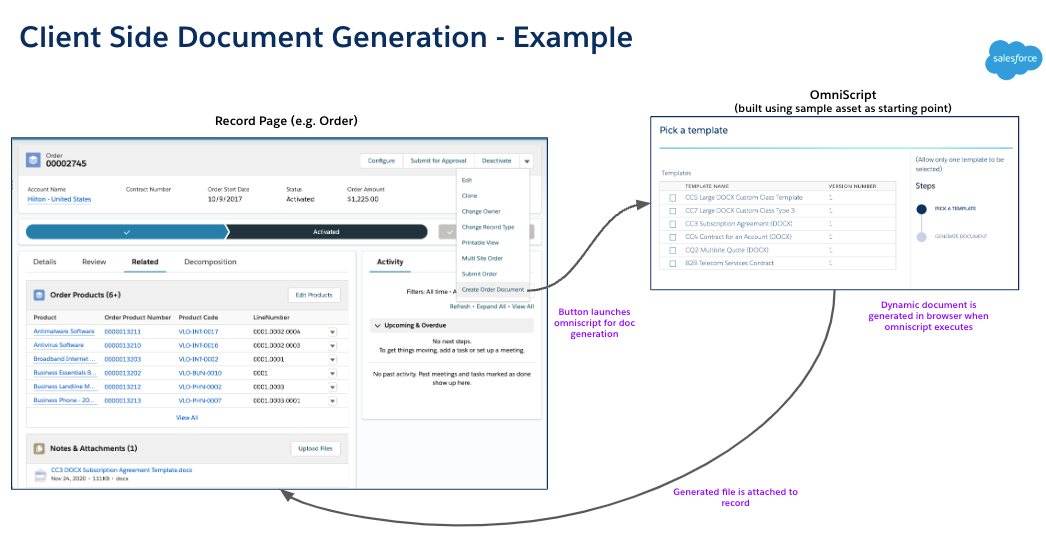
Client-side document generation supports generating single documents, as well as multiples, and conversion to PDF. To get started, refer to these resources:
- Create a Custom Generate Document Button
Generate documents from any object such as a contract, order, quote, work order, or opportunity by integrating Omniscript into a custom button. This example uses the fndSingleDocxLwc Omniscript to generate single client-side documents from Microsoft Word .docx or Microsoft PowerPoint .pptx templates. - Generate a Single Client-Side Document
Single document generation is supported using the customizable fndSingleDocxLwc Omniscript. The Omniscript creates client-side documents from your Microsoft Word DOCX or Microsoft PowerPoint PPTX templates. - Generate Multiple Client-Side Documents
The fndmultiDocxLwc Omniscript supports the generation of documents from more than one document template at a time. It supports both Microsoft Word and Microsoft PowerPoint templates. - Convert Client-Side Documents into PDF Files
The fndmultiPDFConvertLwc Omniscript converts a generated Microsoft Word (.docx) or Microsoft PowerPoint (.pptx) document into a .pdf file. This Omniscript can convert one or more documents simultaneously into .pdf format.
