
You are here:
Omnistudio Server-Side Document Generation
Server-Side document generation is an asynchronous process that's built to handle the rendering of large and complex documents, and for generating documents in batches. The Server-Side document generation service is secure and scalable and is hosted on Salesforce Hyperforce. The generated document is stored in your Salesforce org and is attached to the object for which it's generated. You can submit up to 1,000 server-side document generation requests per hour, per org.

Client-Side document generation is better for some use cases, whereas Server-Side document generation is better for others. To review the factors to consider, see Client-Side and Server-Side Document Generation Compared.
You can use Server-Side document generation as a service. It can generate .docx and .pptx documents, and convert them to .pdf format by using .docx or .pptx templates without any user interaction on the client browser. To generate documents, use either Apex Classes, sample Integration Procedures, or a sample Omniscript. You can also create your own Omniscripts by cloning and customizing the sample Omniscript to generate documents.
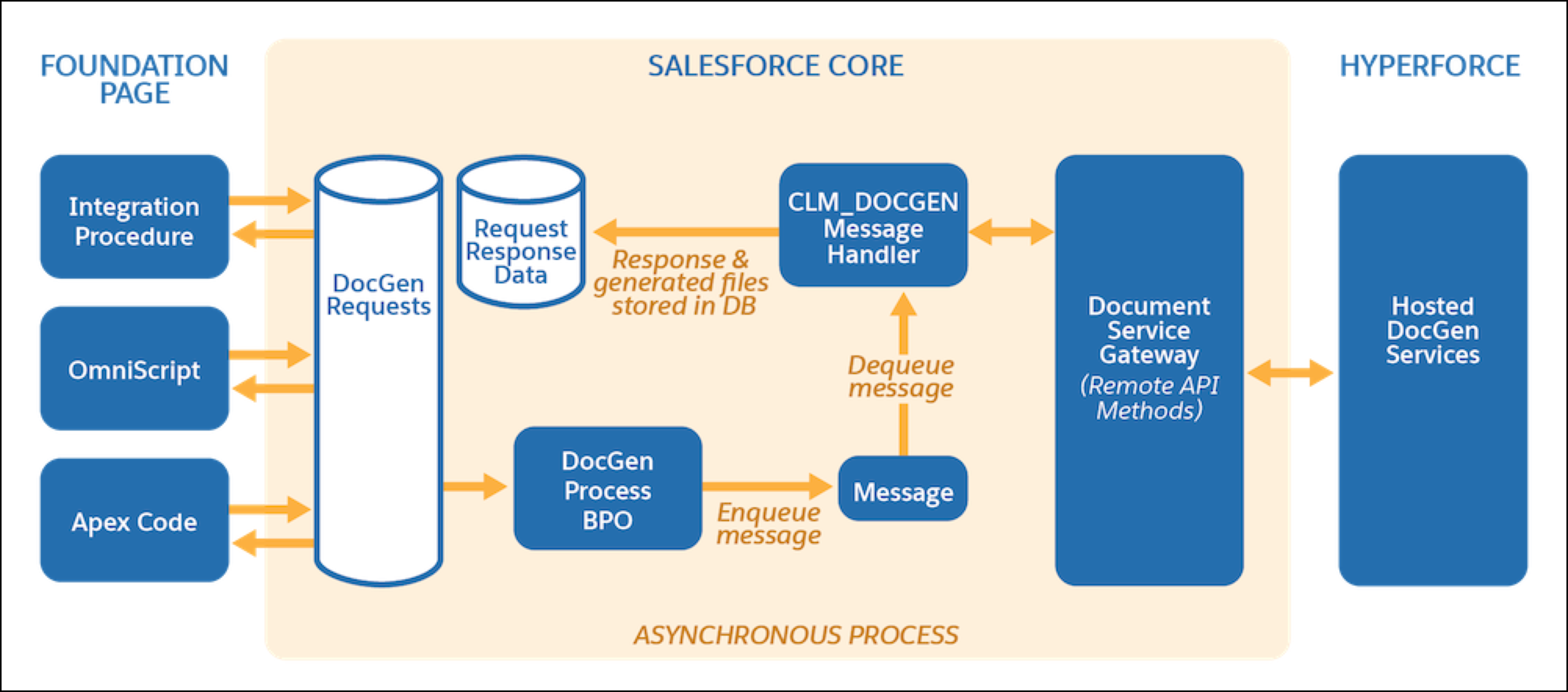
To meet your organization's needs, server-side document generation generally requires some customization.
If you aren't familiar with Omniscripts, Integration Procedures, or Apex, we highly recommend working with an implementation partner to help you build your document generation solution. See Find Your Salesforce Partner.
Use these resources to help you plan your customization:
- Enable Server-Side Document Generation Setting for the Omnistudio Package and Salesforce Document Generation
Server-Side document generation is an asynchronous process that's built for large and rendering-heavy documents and to generate documents in batches. Server-Side document generation is only supported in customer orgs, and it isn't enabled by default. - Omnistudio Server-Side Document Generation Omniscript
The customizable sample fndSingleDocxServersideLwc Omniscript generates server-side documents from your Microsoft Word DOCX or Microsoft PowerPoint PPTX templates. You enter the Object ID, pick a template, select generation options, and generate the document. - Omnistudio Server-Side Document Generation Integration Procedures
The fndSingleDocxServersideLwc Omniscript calls one of three Integration Procedures depending on its ServiceFunction setting. Each of these Integration Procedures calls a different method of the DocumentServiceGateway Apex class by using different parameters. - Sample Apex Code for Server-Side Document Generation
Here's a sample code that demonstrates how to generate documents on the server by inserting a DocumentGenerationProcess record. You can generate a document on the server either by directly passing token data, or by sending document template details and letting Salesforce fetch token data automatically. - Document Generation Process Cleaner Utility
The Document Generation Process Cleaner Utility permanently deletes records within a specified time frame to create space for content document generation in Salesforce. You can use the utility to delete the document generation process records and their associated token data content documents or only the token data content documents. The utility can clean up 100,000 records and their respective token data files of 1MB size in about 2 hours. - Document Generation Batch Process
The Document Generation Batch Process feature allows you to group and manage a large number of single document generation process requests, all under a unique batch document generation ID. - Terminate Long-Running Document Generation Requests
Use the TerminateDocGenRequestCronJob scheduled job to maintain server-side document generation performance by preventing long-running requests from affecting system efficiency.
