
You are here:
Workaround: Omnistudio Omniscripts
If you installed the Omnistudio package before installing the Salesforce Industry package, when you try to use either the fndSingleDocxLwc or fndSingleDocxServersideLwc Omnistudio OmniScripts, an error message can appear. This procedure is a workaround to activate the Omnistudio Omniscripts by modifying the namespace value to match the Omnistudio namespace value.
- Open the latest version of the fndSingleDocxLwc Omniscript.
- To deactivate the Omniscript, click Deactivate Version .
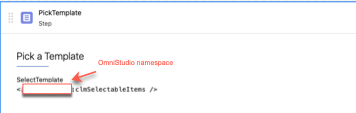
- Expand the PickTemplate step.
- From the Properties tab, click the Lightning Web Component Name field. Change the value to Omnistudio package namespace.
- To activate the fnd Omniscript, click Activate Version.
- Repeat the steps for the fndSingleDocxServersideLwc Omniscript.
Did this article solve your issue?
Let us know so we can improve!
