Learn About Issues in Your Data Processing Engine Definition by Using CRM Analytics (CRMA)
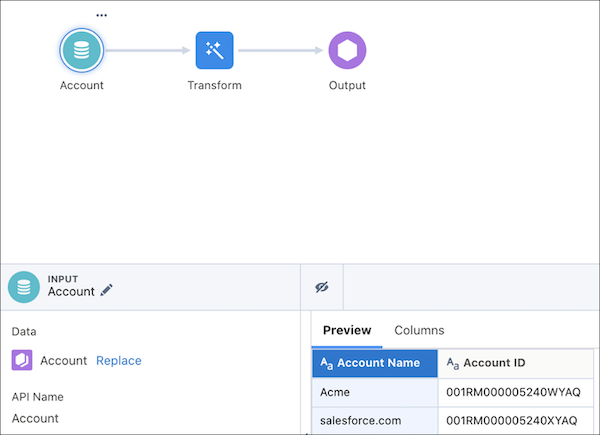
Recipe
Use the Data Manager to determine why a definition isn’t writing back results.The
definition's design or the data available in the org can cause the issues.
After the data is synced from your definition's source objects, a recipe is created to
process the records.
Tip Any changes that you make to the recipe don’t affect the definition or the
run in progress. The recipe is automatically deleted after the run starts writing back
results. To save the recipe and triage the issues after the run completes, run the
definition in the Save Recipe and its Output Records debug
mode.
From the App Launcher, find and select Data Manager.
Switch to the Recipes tab.
The recipes for Data Processing Engine definition runs are named by using this
convention: DPE_{ID of the batch job used to run the definition}.
Open the recipe of the definition that you want to investigate.
On the confirmation window, click Yes, Fix It.
Review the records that each node processed. This review can help you determine whether
the issue is due to your definition’s design or the org’s data.
Example
The oldest Account record in an org was created on March 17, 2020. A filter node in the
definition is trying to filter all Account records created before 2019. When the definition
is run, no Account records are filtered because none of them match the filter criteria. So,
the user looks at the filter node in the recipe. The user recognizes that results aren’t
written back because the filter node doesn’t make any Account record available for
processing in subsequent nodes.
We use three kinds of cookies on our websites: required, functional, and advertising. You can choose whether functional and advertising cookies apply. Click on the different cookie categories to find out more about each category and to change the default settings.
Privacy Statement
Required Cookies
Always Active
Required cookies are necessary for basic website functionality. Some examples include: session cookies needed to transmit the website, authentication cookies, and security cookies.
Functional Cookies
Functional cookies enhance functions, performance, and services on the website. Some examples include: cookies used to analyze site traffic, cookies used for market research, and cookies used to display advertising that is not directed to a particular individual.
Advertising Cookies
Advertising cookies track activity across websites in order to understand a viewer’s interests, and direct them specific marketing. Some examples include: cookies used for remarketing, or interest-based advertising.