You are here:
Create a Data Processing Engine Definition
Manage complex data transformations and integrations in your org by using Data Processing Engine definitions.
Required Editions
| View supported editions. |
| User Permissions Needed | |
|---|---|
| To create a definition: | View permissions information. |
Before you begin, make sure that you have the required user permissions for your chosen runtime.
Runtime Platform Considerations
Choose a runtime based on your data volume and logic needs. CRM Analytics (CRMA) is optimized for complex calculations, while Data Cloud is optimized for high data volume and unification.
| Feature | CRM Analytics (CRMA) Runtime | Data Cloud Runtime |
| Best Used For | Performing complex logic and operations such as forecasting, complex formulas, and hierarchies. | Ingesting massive datasets, unifying data across sources, and managing data between Platform and Data Cloud. |
| Data Sources | Salesforce Objects CRM Analytics Datasets |
Salesforce Objects Data lake, data model, and calculated insight objects CSV Files (for high-volume upload) |
| Writeback Targets | Salesforce Objects CRM Analytics Datasets |
Salesforce Objects Data Lake Objects (DLOs) Data Model Objects (DMOs) |
| Key Limitations | This runtime is governed by Data Pipelines limits. | The Forecast node isn’t available in this runtime. Running definitions in this runtime can result in Data Services credits being consumed from your Data Cloud subscription. For more information on how usage is billed, see Data Cloud Billable Usage Types. |
- From Setup, in the Quick Find box, enter Data Processing Engine, and then select Data Processing Engine.
- Click New.
-
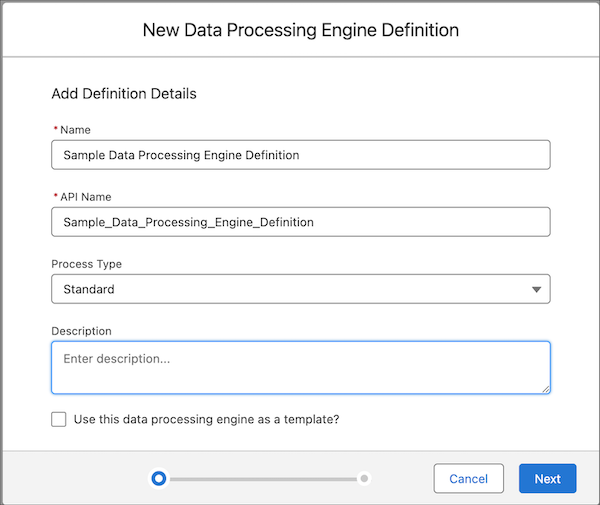
Provide these details.
Field Description Name Enter the name of the Data Processing Engine definition. API Name The API name is automatically populated based on the name that you enter. You can’t change the name and API name after you save your definition for the first time. Process Type Select a process type based on the licenses available in your Salesforce org. Data Processing Engine can process data differently based on the rules set by the license. Process types ensure that definitions follow the validations and limits of the associated license. Process types can also provide exclusive capabilities.
To run the definition without any rules associated with a license, select the process type as Standard.
Description Enter a description of your definition. Use this data processing engine as a template? To create a read-only definition, select this option. Your colleagues and partners can make a copy of the template definitions and change them based on their business requirements. - After you enter the definition details, click Next.
-
Select the runtime platform and then click Next.
For Data Cloud runtime, select the data space where the data sources reside. If a data space isn't selected, the default data space is automatically selected.
-
If you selected the Data Cloud runtime, select the object type you want to use as data
source and as the writeback target:
- Data Lake Object
- Data Model Object
- Calculated Insights
- Click Done.