
You are here:
Filters
Use a filter node to select specific records from a source node based on your business requirements.
Required Editions
| View supported editions. |
Considerations
Keep these considerations in mind when defining filter conditions.
- Values and Variables: Specify a fixed value or use an input variable. To use an input variable, define the variable before creating the filter node. Alternatively, use a filter-type input variable to define your conditions.
- Source Nodes: Select fields from only one source node. If you remove a field from the source node that’s used in a filter, select a replacement field or remove the condition.
- Boolean Fields: To filter records using boolean data type fields (for example, Active) provide the value in text format. For example, to filter active records, set the operator to Equals and the value to true. Data Processing Engine handles the conversion internally.
- Operators: Available operators depend on the field's data type. For example, text fields support Contains, while numeric fields support Greater Than or Less Than.
- Condition Logic: Select whether to filter records when all conditions are met (AND), when any condition is met (OR), or based on custom logic. For example, to find leads in California that are either from the Web or have a Hot rating, enter the custom logic as 1 AND (2 OR 3). In this example, 1 represents the state, 2 represents the source, and 3 represents the rating.

Example
- Filtering by a Specific Value: A sales manager wants to limit a dataset to leads from San Francisco. They set the City field to Equals and specify San Francisco as the value.
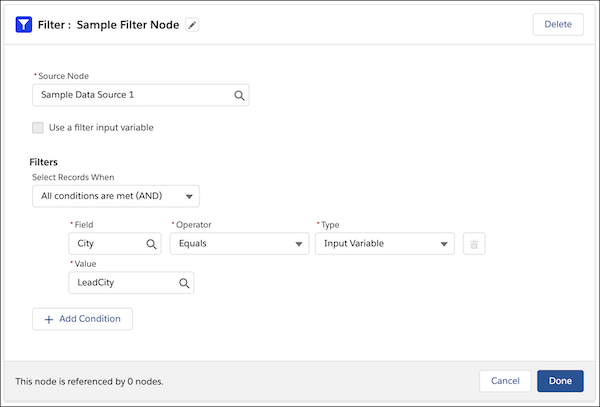
- By Using Input Variables: A regional lead wants to filter a dataset by different cities
dynamically. They use an input variable for the city name and provide the value at run time.
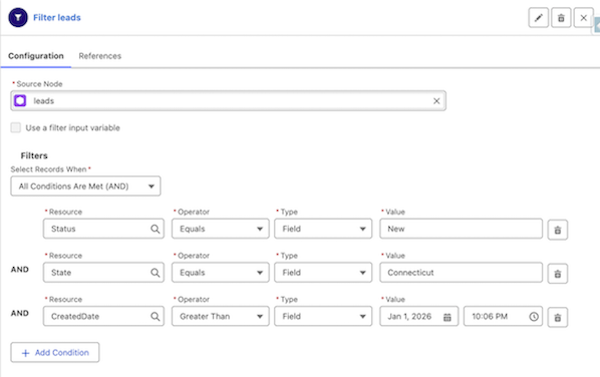
- Applying All-Condition Logic (AND): A marketing team wants to find new leads created
after January 1, 2026, specifically for the state of Connecticut. They use the AND
operator to ensure that all conditions are met.
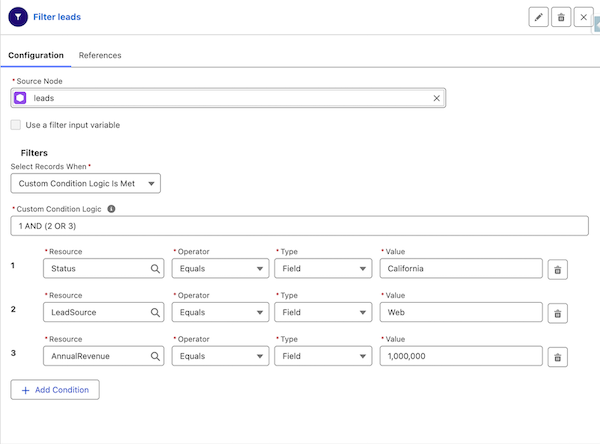
- By Using Custom Logic for Targeted Lead Generation: A marketing team wants to identify
high-potential leads in California AND who either have a Web source OR an Annual Revenue
greater than $1,000,000. They use custom logic to define the relationship: 1 AND (2 OR 3).
Did this article solve your issue?
Let us know so we can improve!
