
You are here:
Formulas
Use the formula node to create multiple formulas and store the results of each formula in a new field. Create multiple formulas in a single node and use the formula results in subsequent nodes. Use the compute relative transformation option to determine the trends of specific fields.
Required Editions
| View supported editions. |
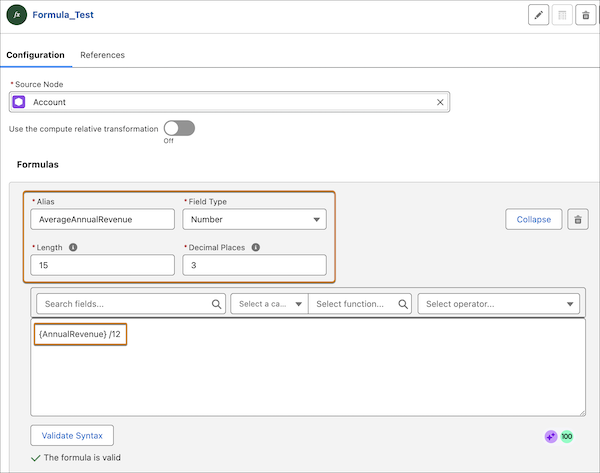
Before you create a formula, specify the alias, data type, and format of the derived field. The derived field can be of type Date, Date/Time, Number, or Text.
To create a formula, pick a field, an operator, and a function in any combination. You can also pick an input variable as a field. After you create a formula, check if the syntax is valid. The result of this node includes all the fields from the source node and the formula fields you create. If a field that’s used in a formula is removed from the source node, ensure that you manually remove the field from the formula.


Math Functions | String Functions | Date Functions | Logical Functions | Additional Functions | Compute Relative Transformation
Math Functions
| Function | Description | Supported Runtime | Syntax | Example Syntax |
|---|---|---|---|---|
| ABS | Calculates the absolute value of a number. The absolute value of a number is the number without its positive or negative sign. | CRM Analytics and Data Cloud |
n is a number or field that you want to determine the absolute value of. |
ABS({AnnualRevenue} - {Target_Revenue__c}) |
| CEIL | Rounds a number up to the nearest integer, away from zero if negative. | CRM Analytics and Data Cloud |
n is a number or field that you want to round up to the nearest integer. |
CEIL({NumberOfEmployees} / 15) |
| EXP | Returns a value for e raised to the power of a number you specify. | CRM Analytics and Data Cloud |
n is a number or field to which you want to raise e. |
{AnnualRevenue} * EXP({Growth_Rate__c}) |
| FLOOR | Returns a number rounded down to the nearest integer. If the number is negative, it’s rounded up to the nearest integer. | CRM Analytics and Data Cloud |
n is a number or field that you want to round down to the nearest integer. |
FLOOR({AnnualRevenue} / 5000) |
| LOG | Returns the logarithm of a number in the base you specify. | CRM Analytics and Data Cloud |
|
LOG(5, {NumberOfEmployees}) |
| MAX | Returns the highest number from a list of numbers. | CRM Analytics and Data Cloud |
|
MAX({Projected_Q1_Revenue__c},
{Projected_Q2_Revenue__c}) |
| MIN | Returns the lowest number from a list of numbers. | CRM Analytics and Data Cloud |
|
MIN({Support_Plan_Cost__c}, {Maintenance_Fee__c}) |
| MOD | Returns a remainder after a number is divided by a specified divisor. | CRM Analytics |
|
MOD({NumberOfEmployees}, 10) |
| POWER | Raises a number to the power of another number. | CRM Analytics and Data Cloud |
|
POWER({Customer_Tier__c}, 2) |
| ROUND | Returns the nearest number to a number you specify, constraining the new number by a specified number of digits. | CRM Analytics and Data Cloud |
|
ROUND({AnnualRevenue} * {Commission_Rate__c}, 2) |
| SQRT | Returns the positive square root of a given number. | CRM Analytics and Data Cloud |
n is a number or field that you want to find the square root of. |
SQRT({Office_Area_SqFt__c}) |
| TRUNC | Truncates the specified number of decimal values from the number. | CRM Analytics and Data Cloud |
|
TRUNC({AnnualRevenue} / {NumberOfEmployees}, 0) |
String Functions
| Function | Description | Supported Runtime | Syntax | Example Syntax |
|---|---|---|---|---|
| BEGINS | Returns true if the string starts with the specified characters. | CRM Analytics and Data Cloud |
|
BEGINS({AccountSource} , "Web") |
| CONCAT | Returns a string by connecting the values of the specified columns and input strings. | CRM Analytics and Data Cloud |
|
CONCAT({Name}, " (", {BillingCity}, ")") |
| CONTAINS | Compares two arguments of text and returns TRUE if the first argument contains the second argument. If not, it returns FALSE. | CRM Analytics and Data Cloud |
|
CONTAINS({Description}, "High Priority") |
| ENDS | Returns true if the specified string is found at the end of the column value. | CRM Analytics and Data Cloud |
|
ENDS({Website}, ".gov") |
| LENGTH | Returns the number of characters in a text. | CRM Analytics and Data Cloud |
field is the text or field to measure. |
LENGTH({BillingPostalCode}) |
| LOWER | Returns the string with all letters in the specified text string to lowercase. Any characters that aren’t letters are unaffected by this function. Locale rules are applied if a locale is provided. | CRM Analytics and Data Cloud |
string is the text or field to convert to lowercase. |
LOWER({Website}) |
| LTRIM | Removes the specified substring from the beginning of a string. To remove leading spaces, do not specify a substring. | CRM Analytics and Data Cloud |
|
LTRIM({Phone} ,"+") |
| MD5 | Returns a 32-character string that is a text representation of the hexadecimal value of a 128-bit checksum. |
Data Cloud |
string is the text or field for which you want to calculate the checksum. |
MD5({Name}) |
| RTRIM | Removes the specified substring from the end of a string. To remove trailing spaces, do not specify a substring. | CRM Analytics and Data Cloud |
|
RTRIM({PhotoUrl} , ".") |
| SUBSTITUTE | Substitutes new text for old text in a text string. | CRM Analytics and Data Cloud |
|
SUBSTITUTE({Phone}, ".", "-") |
| SUBSTR | Returns characters from the string, starting at the specified position and of the specified length. | CRM Analytics and Data Cloud |
|
SUBSTR({BillingPostalCode} , 1, 3) |
| TEXT | Converts a value that represents a number to a text string that represents the same number. | CRM Analytics and Data Cloud |
number is the number or field to convert. |
TEXT({NumberOfEmployees})) |
| TRIM | Removes the specified substring from the beginning and end of a string. To remove leading and trailing spaces, do not specify a substring. | CRM Analytics and Data Cloud |
|
TRIM({SourceSystemIdentifier} , " ") |
| UPPER | Returns the string with all letters in the specified text string to uppercase. Any characters that aren’t letters are unaffected by this function. Locale rules are applied if a locale is provided. | CRM Analytics and Data Cloud |
string is the text or field to convert to upercase. |
UPPER({BillingPostalCode}) |
| UUID | Returns a newly generated unique ID. | CRM Analytics and Data Cloud | UUID() |
UUID() |
| VALUE | Converts a text string that represents a number to a value that represents the same number. | CRM Analytics and Data Cloud |
string is the text or field to convert to number. |
VALUE({Legacy_Employee_Count__c}) |
Date Functions
| Function | Description | Supported Runtime | Syntax | Example Syntax |
|---|---|---|---|---|
| ADDDAYS | Returns a new date after adding the specified number of days. | CRM Analytics and Data Cloud |
|
ADDDAYS({CreatedDate}, 14) |
| ADDMONTHS | Returns the date with the specified number of months after the start date. | CRM Analytics and Data Cloud |
|
ADDMONTHS({CreatedDate}, 12) |
| DATEDIFF | Returns the number of days between start date and end date. | CRM Analytics and Data Cloud |
|
DATEDIFF({LastActivityDate} , {LastViewedDate}) |
| DATETIMEVALUE | Returns a year, month, day, and GMT time value. | CRM Analytics and Data Cloud |
|
DATETIMEVALUE({LastModifiedDate}) |
| DATEVALUE | Returns a date value for a date/time or text expression. | CRM Analytics and Data Cloud |
|
DATEVALUE({LastActivityDate}) |
| DAY | Returns a day of the month in the form of a number from 1 through 31. | CRM Analytics and Data Cloud |
date is the date field to extract the day of the month from. |
DAY({Contract_Start_Date__c}) |
| MONTHDIFF | Returns the number of months between start date and end date. | CRM Analytics and Data Cloud |
|
MONTHDIFF({LastActivityDate} , {LastViewedDate}) |
| NOW | Returns a date/time representing the current moment in UTC (GMT). | CRM Analytics and Data Cloud | NOW() |
(NOW() - {CreatedDate}) * 24 |
| TODAY | Returns the current date as a date data type. | CRM Analytics and Data Cloud | TODAY() |
{Contract_End_Date__c} - TODAY() |
| WEEKDAY | Return the day of the week for the given date, using 1 for Sunday, 2 for Monday, through 7 for Saturday. | CRM Analytics and Data Cloud |
date is the date field to extract the day of the week from. |
WEEKDAY(DATEVALUE({CreatedDate})) |
Logical Functions
| Function | Description | Supported Runtime | Syntax | Example Syntax |
|---|---|---|---|---|
| AND | Returns a TRUE response if all values are true. Returns a FALSE response if one or more values are false. | CRM Analytics and Data Cloud |
|
AND({NumberOfEmployees} > 1000, {BillingCountry} ==
"USA") |
| BLANKVALUE | Checks whether an expression is blank. If the expression is blank, substitute_expression is returned. If the expression contains a value, that value is returned. | CRM Analytics and Data Cloud |
|
BLANKVALUE({Description}, "No description provided.") |
| CASE | Checks a given expression against a series of values. If the expression is equal to a value, it returns the corresponding result. If it isn’t equal to any values, it returns the else_result. | CRM Analytics and Data Cloud |
|
CASE({Industry}, "Technology", "Tech Sales Team", "Healthcare",
"Healthcare & Life Sciences Team", "General Sales Team") |
| IF | Determines if expressions are true or false. Returns a given value if true and another value if false. | CRM Analytics and Data Cloud |
|
IF({NumberOfEmployees} > 1000, "Enterprise", "SMB") |
| ISBLANK | Checks whether an expression is blank. If the expression is blank, TRUE is returned. If the expression contains a value, FALSE is returned. | CRM Analytics and Data Cloud |
|
IF(ISBLANK({Phone}), "Follow up required", "Contact info
complete") |
| ISNULL | Determines if an expression is null (blank) and returns TRUE if it’s blank. If it contains a value, the function returns FALSE. | CRM Analytics and Data Cloud |
|
IF(ISNULL({Website} ), "Website Not Set", "Website
Available") |
| NULLVALUE | Checks whether expression isn’t null and returns substitute expression. If expression is null, it returns the original expression value. | CRM Analytics and Data Cloud |
|
NULLVALUE({AnnualRevenue}, 0) |
| OR | Determines if expressions are true or false. Returns TRUE if any expression is true. Returns FALSE if all expressions are false. | CRM Analytics and Data Cloud |
|
OR({NumberOfEmployees} > 5000, {AnnualRevenue} <
10000) |
Additional Functions
| Function | Description | Supported Runtime | Syntax | Example Syntax |
|---|---|---|---|---|
| COALESCE | Gets the first non-null value from a list of parameters, or replaces nulls with a different value. This function is often used to substitute a default value for null values when data is retrieved for display. |
CRM Analytics and Data Cloud |
|
COALESCE({Phone}, {Fax}) |
| EXPLODE | Converts multivalue data into a new column where each element is a row. You can't nest the EXPLODE function within another function. | Data Cloud |
field is the field that contains the multivalue data you want to transform into individual rows. |
EXPLODE({Type}) |
| SEQUENCE | Returns an array of numbers or dates by defining the start and end values, and the interval between each value. If the interval isn't specified, the function returns all values between the start and end values. | Data Cloud |
|
SEQUENCE({CreatedDate}, {LastModifiedDate}, 1) |
Compute Relative Transformation
To compute relative transformation, turn on Use the compute relative transformation in the formula node.
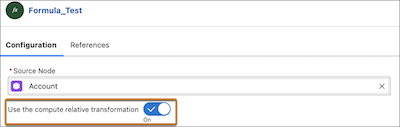
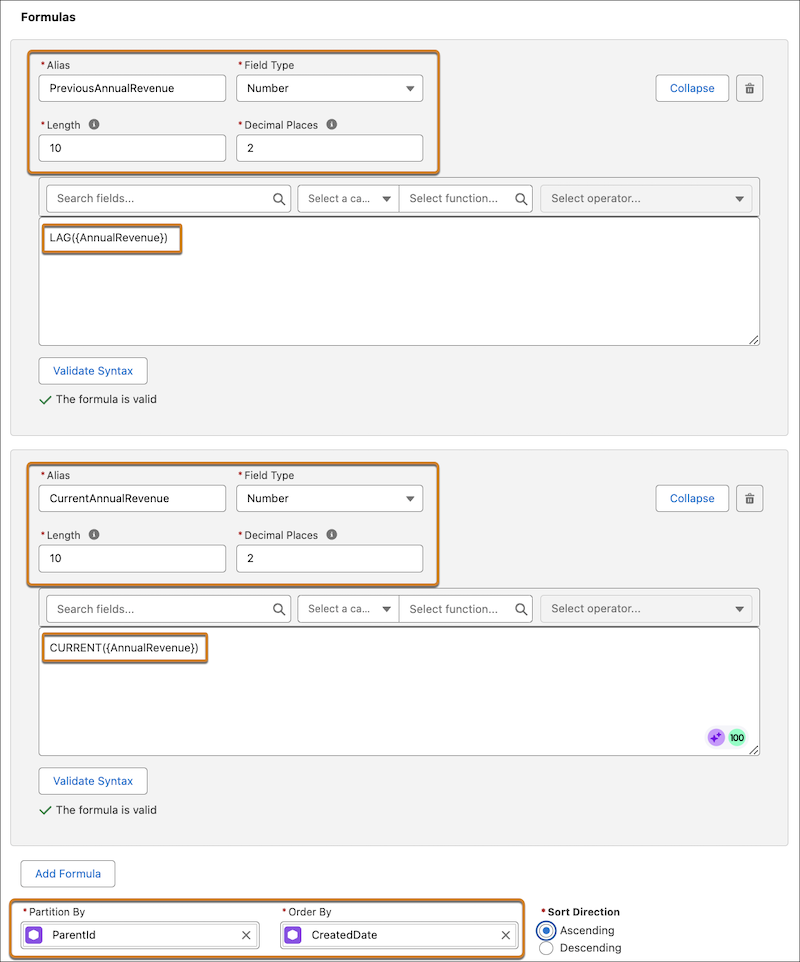
Use these functions when you create formulas to compute relative transformation.
| Function | Description | Supported Runtime | Syntax | Example Syntax |
|---|---|---|---|---|
| ARRAYJOIN | Converts multivalue data into a string with elements separated by the specified delimiter. | CRM Analytics and Data Cloud |
field is the multivalue field to be converted to a string. |
ARRAYJOIN({Type}) |
| COLLECTLIST | Returns multivalue data containing duplicates. | CRM Analytics and Data Cloud |
field is the multivalue field whose values you want to collect into an array. The function will take the value from this field for each record in the defined group. |
COLLECTLIST({Type}) |
| COLLECTSET | Returns multivalue data without duplicates. | Data Cloud |
field is the multivalue field whose values you want to collect into a unique array. The function will only store each distinct value from this field once. |
COLLECTSET({Type}) |
| CURRENT | Returns the value of a specified field from the current row in a partition. | CRM Analytics and Data Cloud |
field is the field whose value you want to retrieve for the current row. |
CURRENT ({AnnualRevenue}) |
| DENSERANK | Returns the dense rank of the current row in a partition. | CRM Analytics and Data Cloud | DENSERANK() |
DENSERANK() |
| FIRSTVALUE | Returns the first value of a specified field in a partition. | CRM Analytics and Data Cloud |
field is the field whose value you want to retrieve from the first record in the partition. |
FIRSTVALUE({Name}) |
| LAG | Returns the value of a specified field from the previous row in a partition. | CRM Analytics and Data Cloud |
field is the field whose value you want to retrieve from a previous record. |
LAG({AnnualRevenue} ) |
| LASTVALUE | Returns the last value of a specified field in a partition. | CRM Analytics and Data Cloud |
field is the field whose value you want to retrieve from the last record in the partition. |
LASTVALUE({Name}) |
| LEAD | Returns the value of a specified field from the next row in a partition. | CRM Analytics and Data Cloud |
field is the field whose value you want to retrieve from a subsequent record. |
LEAD({AnnualRevenue}) |
| RANK | Returns the rank of the current row in a partition. | CRM Analytics and Data Cloud | RANK() |
RANK() |
| ROWNUMBER | Returns the serial number of the current row in a partition. | CRM Analytics and Data Cloud | ROWNUMBER() |
ROWNUMBER() |
| SUM | Returns the cumulative sum of all the rows in a partition. | CRM Analytics and Data Cloud |
field is the number field whose values you want to add together. |
SUM({AnnualRevenue}) |
When the compute relative transformation option is enabled, the result of a formula node includes all the source fields and formula fields that you create.
- Configure End of Month Logic in Formula Nodes
When adding or subtracting months in DPE formula nodes, standard date calculations may not accurately land on the last day of the target month. This occurs because month lengths vary, and leap years affect February. For example, subtracting one month from April 30th (the end of the month) typically results in March 30th, which is not the last day of March. However, your business rule might require the date to be March 31st (or February 29th/28th if applicable).
